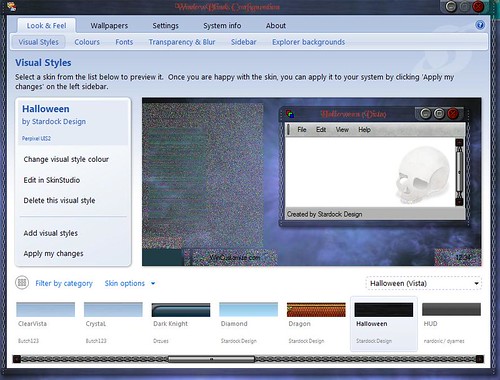
Halloween Theme

Weird looking images

I really like the Halloween theme from Stardock....everything works as it should ie animations etc..

But I cannot get any transparancy in the taskbar at all...and if I try using a diffent taskbar and start menu eg: Dragon

it looks really weird

I;d include a screenshot of what I mean, but am usure how

Your computer has a Windows Experience Index base score of 2.1
Your Windows Graphics Experience score is 2.1

WindowBlinds version : WindowBlinds 6.3 (build 110 x86 - Vista Edition)

WindowBlinds is installed correctly on this PC
WindowBlinds appears to be activated on this PC
(Generic PnP Monitor) 1 is attached to RADEON X300/X550 Series (Microsoft Corporation - WDDM)

Wblind.dll         2008/09/23 10:59:20
Wbsrv.dll         2008/09/23 10:59:22
Wbconfig.exe         2008/09/23 10:59:32
Wbload.exe         2008/02/14 11:05:14
Wbhelp.dll         2007/08/27 11:54:07
Tray.dll              2007/09/12 17:58:21
Wbload.dll              2008/04/29 05:34:28
Screen.exe         2008/07/23 04:10:09


Any help would be appreciated

1,324 views 12 replies
Reply #1 Top

2.1 is a pretty low score for a graphic experiance. Are you using onboard video graphics? You might have hardware that can't run transparency.

Reply #2 Top

yes I am using onboard graphics....but I don't have transparancy problems with any other theme at all.

It's just this particular theme.....I have opend up an image at random using Gimp and they just look weird.

Kind of frustrating as I'd really like to show you what I mean with a screenshot...but don't know how to put one in a post like this

Reply #3 Top

That is actually what I would have asked for and it is pretty easy. Stage the picture somewhere (MySpace, Flicker, any URL will do really) then copy the link address and paste it in using the tool on the bar above the reply window. The button with the little picture of the tree on it. You will want to scale the picture size down some but if it is too big the forums will also help with that.

Reply #4 Top

Quoting Seabass, reply 3
That is actually what I would have asked for and it is pretty easy. Stage the picture somewhere (MySpace, Flicker, any URL will do really) then copy the link address and paste it in using the tool on the bar above the reply window. The button with the little picture of the tree on it. You will want to scale the picture size down some but if it is too big the forums will also help with that.
End of Seabass's quote
Screenie

Reply #5 Top

hmmmmm think I might've screwed up somwhere along the line....you're gonna have to be patient with me I'm afraid


I've uploaded a screenshot to my Flickr page inserted the url....and...nothing......please excuse my lack of knowledge mate :)


Reply #7 Top

Not sure what I'm doing wrong...I copied the url into the required box, typed in the dimensions....etc....and  nothing

Reply #9 Top

Might be a hell of a lot easier if I could email you a screenshot methinks :)

Not having any luck at all uploading

Reply #11 Top

there you go...Music_Mayhem

Reply #12 Top

Music-Mayhem,

Go into regedit and check the following entry:

HKEY_LOCAL_MACHINE\Software\Stardock\ObjectDesktop\WindowBlinds\Path

Make sure that if you have WB installed it points to the following directory:

32bit: C:\Program Files\Stardock\Object Desktop\WindowBlinds (or the path to where you have WB installed)

64bit: C:\Program Files (x86)\Stardock\Object Desktop\WindowBlinds (or the path to where you have WB installed)

If you just have MyColors and no WB, make sure that it points here:

32bit: C:\Program Files\Stardock\MyColors (or the path to where you have WB installed)

64bit: C:\Program Files (x86)\Stardock\MyColors (or the path to where you have WB installed)

This should clear this distortion.  If this does not help, and you installed through Impulse, right click on the entry for MyColors and select "Verify Application".  This shoulkd check and see if all the MyColors files are installed and in tact.  If they are not, it will give you the option to update to fix it.  Once you do MyColors, do the same for WindowBlinds.

If all this fails, e-mail us at [email protected]