I Love DesktopX: February 2009

I suck at introductions. Let's get on with the show!



Outstanding General Info

Daybreak Widget Pack by Fairyy~

It’s a widget pack from Fairyy~. Need I say more? She has a knack for creating stylish, usable widgets that just look good on the desktop. I really like the soothing color combination on this one and the very simple layout. And they’re not huge, which is always a plus for me.

The widget pack includes 3 weather widgets, 2 calendar widgets, and a clock widget, each in different styles so you can pick which color style suits you or, like me, you can mix and match.

With the official start of spring just 20 days away (woot!), these really put me in a cheerful mood.


Most Creative/Original


Lightning Ball Version 2 by zigboom

Behold! Harness the power of nature on your desktop! This one just tickled my fancy, and isn’t that what being creative is all about?

Yes, it’s eye candy. Eye candy is good. I love eye candy. Everyone needs a little eye candy in their desktop diet.

I’m really glad zigboom made a second version because the first was a little big (and y’all know how I prize my desktop real estate.) This second version also changes color, which looks really nice. Works best with dark walls.

I’ve never seen a lightning ball before, so it definitely qualifies as creative and original.


Most Innovative/Resourceful


Standalone Animator Script Component by Littleboy

This one’s for DX Builders and is a really cool object to have. It will, in essence, allow you to add neat fading, moving, rotating, resizing and frame animation effects to whatever you’re building.

And when I say neat effects I mean REALLY neat effects, like elastic moving where the object slides, overshoots, and yo-yos until settling into position. I’ve always wondered how that was done. Now I can just add this component to my object, make a few script adjustments and voila! I now have professional effects.

If you’re not used to scripting it won’t be quite as easy as I make it sound. But included in the zip is an example widget, the script component, and instructions. Using those, and after about an hour or so, I finally put the right pieces of code together. Overall, the relevant code was only some 26 lines at maximum, and it worked great!

What would’ve really taken the cake? If the sample widget actually generated the necessary script to paste in your object, much like Skarn’s DX Form Generator. As it is, though, it’s most definitely innovative. So, big thanks to Littleboy for kindly sharing this!

(Note: Do read & observe the copyright rules if you’re going to use this in your skin. And if you need a little help getting it to work, just ask.)


DX Theme of the Month

MRX V Black by Murex

Murex had created MRX V, the original, and I absolutely loved it. Then, he made one in black. *drools*


All the standard features are included: clock, startmenu, shortcuts, weather, media, calendar, system info, cursor—the works.

And all of that can be completely hidden. In-depth information slides in and out, and the menus themselves can be toggled on or off.

What I like most about the theme is the unique design; it’s intricately detailed, but on the whole it remains very lightweight. There’s a lot of artwork to look at and admire, but it’s not at all busy.

There are subtle animations sprinkled throughout the theme (the color/opacity fade on the startmenu text, the flashing gizmo on the center menu), which add to the overall feel that the author spent a good amount of time and energy getting it right, pondering what would make this theme original.

It is amazingly well-balanced between function and design, pizzazz and usability. This is no small feat. My hats off to the author.

Go download this theme!



Renaming a Shortcut Label

(or whatever your text object is supposed to be)

Got a request for this during the month and thought I’d share it here.

What the script does:

- Allows end-user to rename/edit text without having to switch to DXBuilder

- Truncates text to a specified length

- Shows full text in tool tip

This can be useful for many things, not just the aforementioned shortcut label.

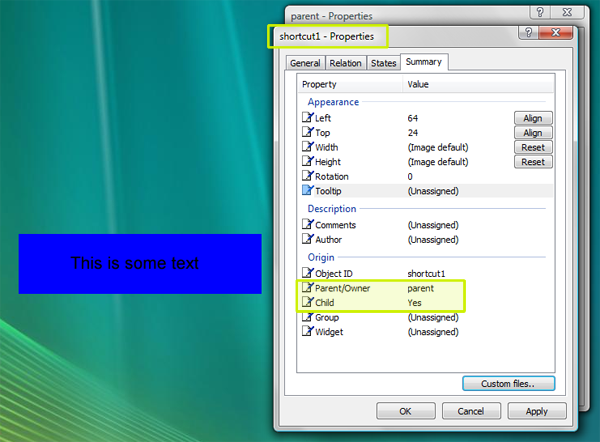
First we need to set up two objects.

1. “parent”

2. “shortcut1”, text object, parent = “parent”, child = “yes”


You should have this:


Next, open the properties of the “parent” object. Create a new script. Copy and paste this script into the “parent” object.


'==============================

' INSTRUCTIONS

'

' This script goes in the parent object of the shortcuts


'--Add more cases for more shortcuts

'--Change maxW variable to your maximum allowed width

'==============================


'Called when L-click on object or its children

Function Object_OnLButtonUpEx(obj, x, y, dragged)

            If dragged Then Exit Function

            Select Case obj.name

                        Case "shortcut1" '---replace with the name of shortcut

                                    iBox(obj.name)

                        Case "shortcut2"

                                    iBox(obj.name)

                        'Add more cases for more shortcuts

                        'Case "another shortcut"

                                    'iBox(obj.name)

            End Select      

End Function


'--- Input Box ---

Function iBox(obj)

            Dim Input

            Input = InputBox("Enter Text", "Change Shortcut Text",DesktopX.Object(obj).tooltiptext)

            If strCheck(Input) = "t" Then

                        DesktopX.Object(obj).text = Input

                        DesktopX.Object(obj).tooltiptext = Input

                        truncateTxt(obj)

            End If

End Function


'--Check if input is not blank (or spaces) ---

Function strCheck(strg)

            Dim abet, nums

            abet = "abcdefghijklmnopqrstuvwxyz"

            nums = "0123456789"

            chk = "f"

            strg2 = LCase(strg)

            For x = 1 To len(abet)

                        g = Mid(abet,x,1)

                        If  Instr(strg2,g) > 0 Then       chk = "t"

            Next

            If chk = "f" Then

                        For y = 1 To len(nums)

                                    g =Mid(nums,y,1)

                                    If Instr(strg2,g) > 0 Then chk = "t"

                        Next

            End If

            strCheck = chk

End Function


'--- Truncate Text to a minimum length--

Function truncateTxt(obj)

            maxW = 200 '--change the value to max allowed width

            If DesktopX.Object(obj).width > maxW Then

                        While DesktopX.Object(obj).width > maxW

                                    DesktopX.Object(obj).text = Mid(desktopX.Object(obj).text,1,len(DesktopX.Object(obj).text) - 4) & "..."

                        Wend

            End If

End Function


The script works in four parts:

-OnLButtonUpEx, we check which shortcut has been clicked and then open the input box. (This could just as well be OnRButtonUpEx, by the way.)

-Function iBox, we display the input box, get user input, and call the other function to check if the input contains actual text. If everything checks out, it sets the new tooltip, text, and calls the function to truncate the object.

-Function strCheck, we check the user’s input for letters or numbers. If none are found, the input is blank and is not accepted.

-Function truncateTxt, we run a loop that continuously shortens the length of the text until it reaches the maximum allowed width. Then, we add ellipses to show there is more text than what appears.

That’s all there is to it. Enjoy!

Resources:


DX Scripting - DesktopX User's Guide

VBScript Functions - W3Schools.com



Goings-on in the Community


Over the last month, I’ve seen more people checking out RomanDA’s step-by-step tutorials. I’ve seen more posts asking for help in figuring out one DX issue or the other. I’ve seen more activity in the DX themes gallery. I’ve seen more activity in the DX object gallery. And I’ve gotten a noticeable amount of emails/PMs asking for specific DX help.

I could very well be imagining things, but, is DesktopX making a comeback? I’ve always believed that DesktopX has great potential waiting to be transformed into kinetic creativity.

Case in point:

This is OCCAM, a WIP DesktopX theme by PoSmedley. You may have read his post about it here.

It's a brilliant concept and I think it’ll be a smash hit once completed. It’s been interesting to read Po's progress on the theme as well.

It’s this kind of visible activity that sparks interest about the program, feeds creativity, fuels excitement, and cultivates can-do-too-ness. I’d like to see more of it.


So, if you’ve got a DX work in progress, or even a concept in progress, tell us about it below. (Don't leave me hangin' people!)

Huh? What? What have I been up to?


Well, I’ve spent the entire last month collaborating on a gadget with a friend for a gaming website. We’ve disagreed, agreed, butt heads, put our heads together, and the thing is almost ready for beta testing (I wonder if there are any Street Fighter Online players on WC.)


I’m pretty much a loner when it comes to creating widgets/gadgets so this was a new experience for me. He really helped push me to strive for excellence. Sure, I’d wince, groan, dread the amount of time and coding it would take, and pull my hair out over stupid errors, but when all was said and done I’d be pretty darn proud of what we accomplished. I’ve learned a lot and I’ve improved a lot. Such is the joy of DXing!

So, fellow DXers, what’ve you been up to? Share your pics or concepts below.


Huh? What? Where’s my pic? Okay, here: LINK


Thanks for reading! See you next month.


17,405 views 26 replies +2 Loading…
Reply #1 Top

Great article! k5 k5 k5 k5

Reply #2 Top
Thanks for a great post sViz and for the Great Comments on my DXtheme. Aw Shucks you make me blush.
 
And Thank you for the help you have given me. And the rest of the community
Reply #3 Top

 Excellent article and really great choices for the featured items! :thumbsup:

I believe you are right in saying that DX is becomming more popular. I'm not ready to start making them myself, though....but maybe when I get a little time, I can play around with it. ;)

Reply #4 Top

"Over the last month, I’ve seen more people checking out RomanDA’s step-by-step tutorials. I’ve seen more posts asking for help in figuring out one DX issue or the other. I’ve seen more activity in the DX themes gallery. I’ve seen more activity in the DX object gallery. And I’ve gotten a noticeable amount of emails/PMs asking for specific DX help.

I could very well be imagining things, but, is DesktopX making a comeback? I’ve always believed that DesktopX has great potential waiting to be transformed into kinetic creativity. "


Yes I think the interest in DX is still alive and thanks to skinners like you and RomanDA that are willing to make scripts available to the rest of us.

For it is these scripts that make it possible to be more inventive with a theme. It is true that DX it's self has a lot of power that most people don't realize is even there. But it is limited in it's own way and a lot of the plug-ins don't work as they should.

It has been a long time since there has been a major update to DX. Hopefully with the renewed interest Stardock will take notice and give us a major update.

Reply #5 Top

I believe you are right in saying that DX is becomming more popular. I'm not ready to start making them myself, though....but maybe when I get a little time, I can play around with it.
End of quote

Well Cyndie if you or any one else ever decides to make a DXtheme I will be more than happy to give you any help I can.  :D

Reply #6 Top

A great article and well presented.Just the thing for us DX addx.;)

Reply #7 Top

Thanks gang! And Cyn, I'm always available by PM or email if ya need any help.


It has been a long time since there has been a major update to DX. Hopefully with the renewed interest Stardock will take notice and give us a major update.
End of quote

I've no doubt the good people at Stardock are hard at work on a lot of things, but...here's hoping DX gets bumped up the proverbial priority list.:thumbsup:

Just the thing for us DX addx.
End of quote

Haha. Yep, the first step is admitting it. Second, feeding it. Third, getting more people hooked on DX. Fourth, world domination. *_*


+1 Loading…
Reply #8 Top

Thanks sViz! B) :thumbsup:

Reply #9 Top

I too, love DX!!!  As if you didn't already know that. While I may not have the scripting abilities of the greats, I do have a fair working knowledge of DX and am willing to help any who ask.

Reply #10 Top

I love DX as well... Getting back into doing some little projects.  Looking forward to seeing some of the new faces in the community!

Current WIP's (some are already uploaded) that I've got going on my Windows 7 laptop.

Reply #12 Top

Huh? What? Where’s my pic? Okay, here
End of quote

Is it some game? Looks nice if so. k6

Reply #13 Top

@Cerebro, I DLed the 'fancy second hand.' It's pretty clever. I love the concept. Are you going to make a theme out of it or just components?


Supes, no the game is online. This is just a handy utility for avid players.

+1 Loading…
Reply #14 Top

Alright... but where is it, in progress :maybe:

Wish you good luck. :star:

Reply #15 Top

Another great article sViz!  Thanks!

Reply #16 Top
Great article Sviz and thank you for including my Widget pack and the nice compliments. I enjoy just playing around with DX . Its a fun way to be creative even if you have no scripting knowledge like me :)
Reply #17 Top
I'm one of those very new people slowly working through RomanDA's tutorials. :HOT: Good article! I'm totally new to the whole world of skinning, so was surprised to read about DX making a comeback, which implies DX has been in decline. That surprises me because my initial perception was and still is that DesktopX has the versatility to match all the other customization programs, and do more besides. So why spend time working with those lesser programs? It was a good read. :)
Reply #18 Top

@Cerebro, I DLed the 'fancy second hand.' It's pretty clever. I love the concept. Are you going to make a theme out of it or just components?
End of quote

I havent decided.  I've got a couple other similar bits going... Maybe with enough time it'll morph into a theme.  We'll see what kinds of components I end up with.  Any suggestions?  Looking for data that can be expressed in a very simple manner, with little/no text...

Reply #19 Top

I loved Desktopx too.:pout: .. I guess my unique stuff is invisible.

Reply #20 Top
great job sViz, looks like u put a LOT of time into these. :CONGRAT:
Reply #21 Top

That surprises me because my initial perception was and still is that DesktopX has the versatility to match all the other customization programs, and do more besides.
End of quote
k1 I have said the same thing.

Reply #22 Top

Thanks for the replies everyone!

Alright... but where is it, in progress

Still a WIP, soon to be in beta testing mode.

I enjoy just playing around with DX . Its a fun way to be creative even if you have no scripting knowledge like me

Yeah, that's what I love about it. Whether you're a hard core coder or just like making cool things, it's pretty versatile and is leaps and bounds easier to learn than many other programs.

Quoting Nyctea, reply 17
I'm one of those very new people slowly working through RomanDA's tutorials. Good article! I'm totally new to the whole world of skinning, so was surprised to read about DX making a comeback, which implies DX has been in decline. That surprises me because my initial perception was and still is that DesktopX has the versatility to match all the other customization programs, and do more besides. So why spend time working with those lesser programs?
End of Nyctea's quote

There has been a noticeable decline in DX activity. The cause is debatable but I'm encouraged by the kind of activity I'm seeing around here lately. Just looking over the recent posts I see 6 or 7 DX related topics (used to be one in a blue moon.) And I agree that DX is the premiere widget/gadget-making program, IMO. Wouldn't trade it for any other.

Anyhoo, welcome aboard Nyctea! :thumbsup:   Don't forget to check out the WIKI

I havent decided.  I've got a couple other similar bits going... Maybe with enough time it'll morph into a theme.  We'll see what kinds of components I end up with.  Any suggestions?  Looking for data that can be expressed in a very simple manner, with little/no text...
End of quote

Most of the major components in DXthemes, such as calendar, weather, etc. are information-heavy and would be challenging to translate into your minimalistic design. The most out-of-the-box, low-text presentation of a general info widget I've seen is Slider XP - Calendar Clock by RomanDA. Might be up your alley or in the neighborhood?


Reply #23 Top

I think I'll make a few clocks that are almost impossible to read.  Abstract time = awesome.

Reply #24 Top
DX has had a lot of activity then dropped down, then back up. I know my own issues have had little to do with DX itself and more with the lack of time i have to spend on anything, that and ideas. I really just dont have anything cool thats pushing my buttons, i like to work on things that someone "wants", ie the last Process Monitor that Zu wanted, it was cool, and something i had never even thought of, i love that stuff. I enjoy helping all of you with your script problems, when i can, i understand how hard it is to learn dx and to become good at it, i still consider myself a noob when i look at the things that VAD_M does, his scripts have me scratching my (big bald) head. I learn best by looking at what others have done and trying to change it (or break it). If i didnt suck at graphics, i might be making more cool stuff, i love OCCAM Po is making, its so cool, his graphics are so beautiful, and the look is soo clean. Im glad i could help him a little with it.
Reply #25 Top

Any suggestions?
End of quote

How about a Sunrise/Sunset or moon phases tied to the system clock/calendar?