

Island Dog Island Dog

WindowBlinds 7.3 Released!

WindowBlinds 7.3 Released!

WindowBlinds is a program that allows users of Windows 7, Vista, and XP to totally change the look and feel of the Windows GUI to anything they'd like by applying any of the thousands of free skins available.  WindowBlinds 7.3 adds a Windows 8 skin along with a Metro skin (for registered users) as well as enhancing skinning support for Office 2010, bug fixes, and a number of other updates.

The enhanced version, which allows on-the-fly recoloring of skins and access to more enhanced skins is $19.95 or can be purchased as part of Object Desktop, Stardock's flag-ship suite of desktop experience utilities for $49.95.

Users can download WindowBlinds 7.3 at www.windowblinds.net.
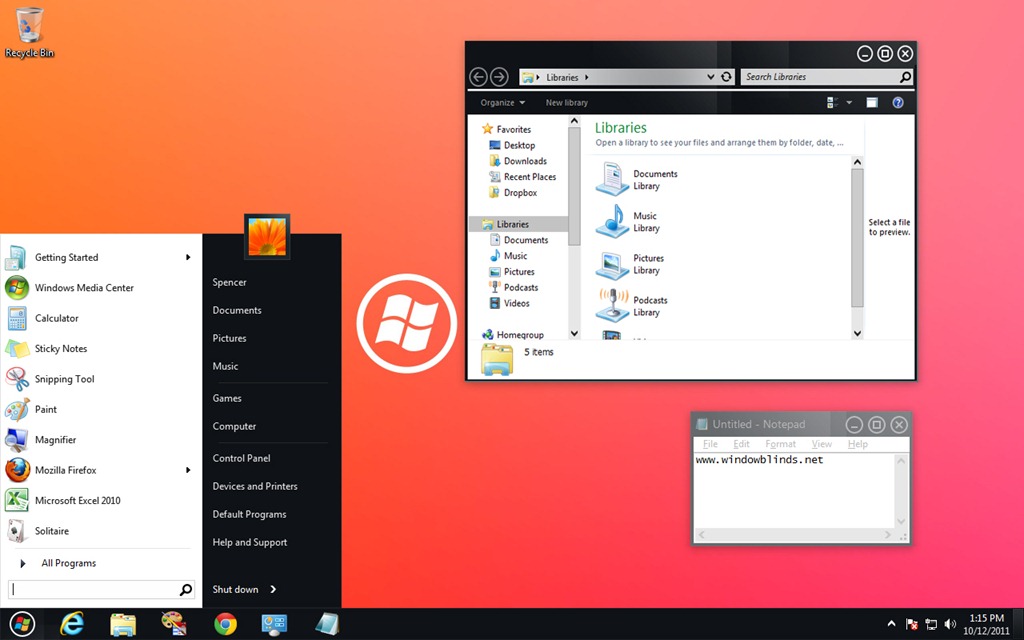
metro1 win8
53,969 views 69 replies
Reply #26 Top

i just bought the object desktop for 34.95 as a upgrade now i have to download and install 7.3 great.  also does anyone know a killer windows blind for halloween.

Reply #28 Top

https://www.wincustomize.com/article/412652/

Make sure you uninstall Windowblinds 7.2 first. I did mine through add/remove programs in control panel, reboot then install WB7.3, reboot again and the link up top is for some killer WB's for Halloween. Welcome to the WC scripttron75

Dang Wizards ... always get the drop on stuff. Hi Wiz...lol

Reply #29 Top

Ya I renewed early too.  now I'm good through 12/12

Reply #30 Top

Has the color settings+transparency bug been fixed? (ticket #EEM-354368)

Reply #31 Top

Quoting WebGizmos, reply 14
Not sure what caused this but...I just updated WindowBlinds and when my pc rebooted my screen brightness was reduced a bunch...almost like I just put on sunglasses...I rolled it back to the previous version and my brightness was restored.
End of WebGizmos's quote

That does not sound like anything WindowBlinds should be causing as it does not contain code to alter the screen brightness.

Reply #32 Top

WB 7.3 is ignoring the per application "ignore" settings.  I turned it off for Excel 2010 because of the statement that it had better support for Office 2010.  It was worse.  So I turned ignore back on and it's still causing problems.  All my grid lines are invisible so the entire spreadsheet, even a blank one looks like it's on plain white paper.  Toggling the gridlines on and off does nothing.  Ignore is also failing for cmd.exe.

Guess I'me reverting back to the previous version when I get a chance.

Reply #33 Top

https://www.wincustomize.com/article/412652/ Make sure you uninstall Windowblinds 7.2 first. I did mine through add/remove programs in control panel, reboot then install WB7.3, reboot again and the link up top is for some killer WB's for Halloween. Welcome to the WC scripttron75 Dang Wizards ... always get the drop on stuff. Hi Wiz...lol
End of quote

I didn't do that at all. I simply installed 7.3 overtop of the last beta and rebooted. Worked just fine.

Reply #34 Top

SOrry for the moronic question, but I just purchased WB about 5 weeks ago, was running the beta, but when I go to About WindowBlinds, in the config, it reads windowblinds 7.3 build 307. Is that the correct one, or am I missing how to update to newest one?

Reply #35 Top

I have just renewed my Object Desktop subscription and i dont see anywhere in my account downloads a link for Window Blinds 7.3 the latest one there is 5.5 i have window blinds 7.2 currently installed which i used to update through impulse but i can no longer use impulse now can anyone tell me how the get the link for 7.3.

Reply #36 Top

Try it at the Stardock Store. Login there and check your account if you haven't already.

Reply #37 Top

Quoting gevansmd, reply 32
WB 7.3 is ignoring the per application "ignore" settings.  I turned it off for Excel 2010 because of the statement that it had better support for Office 2010.  It was worse.  So I turned ignore back on and it's still causing problems.  All my grid lines are invisible so the entire spreadsheet, even a blank one looks like it's on plain white paper.  Toggling the gridlines on and off does nothing.  Ignore is also failing for cmd.exe.

Guess I'me reverting back to the previous version when I get a chance.
End of gevansmd's quote

It occurs to me to ask you to post a screenshot.  Some monitors have terrible rendering of light colours and so off white and white look identical and in some themes the line colour and the document colour may be closer than in others.

+1 Loading…
Reply #38 Top

Quoting RONNIE1958, reply 35
I have just renewed my Object Desktop subscription and i dont see anywhere in my account downloads a link for Window Blinds 7.3 the latest one there is 5.5 i have window blinds 7.2 currently installed which i used to update through impulse but i can no longer use impulse now can anyone tell me how the get the link for 7.3.
End of RONNIE1958's quote


Quoting Uvah, reply 36
Try it at the Stardock Store. Login there and check your account if you haven't already.
End of Uvah's quote


https://store.stardock.com/login.aspx?ReturnUrl=/myaccount/products 

Reply #39 Top

i'm still having the issue of all transparency gone after a reboot. it doesn't matter what skin i use. if it has transparency, it's gone after a reboot. i always have to reapply the skin. all drivers are up to date.

on another note, whatever happened to greenreaper?

Reply #40 Top
I believe GR is now at Gamestop with the Impulse team.
Reply #41 Top

Just updated with impulse. After restart a WB DLL problem appears in a window. Windowsblind icon in tne tray was not working. Problems appear with some programs (not from Stardock). I tried to roll back with Impulse on an older WB but it failled. I rolled back (by windows restore) and every thing is OK. This new version seems to have some problems. Be careful before installing ...

Reply #42 Top

OK, today comes a new update, but the problem with deskscapes3 is not gone.


 Every time if i apply a WB skin, my animated background freeze and i must open deskscapes and apply my dream again. Sorry for my bad english.


Roll back to WB 7.2 and it works perfect, why not with WB 7.3 ?

Reply #43 Top

Quoting ablev12, reply 42
OK, today comes a new update, but the problem with deskscapes3 is not gone.


 Every time if i apply a WB skin, my animated background freeze and i must open deskscapes and apply my dream again. Sorry for my bad english.
 

Roll back to WB 7.2 and it works perfect, why not with WB 7.3 ?
End of ablev12's quote

If Deskscapes stops then typically a wallpaper has been applied.

Reply #44 Top

Quoting Neil, reply 43
If Deskscapes stops then typically a wallpaper has been applied
End of Neil's quote

Deskscapes stops and applies the dream you were running as a wall. Deskscapes does not pause, it stops and is no longer running. Right clicking does not give the resume link, and the pause link is greyed out. 

Reply #45 Top

Deskscapes does not pause, it stops and is no longer running. Right clicking does not give the resume link, and the pause link is greyed out.
End of quote

Yeah, that´s it, but with WB 7.2 i can apply a WBskin and Deskscapes don´t stop.

Reply #46 Top

OK, I renewed my OD subscription :pout:

I had windowblinds installed through Impulse. Is it best to uninstall all and start fresh? :w00t:

Reply #47 Top

Probably.  But use the individual installers from the Stardock Store My Accounts page, not Impulse.

Reply #48 Top


WebGizmosreply 14Not sure what caused this but...I just updated WindowBlinds and when my pc rebooted my screen brightness was reduced a bunch...almost like I just put on sunglasses...I rolled it back to the previous version and my brightness was restored. That does not sound like anything WindowBlinds should be causing as it does not contain code to alter the screen brightness.


Don't know Neil...all I know is when I updated it thats what happened...when I rolled it back it fixed the problem.

Reply #49 Top

Quoting Daiwa, reply 47
Probably.  But use the individual installers from the Stardock Store My Accounts page, not Impulse.
End of Daiwa's quote

I think that was my big mistake.

Reply #50 Top

Whatever put it off the rails, sounds like your rig got well-borked.  :(

Hava :beer: on me.
