GunslingerBara GunslingerBara

DesktopX 4 BETA Now Available!

DesktopX 4 BETA Now Available!

A new DesktopX 4 BETA is available for DesktopX 3.x & Object Desktop customers. This BETA release is focused on streamlining the interface and configuration options. Visit the DesktopX Themes library on WinCustomize.com to select from hundreds of choices to change your desktop look and feel.

This BETA can be downloaded from your products download page on the Stardock store. Logon with your Stardock account at https://store.stardock.com/myaccount/products. Please note this beta update is only downloadable via the Stardock store and not available via Impulse.

Create and use a complete new desktop environment specifically designed for your needs.

Custom sidebars can contain all types of information including system information, weather, clocks, and much more.

104,682 views 83 replies
Reply #51 Top

Totally unrelated question, as I use my Pro at the moment and have to skip the Beta: What is the WindowBlinds skin used in the 1st screenshot ?

Reply #52 Top

I'm another person who's grateful that DesktopX is being worked on. It doesn't appear to be justified financially to spend any resources on the program for Stardock, so they are doing those of us who admire/use/make things with the program a big favour. It's too bad it isn't working out yet, but I'm hoping for the best.

I pay close attention to what's going on with DesktopX, and it's become obvious to me that there are some very skilled and clever people here who have a great deal of admiration for the program, and also have the best wishes for it's success, but are frustrated with the unsolved problems.

I'll be cheering all of you on from the sidelines, hoping it gets sorted out. Thanks for all the trouble Stardock and the dedicated users are taking, and the best of luck to you.

Reply #53 Top

I think it goes without saying how I feel about it. :moo:

Reply #54 Top

As for how mine is allowing me to make gadgets.. No clue. I simply downloaded the file from the link in this thread, installed it.


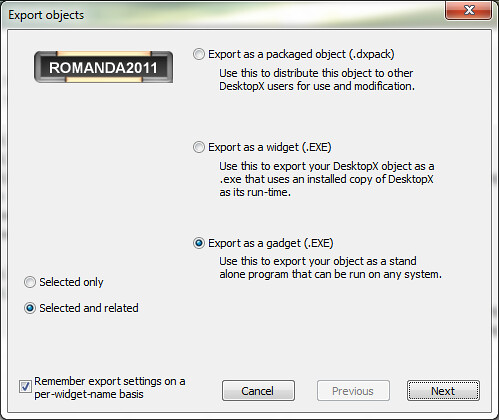
I run DESKTOPX PRO from my start menu, then when i go to export i see:


As for my previous comment about stopping the bashing, im simply trying to keep the updates coming, and i know (as a programmer) if the first time i take it to work on something and get based to death, id just quit, or move on to something else.   Not my intent to piss anyone off.

Reply #55 Top

Well, I wonder why I lose Pro when I install it? Maybe I should alter the install directory?

Also, I see above that export as windows sidebar gadget isn't there. I want to keep that ability.

Reply #56 Top

RND: I think that one was discontinued.

Reply #57 Top

Quoting c242, reply 56
RND: I think that one was discontinued.
End of c242's quote

Well, looks like...lol. But I still have it and may keep what I have because of it.  :grin:

Reply #58 Top

This is aimed at Gunslinger I guess, but any DesktopX staff really: Where to next?

Do you want us to just keep posting bugs etc. here?
What about using one of those websites which tracks issues separately so you can see what's been reported and indicate status or how you might address them.

What should we focus on?
Is there some particular change or feature that needs testing by those of us that managed to get it installed and (mostly) functional?

Ta.

O:)

Reply #59 Top

I too am grateful that it is getting attention, but I would at least like to be able to get what I've paid for without having to use impulse to get it.

It's going on months that one has not been able to download a workable version of Pro without using Impulse. FIX IT... PRETTY FUCKING PLEASE!!!

Thank you for the attention to DX4 and I DO look forward to continued progress :) 

Reply #60 Top

Running just fine right now on Win7 x64 here, downloaded this evening. Currently using the Steampunk theme.

Reply #61 Top

For those who got the beta to work on their system (looks like it's all Win7) what was the last version you had installed/updated previously?

Reply #62 Top

Quoting sViz, reply 61
For those who got the beta to work on their system (looks like it's all Win7) what was the last version you had installed/updated previously?
End of sViz's quote

I have the beta working on my laptop. (It still don't know where to look for skins.) On my main rig, it took out my Pro.


Using 3.5 before the beta. Still 3.5 on my main rig.

Reply #63 Top

I hope its done by the time I get to it.

Reply #64 Top

*cough*

Reply #65 Top

*snigger*

Reply #66 Top

Can we please get this put back into the new version?

Reply #67 Top

:grin:

Reply #68 Top

Is there any update on this? 

I am trying to work on something i need running for work.  Im guessing i need to nuke this beta 4 version and go back to 3.x to make sure its all working. 


Reply #69 Top

Lets see.. I wonder WHY i dont use DX much anymore.


 1. Used the link on the Stardock page to make sure i had the latest download.
     That download shows 3.5 - YES Even after i install it!

 2. The Serial # on the STARDOCK page, will not work, i had to HUNT thru my emails for the older one, and THAT worked to install it.

 3. After I installed it, i went to open the latest project i spend HOURS on sat AND Sunday..

    oh yeah, thats not there anymore, searched my entire pc for the file.  YES the .DESKTOP file it there but its dated FRIDAY
    How the HELL is that possible as i NUMBER IN SEQUENCE the versions as i make changes, and the last one V3 is dated BEFORE V2??

    V2 is even OLDER (content) then V3.

    I Had at least 6-7 HOURS into V3 from V2.  

4. When i do attempt to load V3 with 3.5 - the only one i have now.. I get an error when attempting to edit the script.
    "SYNTAX ERROR Invalid Character LINE1 COL1"  - Really the FIRST Character of the script?

YOU HAVE GOT TO BE KIDDING ME

OK DX - YOU SUCK - --- wow that sounds like an old post i made YEARS ago, nice to know its changed so much.

DAMN.

Do I even ATTEMPT to start over?  What A FREAKING WASTE


Reply #70 Top

UPDATE..

  Went to https://store.stardock.com/myaccount/products downloaded 3.5 - not 4beta -

  When I created anything now, even something NEW and click on the script button i get:

DX BROKE!

Ok, this has me going nuts.


 Where can i download the 4.x - or 3.99? whatever the hell it is.


Reply #71 Top

Quoting RomanDA, reply 69
Lets see.. I wonder WHY i dont use DX much anymore.
End of RomanDA's quote
RomanDA.  Thanks for posting this here and contacting me via chat.

The serial number issue should be fixed now.  I'll work with you to get a list of the bugs you found so that they can be looked into further.

Reply #72 Top

@Zubaz... I was able to reinstall a download i had of DX4_Pro.

It fixed the script issue, and after using the AWESOME Carbonite, i was able to restore the 700+ themes that had been removed by the uninstaller.

I have it all working again now.  But damn, what a mess.

The website listed does not download the beta's any longer, so that needs changed, or updated on this thread, unless i missed it.

Where i went wrong was thinking there was an actual "update" from impulse.

Still have that disappearing item issue i sent in a year ago.. X|

Oh well.. I if can milk this thing to work with what i need great.  Just need to make this damn thing work.

Have not tried to export.. trying now..  Worked.. Gadget made.

Reply #73 Top

I have mentioned several times in several places that the current download of DX Pro 3.5 that is in the store will not allow anything scripted to run.

I suppose David uncovered why.

Reply #74 Top

missed that RND... but yeah.. it SUCKS and needs removed.. but i think Zu is on the case.

Reply #75 Top

Waste of time and sick of waiting. Really...