It ain't fun no more WTF!!!

All three browsers affected. Firefox, Internet explorer and Chrome......JEEZ!!!

     Yesterday it was an issue with Windows update. I thought it was solved. It started out with two of my browsers not loading correctly. Today however its something more serious. IE, Chrome and FF are all being redirected to the Comcast billing site. No matter what link I click on or site in my speed dial they all go to Comcast. I believe it started when I opened yahoo. There was an ad on the page for comcast that didn't fully load. When I clicked on mail it started. I ran all of my utilities thinking I caught a bug but neither of them found anything. I opened MalwareBytes to run that one and as usual it needed to update its virus definitions, no problem as I've done that many times before. This time though an error message came up saying that there are files missing or corrupt. So In uninstalled MalwareBytes hoping to go for a fresh install. No go.

     I used the system restore and took my laptop back to the 13th. thinking whatever is on it would be gone. Nope! Its still there and when I tried to open Windows update another error message saying it cannot access any updates. Windows update is not working, browsers are being redirected, uninstalling FF and rolling back to a previous version didn't work. Right now I can't use my laptop at all on the net. Is anyone else having this issue with browsers being redirected or is it a bug on my system. The only thing I can think of to do is use my rescue disk and pray it works. 

209,591 views 100 replies
Reply #1 Top

It does sound like some 'heavy duty' mischief is taking place.  Sorry to hear this.  I believe you know what you are up against, unfortunately it sounds like a clean install might have to be done. 

Someone like yrag will see this and I'm sure be able to help.

Reply #2 Top

Who is your ISP?

If it is comcast then it may be they believe you have not paid your bill or have used too much bandwidth and so are directing you to that page.

EDIT : As DrJBHL correctly points out below, you should be very careful it is not some sort of scam site trying to get your private info.

Reply #3 Top

It started out with two of my browsers not loading correctly. Today however its something more serious. IE, Chrome and FF are all being redirected to the Comcast billing site.
End of quote

Do as Neil suggests, but make sure that's the real Comcast site, Uvah. Check the url, and make sure it's https.

Reply #4 Top

Quoting DrJBHL, reply 3
It started out with two of my browsers not loading correctly. Today however its something more serious. IE, Chrome and FF are all being redirected to the Comcast billing site.

Do as Neil suggests, but make sure that's the real Comcast site, Uvah. Check the url, and make sure it's https.
End of DrJBHL's quote

Good point.  It could be a hack to redirect you to a site to harvest your private info.

If it is just happening on the one machine then I would assume something has compromised the entire machine and a wipe and reinstall is probably the best policy.  Afterall if it has messed with dns, who knows what else it has messed with that you do not know about...

Reply #5 Top

Will the rescue disk do it as that is the only disk I have for the laptop. Either that or use the Win7 Pro disk I have and no, I don't have Comcast. Don't have a TV either. My ISP's are all hotspots around town. Oh and it is a https. I did notice that the only thing it asked for is a phone number. Then a button to 'mt account'. That parts funny as hell as I don't have one. Gonna visit the little boys room and get started but first ..... need to back stuff up. I'll let you know how it works out.

Reply #6 Top

Quoting Uvah, reply 5
Will the rescue disk do it as that is the only disk I have for the laptop. Either that or use the Win7 Pro disk I have and no, I don't have Comcast. Don't have a TV either. My ISP's are all hotspots around town. Oh and it is a https. I did notice that the only thing it asked for is a phone number. Then a button to 'mt account'. That parts funny as hell as I don't have one. Gonna visit the little boys room and get started but first ..... need to back stuff up. I'll let you know how it works out.
End of Uvah's quote

If your ISPs vary, have you tried picking a different wireless network in case the one you are using is broken?

Reply #7 Top

One of the Hotspots may be the villain.

Reply #8 Top

A lot of the trends now--though they are still small in number--is "extortionware".  Your machine is infected and you're directed to a site to purchase "remedy software".

I'd contact your cable company and ask for input.

Reply #9 Top

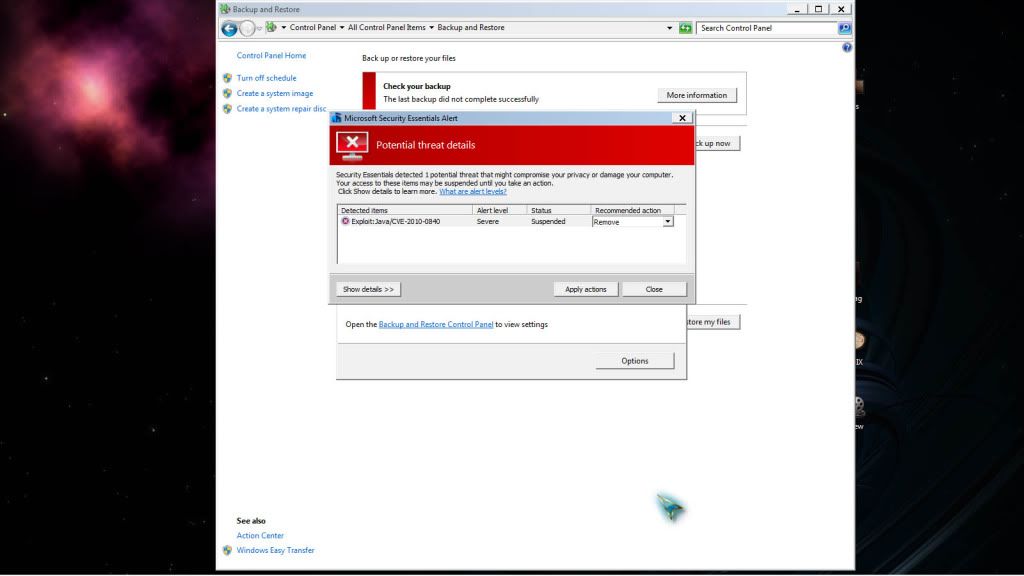
There is no cable company. That said, I found this or rahter MSE grabbed this as I was doing a backup. Idiot that I am I ran all but MSe on my machine. Right now I'm using the Acer. Here's a screenshot.

Reply #10 Top

HijackThis may be able to find your problem...unless your IIS got screwed, I'm not sure what could be re-directing all URL's.  Have you tried connecting directly to an IP address?  208.185.127.40 is the IP address for About.com, you may want to see what happens

Reply #11 Top

Quoting Uvah, reply 9
There is no cable company. That said, I found this or rahter MSE grabbed this as I was doing a backup. Idiot that I am I ran all but MSe on my machine. Right now I'm using the Acer. Here's a screenshot.

End of Uvah's quote

How did I know.

Uvah... get busy changing all your email/etc. passwords.

Keep a very close watch on your credit card account/s. Consider changing the card/s number/s.

Reply #12 Top

Have MSE remove. Disable Backup and Restore and re-enable. Control Panel/ Java/ Clear Temporary files cache. Un-install Java.

Re-boot and install: http://www.oracle.com/technetwork/java/javase/downloads/index.html


That said, personally, I don't think you're going to recover this to normality....or at least anything you can trust.

Reply #13 Top

Quoting yrag, reply 12
Have MSE remove. Disable Backup and Restore and re-enable. Control Panel/ Java/ Clear Temporary files cache. Un-install Java.

Re-boot and install: http://www.oracle.com/technetwork/java/javase/downloads/index.html


That said, personally, I don't think you're going to recover this to normality....or at least anything you can trust.
End of yrag's quote

I agree. The Java vulnerability has been exploited... and there are many variants of that baddy.

Needs a total, really low level wipe and reinstall and use only the latest Java.

Reinstall only what you really need.

I wouldn't trust any backups... unless made on an external drive well before any of this started happening.

Before doing the wipe, Uvah... give RefreshPC a shot. It's free. http://www.xp-smoker.com/refreshpc.html


Reply #14 Top

Well, as now, there is around 400 million computer infected with the virus DNS changer... now, internet browser is redirected randomly at various time to other site... but the 7 March 2012, FBI will shutdown the fake DNS server that they have setup in 2011 when they have arrest the hacker, result will be that people who are infected will not be able to surf the internet at all after the 7 March 2012... 

For test if you are infected, go to http://www.dns-ok.be/ ... if you have a big green "V", everything is ok... if you have a big red "X", it mean that you are infected... in case of infection, there is info and link for removal tool... sorry, it is in French of Dutch...  more detail at http://www.dns-ok.be/dnschanger_fr.html ...

Well, you have maybe not these virus but your symptom are very similar...

If is always useful to have something like SARDU ( sardana antivirus rescue disk utility ) near you... for SARDU, go to http://www.techmixer.com/multiple-antivirus-bootable-rescue-cd-utility-shardana-antivirus-rescue-disc-utility/ or for SARDU2, go to http://www.techmixer.com/sardu-2-create-multiple-antivirus-utility-rescue-disk-usb/ ...

With SARDU2, you have :

- Antivirus Rescue Disk: Avira AntiVir Rescue System, BitDefender antivirus Rescue CD, Dr.Web Live CD, PC Tool AOSS, AVG Rescue CD, F-Secure Antivirus Rescue, GDATA Rescue CD, Kaspersky ‘Kav Rescue CD’ and Panda Safe Cd.
- Utility: Floppy win98SE, Gparted, NT password Recovery, Parted Magic, Ophcrack, Redo Backup Live, Trinity Rescue CD, System Rescue CD, Ultimate Boot CD and CloneZilla.
- Linux: Austrumi, Damn Small Linux, LiMP, Puppy Linux, xPUD, ubuntu, kbuntu and Slax.
- Windows PE: LiveXP, MegalabCD, WindowsPE, UBCD4WIN, and VistaPE. 

A other good one is Trinity ( http://www.techmixer.com/repair-and-rescue-windows-os-using-trinity-rescue-kit-live-cd/ ) :

"Inside the live CD. you can see a lot of tools like resetting password tool that allow user restore and clear the password of windows and Linux operating system which user can set the password as they want on next OS login. Meanwhile, a tools to remove viruses which it equipped with 4 different virus scan products (ClamAV, AVG, F-Prot, BitDefender) integrated in a single uniform command line with online update capability.

Plus more, it can simple allocated all local files system with a simple script entry and then clones an NTFS partition to another PC over a network, a mass undeleter that tries to recover every deleted file on the drive. In addition, Trinity Rescue Kit (TRK) Live CD also provides for recovering data off a formatted or dying disk, two tools for fixing master boot record repair programs, and hardware diagnostics.

This Trinity Rescue Kit live CD can be bootable within three method like burn into ISO files, USB stick installable or network over PXE.

The best part of this Trinity Rescue Kit live CD can use on all windows and Linux to for repair and rescue purpose."

As you can see, the recent trend in rescue boot CD/DVD/USB is to be Windows/Linux compatible... beware that these linux/windows version are minimal with only diagnostic/repair tool... similar CD/DVD/USB exist for other task like by example diagnose and test a network for security... personaly, i think that they are a must have for any owner of computer... don't wait until you cannot boot anymore for think about these tools...

Reply #15 Top

Thoumsin we already know which virus... look at the screen shot.

Reply #16 Top

Well ... it kinda goes likethis ... I did a clean install with the Win7 Professional disk. Everything went smoothly then I discovered my screen resolution was set at 800x600. My normal resolution is 1600x900. I triede to adjust it and the best I can get is 1024x768 ... not acceptaqble as everything thing looks funky. Another thing .... this Win7 was originall y madefor a desktop. Does putting it on a laptop going to make a difference? It shouldn't. Its also missing a bunch of drivers. They're not installed on this OS.

Reply #17 Top

Quoting Uvah, reply 16
Well ... it kinda goes likethis ... I did a clean install with the Win7 Professional disk. Everything went smoothly then I discovered my screen resolution was set at 800x600. My normal resolution is 1600x900. I triede to adjust it and the best I can get is 1024x768 ... not acceptaqble as everything thing looks funky. Another thing .... this Win7 was originall y madefor a desktop. Does putting it on a laptop going to make a difference? It shouldn't. Its also missing a bunch of drivers. They're not installed on this OS.
End of Uvah's quote


The reason for the resolution change is because your notebook is using a default video card driver.  Go to the manufacturers website and get the appropriate video card driver for your notebook.


EDIT:

Also as a little aside.  This isn't the first time I've mentioned it but Hitman PRO (from www.surfright.nl) is a fantastic little fast cloud-based scan that checks your brower installation for DNS hijacks and/or proxy re-directs and fixes them quite nicely.  Just for future reference.

Reply #18 Top

Quoting Uvah, reply 16
this Win7 was originall y madefor a desktop. Does putting it on a laptop going to make a difference? It shouldn't. Its also missing a bunch of drivers. They're not installed on this OS.
End of Uvah's quote
Quoting DrJBHL, reply 15
Thoumsin we already know which virus... look at the screen shot.
End of DrJBHL's quote

If have look at the screen shot... the java class who use the vulnerability is the "tool" who allow remote execution of code... if it was "used", there is some code elsewhere who was excecuted... code who can be the real virus...

In some way, the java class and his vulnerability is like a backdoor... screenshot show that the backdoor was found but give no information if somebody/something have use it for go inside the system... it is possible that nobody have use it or that hundred of trojan/virus/malware have use it...

By the way, the java backdoor ( CVE-2010-0840 ) work from Java 5.0 update 23 ( java 5.0 end of life is 8 april 2008, end of support 3 nov 2009 ) to Java 6.0 Upadate 18 ( 13/01/2010 )... update 19 from 30/03/2010 is good... The last Java 6 update, the 30th, is from 12/12/2011... Java 7 have begin the 07/07/2011... last Java 7 update, the 3th is from 14/02/2011... Point is that the backdoor is on slot if java was updated after 30/03/2010... same if the class is downloaded from some malicious site, the class cannot use the exploit anymore and excecute remote code...

In short, the screenshot show a tool, and it is not possible to know if the tool was use or not for excecute a remote code... if some malicious code was excecuted, there is something somewhere else in his system...

Quoting Uvah, reply 16
this Win7 was originall y madefor a desktop. Does putting it on a laptop going to make a difference? It shouldn't. Its also missing a bunch of drivers. They're not installed on this OS.
End of Uvah's quote

Is it a full version of Win7 ( box with original cd/dvd ) or a OEM version who was pre-installed on the computer where you have make the "rescue" Win7 disc yourself ?

If it is the OEM, it is very possible that it lead to problem... by example, i have recently install a HP computer, make the rescue disk but it resinstall correctly only on the HP computer... asking Microsoft, they have reply me : "oem version cannot be transfered to a new PC, it lives & dies on the 1st PC it is installed on"...

Reply #19 Top


^^^

Correct on both counts!  ;)

Reply #20 Top

Uvah you said the disc you used was from a desktop computer. You also said you had a rescue disc. If this was the rescue disc you were talking about you are lucky it works at all. As Thoumsin said any rescue disc (oem) that comes with a new computer is find for that computer only to do re-formats. A rescue disc doesn't know if it's a desktop or laptop only knows which computer it belongs to.

Reply #21 Top

This is not a rescue disk and the OS is not OEM. It was bought separately. Its the same one I installed on the laptop that was stolen. At any rate its a driver issue. All I need do is download the correct drivers and I should be good to go. Ironic now that I think about it. I was toying with the idea of installing the pro version on the Toshiba. Maybe this is Kismet. I downloaded an app I found with Google. It'll tell me which drivers I need though asking 'it' to go for them costs money. All I need it to do is tell me which ones. I'd lke to get my hands on the dude who sent this gremlin out there. I'd have fun introducing him/her/it to a whole new meaning to the word pain.

Reply #22 Top

Quoting Uvah, reply 21
I'd lke to get my hands on the dude who sent this gremlin out there. I'd have fun introducing him/her/it to a whole new meaning to the word pain.
End of Uvah's quote

The goverment only gets about .001% of the bad people so good luck finding them. :rofl:

Reply #23 Top

Quoting Uvah, reply 21
I downloaded an app I found with Google. It'll tell me which drivers I need though asking 'it' to go for them costs money.
End of Uvah's quote

Christ...enough already!!


Stop downloading and installing shit.


Windows 7 will install all the drivers you need....run the fuckin' update.................

Reply #24 Top

 I did that and it tells me it can't find any besides I didn't install it yet. One of the drivers I need is for the network adapter. Once I get that and I'm able to get online I can do it all on theToshiba. Right now I'm using the acer.

Reply #25 Top

Quoting Uvah, reply 21
...At any rate its a driver issue. All I need do is download the correct drivers and I should be good to go...

... I downloaded an app I found with Google. It'll tell me which drivers I need ...

End of Uvah's quote

Well, you need all drivers found the "download" webpage for your laptop... not some mystic application found via Google...

Since, you have speak about Acer and Toshiba, use the following link :

- http://www.csd.toshiba.com/cgi-bin/tais/support/jsp/home.jsp?nav=Download

- http://support.acer-euro.com/drivers/downloads.html

As for the graphic card, always use the last version found on the website of the brand ( nvidia, ATI, Intel, etc )... they are usually more up-to-date that on the site from the brand who have build the laptop...