Stardock10 - Product activation is requested at different intervals even though the product is activated

Dear Startdock Team

We are using the product Stardock 10 on a Citrix XenApp 7.15.


Now we have again and again the problem that the activation request of the product, pops up in different time intervals, although the product is activated.


Manually re-activation temporarily solves the problem until the next time. 


This is extremely unfavorable for home office users who work with the Citirx platform, as they will then no longer be able to work.


We use a proxy through our firewall, but it does not block the traffic. The manual activation works.


We would like to understand how the activation mechanism works so that we can possibly narrow down the problem. The product is basically great, but we need to solve the problem quickly.


 We have activated the product as follows.


1. click on "Enter Product Key".

2. enter the product key

3. click on "Activate


We can't say exactly how often this happens, but in this example, the last activation was on 10/18/2019 and the message for the reactivation came today on 10/21/2019.

We need a solution where the product is permanently activated and does not keep asking for it.


Regards
Yves

8,021 views 18 replies
Reply #2 Top

Dear Basj


Unfortunately, your instructions didn't help. The problem of activation occurs again and again at different intervals, even though the product has been successfully activated. This is very annoying.  We urgently need a solution.

Reply #3 Top

Hello,

Have you tried this?

Press the Windows key and "R" at the same time. A "Run" dialog box will pop up, please paste the path below into the "Open" field and press OK.

%ProgramData%\Stardock\

In the folder that pops up, you should see a folder named PRODUCTNAME. Please delete this folder and all of its contents.

After you have deleted that folder, please attempt to activate once again and it should succeed without any errors.

Let us know.

Thank you,

Basj
Stardock Community Assistant.

Reply #4 Top

Hello Basj

Yes, that's exactly what you suggested in your first answer and that's exactly how we implemented it. But unfortunately it doesn't work.

We really need a functional solution quickly because we are currently in a pilot test with this application and it has to work perfectly. In this state the application is worthless for us.

What are the productive activation servers?
Would the "offline activation method" be a possible solution?

It is really very important that we find a solution, this project also depends on it.

Thank you
Yves

Reply #5 Top

Hello,
I have forwarded your questions/problems to the Stardock Support team for their assistance. Please keep an eye on this thread for any updates. We appreciate you feedback and patience.

Thank You,
Basj
Stardock Community Assistant.

Reply #6 Top

Hello,

Sorry to hear you are having trouble.

I created a ticket for you - you should have mail.

Sean Drohan
Stardock Support Manager

Reply #7 Top

I have this issue as well on three different computers where I keep getting asked for a license key, between 3 days and a weekly interval. This dialog virtually disables the computer, and even after uninstalling it still kept asking to uninstall.

There is no "PRODUCTNAME" folder under C:\ProgramData\Stardock.

I can't risk reinstalling until this is fixed.

I had recommended your product to other people. Some of them have since uninstalled because they get sick of this.


Regards

Hans Moller

Reply #8 Top

Hello,

PRODUCTNAME should be replace by product you having problem with. So if the issue is on Fences, you should delete folder named "Fences". But since you did not mentioned which product you having issue with, I am not sure which folder you should delete.

Press the Windows key and "R" at the same time. A "Run" dialog box will pop up, please paste the path below into the "Open" field and press OK.

%ProgramData%\Stardock\

In the folder that pops up, you should see a folder named PRODUCTNAME. Please delete this folder and all of its contents.

After you have deleted that folder, please attempt to activate once again and it should succeed without any errors.

Thank You,
Basj
Stardock Community Assistant.

Reply #9 Top

Good day


Went through all the setups, deleted the "C:\ProgramData\Stardock\Start10" folder.

Entered the key again, this morning after about two hours on the computer I get the dialog again to enter the product key.

I entered it for the last time. If it happens again we will uninstall Start10 on all four of our computers. This has been happening since March 2017, and we are now pissed off.


Hans Moller

Reply #10 Top

Please let us know if it happen again. So that I can forward your issue to Stardock Support for help from them.

Thank you,

Basj
Stardock Community Assistant.

Reply #11 Top

Quoting hansmoller, reply 9

Entered the key again, this morning after about two hours on the computer I get the dialog again to enter the product key.
End of hansmoller's quote

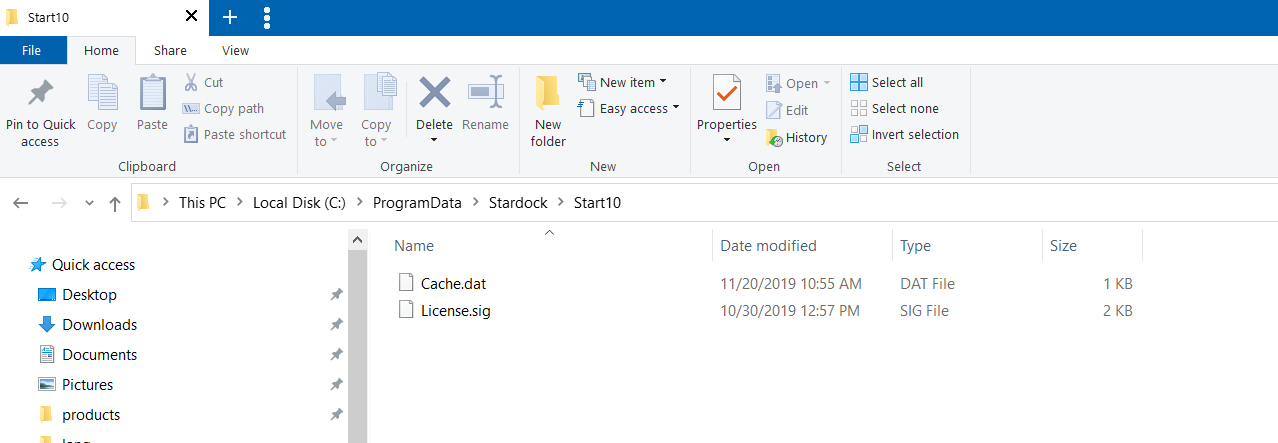
After you activate, I need you to verify that there is license.sig file here:

C:\ProgramData\Stardock\Start10

And it has the current date / time.

When / if it asks you again, go to that same location and verify that file is still in that location.  If it is not, that is the reason you are getting prompted.  Anytime I have seen that, its is an Antivirus app that is quarantining the sig file.

Sean Drohan
Stardock Support Manager

Reply #12 Top

The license file License.sig has always been there. We rely on Windows Defender, no other Antivirus programs installed.


Reply #13 Top

Quoting hansmoller, reply 12

The license file License.sig has always been there. We rely on Windows Defender, no other Antivirus programs installed.
End of hansmoller's quote

Well, I need to know some specifics, hansmoller:  

  • Is the date of the sig older or when you just then reactivated?
  • Are you using key / email or email / password to activate?  I ask as you have multiple licenses on your account. 
  • If it is key / email, what key? Of the people using Start10, are you all using the same key?
  • Is this a VM / Citrix environment?

Sean Drohan
Stardock Support Manager

Reply #14 Top

Sean

Haven't ever looked at the sig file, just did the activation process off your dialog. I enter the email account end respective product key for that computer.

We have four separate keys, which are uniquely applied to each computer, i.e. two computers run off the same key. They are under the one email account.

Not sure if it is a good idea publishing the actual keys on the forum. I have a text file with the keys in them I can email to you.

All computers are Windows 10, no VN/Citrix.

The activation request interval varies. We have nothing for weeks, then one every three or so days, then nothing again for a while.


Hans

Reply #15 Top

Hansmoller,

Quoting hansmoller, reply 14

Not sure if it is a good idea publishing the actual keys on the forum. I have a text file with the keys in them I can email to you.
End of hansmoller's quote

I know what the key are.

Can you help me reconcile these two statements, what one it accurate:

Quoting hansmoller, reply 12

The license file License.sig has always been there.
End of hansmoller's quote

Quoting hansmoller, reply 14

Haven't ever looked at the sig file, just did the activation process off your dialog
End of hansmoller's quote

Also:

Quoting hansmoller, reply 14

The activation request interval varies. We have nothing for weeks, then one every three or so days, then nothing again for a while.
End of hansmoller's quote

Before you do anything when prompted, and you go here:

C:\ProgramData\Stardock\Start10

Is there a License.sig?  If so, is the date old - from the last time you activated?  If so, did you change hardware on that PC in any significant way (new motherboard, SID, MAC, restore from a backup, etc)?

If there is not a License.sig, that is why it is prompting.  Has the License.sig been quarantined in your AV / Malware product - did you do any scanning of the PC with any unique software?

Sean Drohan
Stardock Support Manager

Reply #16 Top

Sean


You wrote:  If it is key / email, what key? 

Then you wrote: I know what the key are.


I wrote: We rely on Windows Defender, no other Antivirus programs installed.

Subsequently you ask: Has the License.sig been quarantined in your AV / Malware product - did you do any scanning of the PC with any unique software?

So I repeat: We rely on Windows Defender, no other Antivirus programs installed.

If Window Defender is interfering with the Start10 license, please contact Microsoft. However there have been no reports of Windows 10 quarantining the license.sig file.


My statements: 

The license file License.sig has always been there.

Haven't ever looked at the sig file, just did the activation process off your dialog

These do not conflict, I have noticed the file being there, just did not note the date.


Further: There have been no significant hardware changes that would have needed a prompt for the license key.

It is not up to the user to note license files and their dates. It is up to your software to function correctly.

Apart from AutoCAD an Trimble Surveying software, our computers have a number of software supplementary packages like PDF writers, image software, video editing software, WinISO, WinRAR etc.. All are registered with license keys, none of them have issues finding their license registration like Start10.

I wrote an email on 18 November outlining all the issues, instead of answering I get referred to this forum, and I sit and type out all the issues again.


My previous statement from November 18 still stands:

"I entered it for the last time. If it happens again we will uninstall Start10 on all four of our computers."


It is slowly becoming too hard and a waste of time keeping Start10 activated.


Regards

Hans Moller

Reply #17 Top

Hans,

Quoting hansmoller, reply 16

It is not up to the user to note license files and their dates. It is up to your software to function correctly.
End of hansmoller's quote

I understand your frustration - I share it quite frankly.

That said, we, quite literally, have hundreds of thousands of Start10 licenses deployed all over the world in a wide range of environments.  In the incredibly few cases where we have seen Start10 spontaneously prompt for activation, we have solved them by working with the client - by asking questions and asking them to try various things - to solve it. You have seen the result of those prior efforts; me asking you things that ended up being the reason why they had the issue. Ultimately, if I can't get information, I can't help.  Could it be, in the end, that it is an issue with the app - that you have exposed something we have not yet seen - absolutely; but I still need information to determine that.

With you answering that there have been no hardware changes, the main bit of information I still need...

If you go to this location now:

C:\ProgramData\Stardock\Start10

You should see a License.sig file as shown:


When you are unexpectedly prompted for information, and before you even try to activate again, it's crucial to go to that location again to see if its missing.  If it is, that is the task, to find out why or what is removing it (something on the PC or a flaw in the app).

Again, Hans, I get that this is frustrating but I need this information.  If you would like to pass this on to someone else in your group, I would be happy to continue with them to resolve this issue.

Sean Drohan
Stardock Support Manager


Reply #18 Top

Hans, 

After speaking with Net Dev, we are going to have you try something that is a bit too detailed for a forum post.  I will create a ticket for you - you will have mail on it soon.

Sean Drohan
Stardock Support Manager