Continues cycling through activation sequence

I have switched my primary and secondary computers.  I then went through the activation sequence on the new primary computer.  After I use the server option I get the following message:

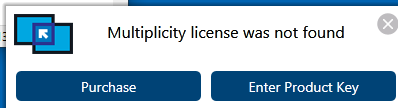
When I click finish I get this message:

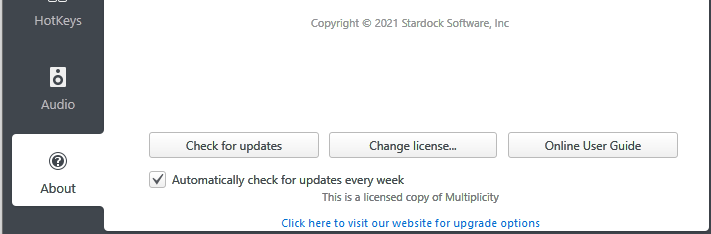
When I click on the finish tab the license dialog exits to the configure screen where I can configure the secondary computer.  When I click on the about I get the following:

It shows that it is licensed.   But after a while I get a pop up asking me to activate the program again and the sequence starts all over. 

Here are the steps I have taken.

1.  followed the instructions a post about error code 212.  and deleted the Multiplicity folder in %ProgramData%\Stardock\- no change

2.  Uninstalled multiplicity include settings and data.  The deleted the %ProgramData%\Stardock folder.  Then reinstalled multiplicity and the activation sequence returned to what is described above.  


Any ideas?  


3,040 views 6 replies
Reply #2 Top

Thanks for the response.   Unfortunately this does not address the issue.   The referenced procedure is exactly what I followed and I did get the first dialog indicating that activation was successful (see graphics 1 above).  However when I clicked on the finish button, I received a dialog indicating that it wasn't successful (see graphics 2 above) asking me to go back to complete activation.  

At the current time I'm not experiencing problems but if history repeats itself,  in a few days I expect the the request for activation will appear again.  

Reply #3 Top

at 10:00  AM PST today (2/28/2021) I got the following popup:

I went through the sequence to activate the key trying both pasting the key and using the web link to activate the key.  The same cycle repeated itself as shown earlier in the message.  Prior to starting the reactivation sequence, I took a snapshot of the about:

As you can see, before I started the activation dance, the about indicated that it was a licensed copy of Multiplicity.

Any suggestions would be appreciated.  

Reply #4 Top

Hello,

If this is a Steam version let us know .

If it's a Stardock site version follow below .

Would you do this PURGE: https://forums.stardock.com/486104/multiplicity-support-faq#reinstalling

Reboot and ReInstall the latest version from your account https://store.stardock.com/myaccount/products/

reboot , test and report back please.

You can get your key from your account also .


AzDude
Stardock Community Assistant

Reply #5 Top

I did as  instructed but the same result with the two dialog boxes as shown in the first post above.  … and the "about" indicates it is a licensed copy.   In a day or two I'm again expecting to get a pop up asking me to activate.    I will report back if this occurs.  Thanks for working with me on this.  

Reply #6 Top

Hello,

I have forwarded your report to the Stardock support team for their review and recommendations.

Please keep an eye on this thread for any updates.

We really do appreciate your feedback, thanks.


AzDude
Stardock Community Assistant