soundpackager not working

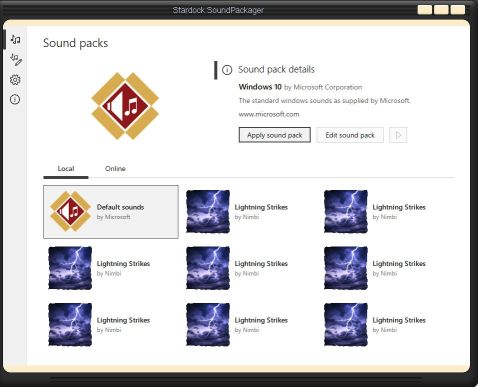
I recently installed soundpackager and at first it worked just fine. when I downloaded the lightning strikes sound package it would only show that sound pack. I tried uninstalling and reinstalling soundpackager, but when I all the sound packages were replace with the lightning strikes sound pack except for the default sounds. I have no idea why this is happening and any help would be greatly appreciated.
4,291 views 8 replies
Reply #1 Top

Hello,

Sorry to hear you are having issues.

What version of Windows are you running 

need full numbered version ( use winver.exe ) for that info .

also explain in better detail what happened not really clear to me .


AzDude
Stardock Community Assistant

Reply #2 Top

I'm using Windows10 Home Build 19041.867

when I installed the sound pack lightning strikes it changed all my sound packs to the lightning strikes sound pack. when I try to install a new sound pack it makes it lightning strikes. I've included a screen shot to show what I mean.


Reply #3 Top

I tried the online option to get a new soundpack but when it installed it just did it as lightning strikes once again. right now I'm using the trial of soundpackager and I'd really like to register it, but I'd like to make sure it's going to work before I pay for it. I'm open to any and all suggestions.

Reply #4 Top

Hello,

Sorry to hear you are having issues.

here's the path to the packs C:\Users\your name\Documents\Stardock\SoundPackager.

try deleting those lightnings , reboot and try a new sound pack , try one of mine.

I made a few and they all work fine for me and others too .

Report back ..

Jurassic Park https://www.wincustomize.com/explore/sound_schemes/240/


AzDude
Stardock Community Assistant

Reply #5 Top

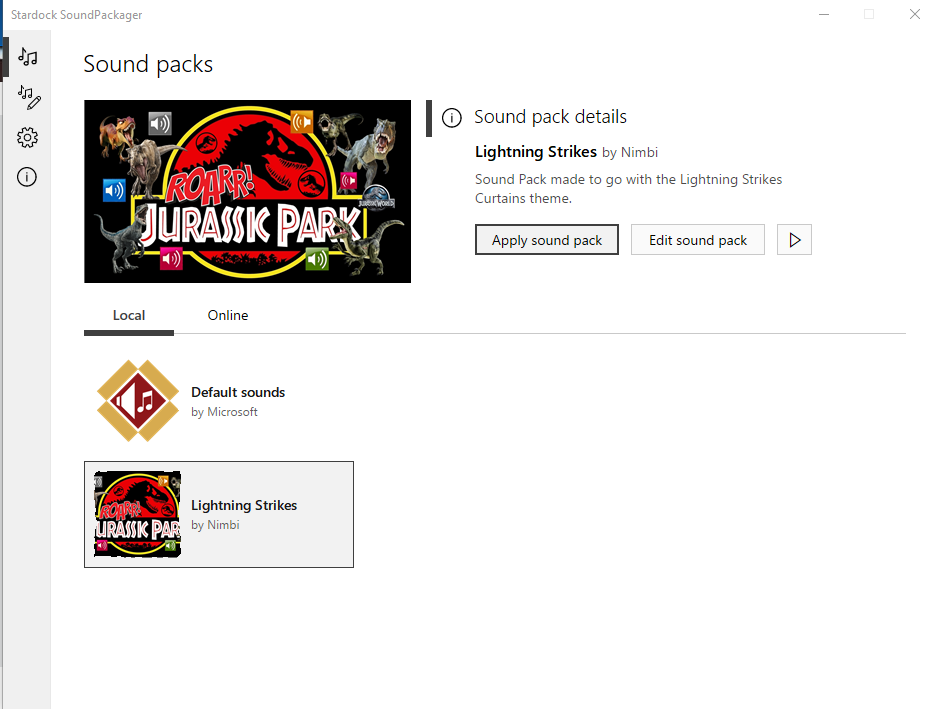
thanx for the response AzDude. I tried going in and deleting the sound packs folder and installed the jurassic park sound pack. it's still setting it as lightning strikes. I'm including another screenshot of what it did. as you can see it seemed to put in the right pack but it's still using the lightning strikes sounds and stuff. is there anything in an .ini file or maybe in the windows registry I can try to change? I'm at my wits end here. I have no idea what else to try. I was also wondering if I register the program would it make any difference?

Reply #6 Top

Hello,

Today is Sunday support people off but have to check with them for a fix - Stay- tuned.

I have forwarded your report to the Stardock support team for their review and recommendations.

Please keep an eye on this thread for any updates.

We really do appreciate your feedback, thanks.


Reply #7 Top

Hello,

Sorry to hear you are having trouble.

Go hear:

C:\Users\YourWindowsAccountName\AppData\Roaming\Stardock\SoundPackager\Packages

Rename the folder to:

C:\Users\YourWindowsAccountName\AppData\Roaming\Stardock\SoundPackager\Packages.OLD

And try downloading again.

Sean Drohan
Stardock Support Manager


Reply #8 Top

my computer went south on me so I had to restore it back to factory settings. I installed soundpackager and it seems to be working just fine now. whatever glitch was causing it to act up seems to have been corrected. thank you for all the help.:)