Windows 11 with IE/IE Mode Have ERROR

My used IE/IE Mode in Windows 11 with WindowsBlinds 11, This Error is:

+ System
   
- Provider
      [ Name] Application Error
      [ Guid] {a0e9b465-b939-57d7-b27d-95d8e925ff57}
   
  EventID 1000
   
  Version 0
   
  Level 2
   
  Task 100
   
  Opcode 0
   
  Keywords 0x8000000000000000
   
- TimeCreated
      [ SystemTime] 2022-12-12T03:23:53.8837146Z
   
  EventRecordID 16054
   
  Correlation
   
- Execution
      [ ProcessID] 17748
      [ ThreadID] 1432
   
  Channel Application
   
  Computer ganysa
   
- Security
      [ UserID] S-1-5-21-4122800123-118306827-676631252-1001
- EventData


    AppName IEXPLORE.EXE
    AppVersion 11.0.22621.1
    AppTimeStamp a0a1d8be
    ModuleName WBLIND.dll
    ModuleVersion 11.0.0.1
    ModuleTimeStamp 637b6aab
    ExceptionCode c0000005
    FaultingOffset 0006cd74
    ProcessId 0x1de0
    ProcessCreationTime 0x1d90dd8b4ce8f83
    AppPath C:\Program Files (x86)\Internet Explorer\IEXPLORE.EXE
    ModulePath C:\Program Files (x86)\Stardock\WindowBlinds\WBLIND.dll
    IntegratorReportId c829651b-7ca3-4be2-bea7-4bc8a76eeacf
    PackageFullName  
    PackageRelativeAppId  

My WB11 was last release.

How Can with fix this?
3,416 views 2 replies
Reply #1 Top

Hello,
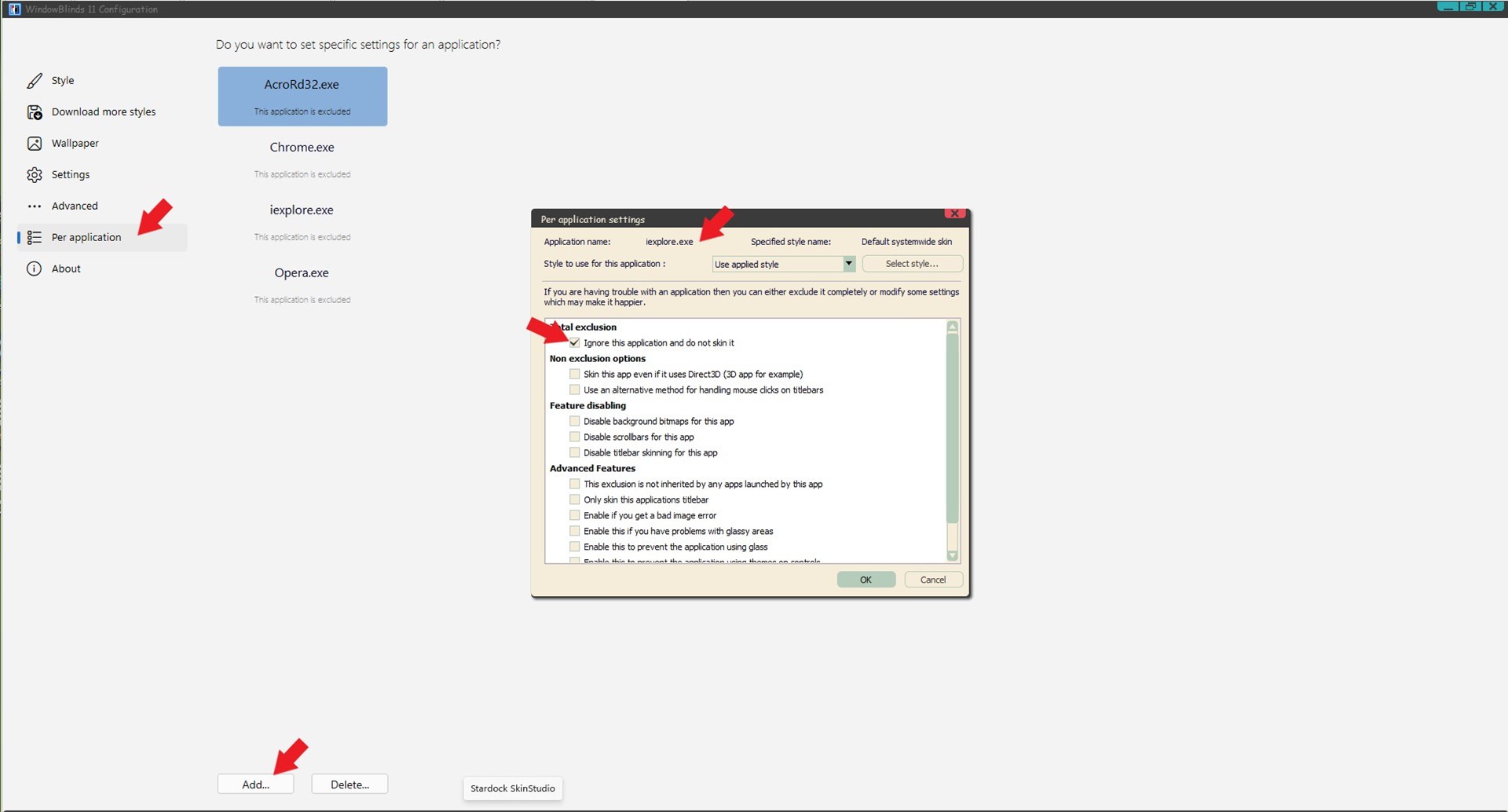
Sorry to hear you are having issues. If you have issue with an app you should exclude it from WB. Refer to screenshot below and exclude Iexplore.exe from WB11.

Thanks
Basj,
Stardock Community Assistant.

Reply #2 Top

It does not look like you are using the latest release of WindowBlinds.

Did you purchase WindowBlinds 11 when it was in beta?
