


Double taskbar date feature request
Time and date related
 Stardock Forums
Hi all. Long time Stardock fences user, newbie Start11 user here.
I (unfortunately) upgraded to Win11 and could not stand the limited customisation of the new taskbar.
The one feature I have always used was: double taskbar (two rows), locked, which automatically showed the full time and date (time, week day, date) *emphasis on week day.
It may be a personal preference as a self employed ADHD person with weekday specific deadlines, but I have always appreciated the quick glance to the full date, especially the day of the week.
I thought, with the ability to resize the taskbar with Start11 I would be able to recreate this clock+date look, but unfortunately I cannot. The software just positions the same time+date in the middle of the double taskbar with empty space top and bottom, and I cannot find any way of customising it.
Soo here's my feature request for any other double toolbar, problematic individuals out there, I cannot be the only one?? 

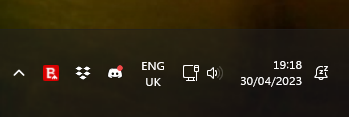


 thanks again. Maybe this post will help someone in the future lol