Exclude icons that are not in a fence from being hidden

Hi,

I hope that developers enable a feature called "Exclude icons that are not in a fence from being hidden". 
I do not wish to have all my desktop icons inside of fences, since I download stuff onto my desktop, I just want to use the quick hide functionality with fences from Stardock Fences, not with regular icons. 

I thought of this as the whole purpose of me using this software.

Can this be done? Can Stardock implement this feature?

Thanks

5,281 views 9 replies
Reply #1 Top

Hello,
Sorry to hear you are having issues. Have you tried this setting. Right click on your desktop icon individually and set it not to hide.

Note: in Windows 11, need to right click on icon-> Show more option->"Exclude this icon from Fences...."

Thank you.
Basj,
Stardock Community Assistant.

Reply #2 Top

Hi, what I want is that behaviour to be happening as default, I don't want to have to do what you suggest evertime that I download something or move something to the desktop, which is very often.

I want non-Fence icons to behave as not Fence, I do not want to hide them or have to tell them to not be hidden.

Couldn't you, for the money the software costs, create "Exclude icons that are not in a fence from being hidden"??

Regards

Reply #4 Top

You could create a new Fence and call it My Desktop, or what ever you like, and then create a new rule that places all new icons to the desktop go to the Fence you created.


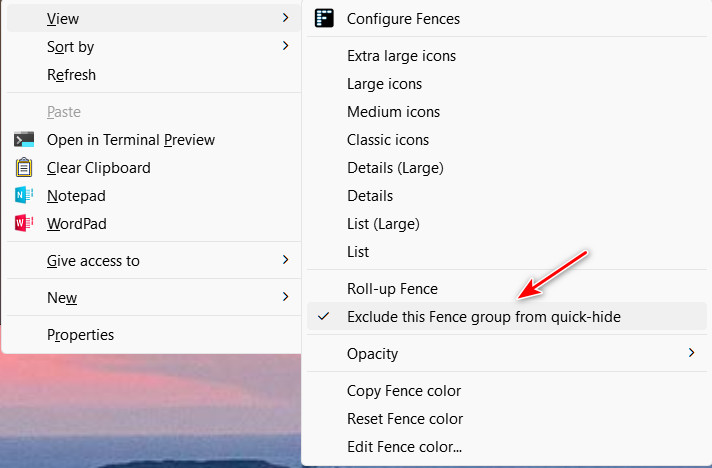
Now right-click that Fence and "Exclude this Fence group from quick-hide."

Reply #5 Top

Not what I'm looking for. I don't want regular icons, or icons I wish to use, to be in any fence at all, I want normal Windows behaviour for those icons, and I want to hide icons in fences with double click. I'd like a functionality called "Exclude icons that are not in a fence from being hidden".
Would that be hard to implement? Can that be implemented? Can you pass to the developers team? Is it possible?

Regards

Reply #6 Top

It seems that what is happening when you use Quick-hide, Fences is toggling "Show desktop icons" in the context menu. So, it looks like Fences are treated as icon elements on the desktop to the OS. That is most likely why you have to exclude the individual desktop icons (or Fences) from Quick-hide on a one by one basis.

Reply #7 Top

Hello,
I have forwarded your request to the Stardock Support Team for their review and recommendations. Please keep an eye on this thread for any updates. We really do appreciate your feedback, Thanks

Basj,
Stardock Community Assistant.

Reply #8 Top

Like you mention, Quick-hide is toggling "Show desktop icons", and the desired functionality is for Fences to "toggle Fences icons", at least to have the option to "Exclude icons that are not in a fence from being hidden".

Regards

Reply #9 Top

Thank you. Like pelaird says, right now Quick-hide's functionality is that of Windows, toggling "Show desktop icons".

The desired new functionality would be "Exclude icons that are not in a fence from being hidden", and it would consist on toggling opacity, from 0% to the previous opacity only on Fences icons, or maybe completely hiding them, as 0% opacity changes when hovering over.

Hopefully developers can find a workaround. 

Thanks