Abisnabidam Abisnabidam

DeskScapes 2026 Release Feedback Thread

DeskScapes 2026 Release Feedback Thread

Obtaining the product

Object Desktop members can get the release from within Object Desktop Manager 

Individual purchases (as well as Object Desktop Members) can also be obtained from your account page: https://store.stardock.com/myaccount/products

For guest check-out purchase (no account), from this link: http://www.stardock.com/support/productkeyretrieval

Reporting an issue

Please include the following for anything found:

  • Exact Windows version \ build (winver.exe)

  • Detailed steps to recreate the issue seen

  • Screenshots and videos are very helpful.  Videos can be uploaded to a cloud drive service (GoogleDrive, DropBox, OneDrive, YouTube), with a shared link included in your post.  Images can be copied and pasted directly into a post.

  • If there are specific apps that the app does not work (well) with, please note what apps and their exact versions.  If any app is not common, a link to a trial version would be appreciated.

Thank you for your interest and any time you put into making DeskScapes 2026 a better product.


1,020 views 95 replies | Pinned
Reply #26 Top
Quoting Neil, reply 3993451

Quoting PhoenixRising1,

reply 3993448

Which card is connected to your display?  It should be detecting whatever your primary monitor is attached to.

End of Neil's quote

It is a laptop so the card doesn't always run unless I enable the mux switch, which I prefer not to do to save on power.

Reply #27 Top
Quoting PhoenixRising1, reply 3993454

Quoting Neil,

reply 3993451

Quoting PhoenixRising1,

reply 3993448

Which card is connected to your display?  It should be detecting whatever your primary monitor is attached to.

It is a laptop so the card doesn't always run unless I enable the mux switch, which I prefer not to do to save on power.

End of PhoenixRising1's quote

Can you tell it to use the Nvidia GPU for DeskScapesConfig.exe and sd-cli.exe?

Reply #28 Top
Quoting spectrum79048, reply 3993440

Help


I'm having problems as well.  It's the same problem another user has reported on a different thread of this support page. I have been using Deskscapes in its various incarnations for over 10 years, so I'm not a rookie.


Deskscapes 2026 dated 05/21/2026 doesn't work with my Windows 11 version 25H2 (OS Build 262200.8457).


I installed Deskscapes 2026 today over a working Deskscapes 11 install. The application will run, but it won't install "any" backgrounds. I used the purge bat file and rebooted. I then reinstalled Deskscapes 2026 and rebooted. It still doesn't work.


It doesn't affect me using my computer while waiting for a fix/version upgrade, but it's irritating. I like my new shinney things to work without issues or work-a-rounds.

End of spectrum79048's quote

I believe you need to install this update   https://www.microsoft.com/en-US/download/details.aspx?id=35&msockid=1a6387e185a769b933699188848068b7 

+1 Loading…
Reply #29 Top
Quoting WindowzWallz, reply 3993444

DeskScapes 2026 just shows a black screen on both of my monitors. What other updates do I need to make to make this work? I was running both static and animated wallpapers on DeskScapes prior to this update without issue. Running Windows 11 version 25H2. Also running Start11 v2 and Fences 6.

End of WindowzWallz's quote

Did you restart your computer after the install? Even if you did, try restarting again.

Reply #30 Top
Quoting Neil, reply 3993456

Can you tell it to use the Nvidia GPU for DeskScapesConfig.exe and sd-cli.exe?

End of Neil's quote

Thanks, I was able to get it to work adding those.

Flux is still grayed out. I kind of would like an advanced feature somewhere that let's me over ride that at my own risk. Kind of like what LM Studio does

Reply #31 Top

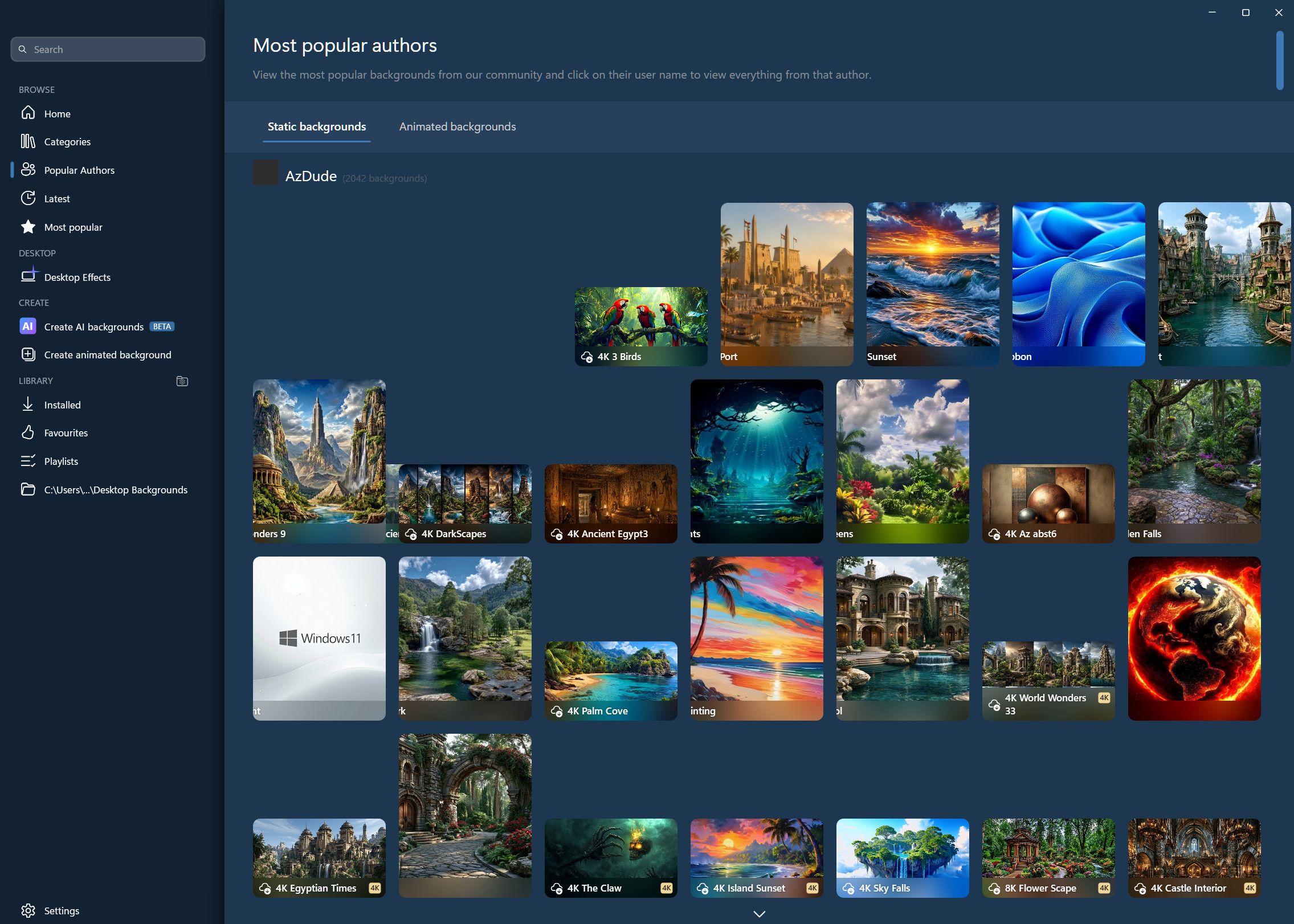
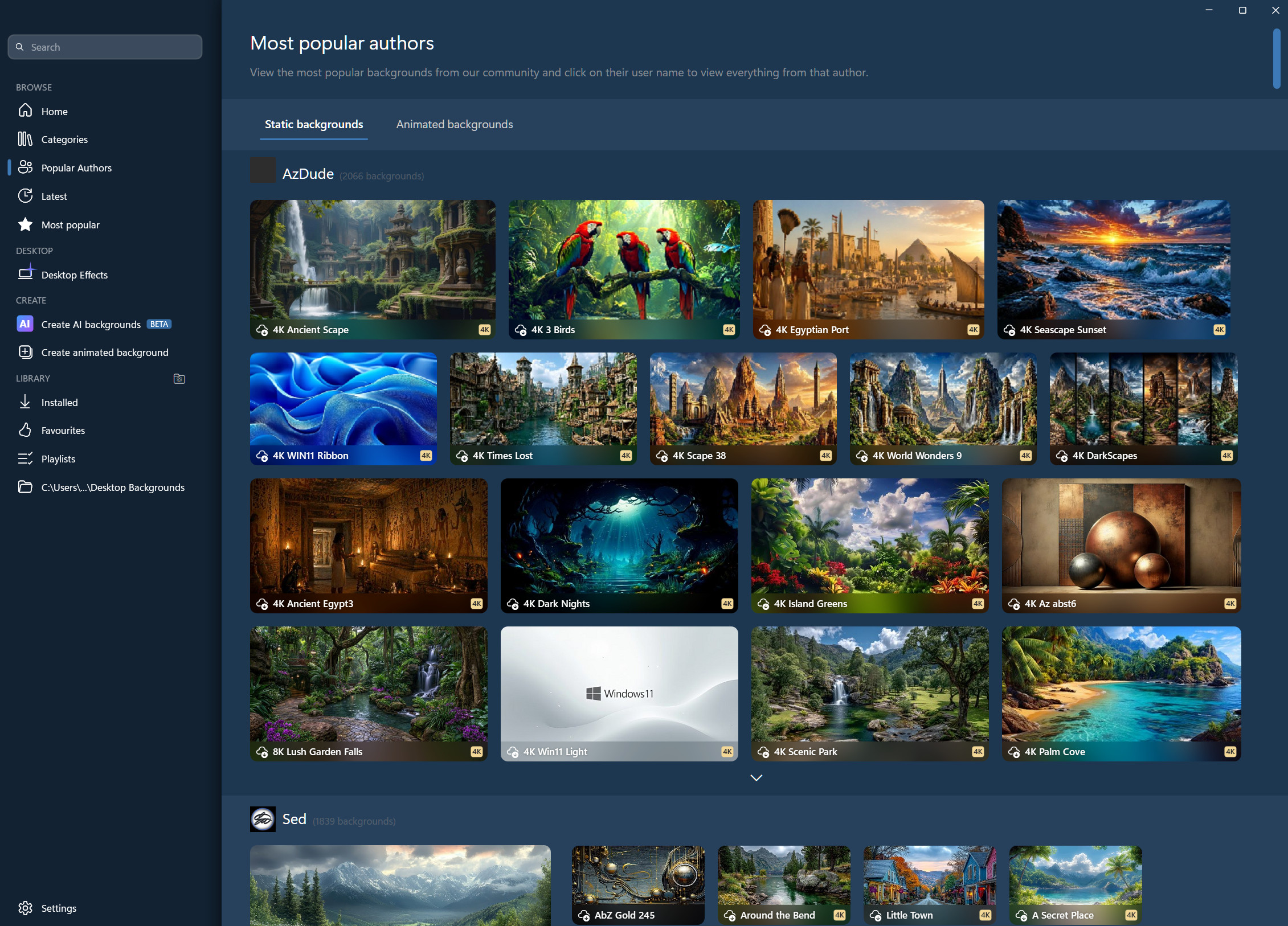
There appear to be some UI display issues. I have experienced random flickering on different categories, and frame irregularities with images. (Thumbnails set to Large, always show label)

First attempt at clicking on Popular Authors - Static backgrounds

After clicking on another category and then back to Popular Authors - Static backgrounds

Reply #32 Top

Dear all,

could you kindly spread a list of placeholders used for adjusting the info pane details?

1. E. g. >Desktop Effects >Info Pane: there is a small help window below the time format window but no complete list of what %Y, %y, %A etc .does and what it can be used for. I tried a few things but this ids far from complete.

2. E. g. >Desktop Effects >Info Pane: What are the names of the time zones Deskscapes is using? The example given in the help window "Pacific Standard Time" does not work,. i. e. same time is displayed as without that info.

3. There is an option to change the font. At the moment I have to enter the font name manually. A drop-down list would be great!

4. There is an option to add a pre- and a post string. Unfortnately I cannot add a leading or trailing space. These are ignored. Possible to fix in future version?

Thanks, Steffen

Reply #33 Top

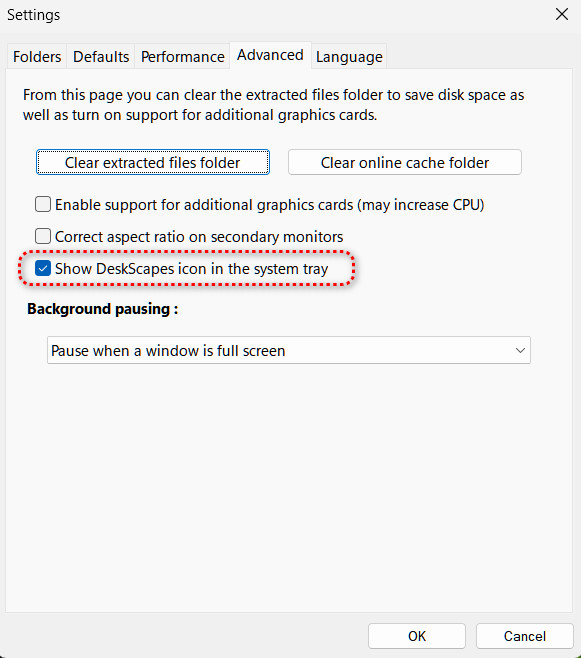
It appears that the Advanced Setting to "Show DeskScapes icon in the system tray" does not survive a restart of the computer.

After the restart, I had to enter Advanced Settings; uncheck "Show DeskScapes icon in the system tray" and click Okay; then check it again and click okay. It then appeared in the System Tray again.

Reply #34 Top

Hi All,

I've had quite the adventure trying DS 2026.
With the help of CoPilot AI, I have this report to offer both users and devs. Enjoy.
-----------------------------------------------------------------------------------------

DeskScapes 2026 – Static Wallpaper Rendering Failure on Windows 11 Insider GE (Technical Report + Developer Addendum)

User Environment: Windows 11 Pro • Version 25H2 OS Build 26200.8514 (Insider GE branch) Windows Feature Experience Pack 1000.26100.311.0 Static wallpapers only — no animated content.
AMD Ryzen 5 5600X 6 - Core CPU
AMD RX 6700 XT GPU w/Driver Version 26.5.2 (latest)

Overview of the Issue

After installing DeskScapes 2026 over DeskScapes 11.02, the desktop failed to display static wallpapers from a playlist. Instead of the selected image, the desktop showed:

  • a muted black screen,

  • with faint, hazy shapes visible on the right third of the monitor.

This indicates that DS2026 was attempting to render a desktop surface, but the rendering pipeline never fully initialized.

No animated wallpapers were used at any point — only static images sized to the display.

Symptoms Observed

  • Desktop background becomes a “dirty black” instead of the selected wallpaper

  • Faint shapes or colour smears appear on part of the screen

  • No error messages

  • DS2026 UI loads normally

  • Wallpaper playlist attempts to advance, but nothing displays

  • Rebooting does not resolve the issue

  • Reinstalling DS2026 does not resolve the issue

This behaviour suggests a partial GPU surface initialization failure, not a total crash.

Technical Interpretation

DeskScapes 2026 uses a newer rendering pipeline compared to DS11.02. On Windows Insider GE build 26200.8514, this pipeline appears to fail during:

  • DirectX surface creation

  • Swapchain binding

  • Desktop compositor (DWM) acceptance

  • Explorer hook initialization

The faint shapes on the right side of the screen are consistent with uninitialized GPU memory being composited, meaning DS2026 did create a surface, but it never completed rendering the static wallpaper.

DeskScapes 11.02 uses an older, more compatible rendering path and does not exhibit this issue.

Cleanup Steps Performed

To ensure no corrupted components remained, a full purge was done:

1. Revo Uninstaller (Advanced Mode)

Removed DS2026 and all detected registry/file remnants.

2. DSPurge.bat in Safe Mode (Admin)

Confirmed no DS files remained.

3. DSPurge.bat again in normal Windows (Admin)

Double‑confirmed clean state.

4. Manual Verification via PowerShell (Admin)

Checked for and confirmed absence of:

  • DeskScapes processes

  • DeskScapes services

  • Autostart entries

  • Shell extensions

  • Program folders

  • DLLs or hooks in System32

System was verified 100% DeskScapes‑free.

Resolution

After reinstalling DeskScapes 11.02 (fresh download via Object Desktop):

  • Static wallpapers load instantly

  • No black screen

  • No rendering artifacts

  • Faster performance than before

  • No compositor or GPU issues

DeskScapes 11.02 works perfectly on this Insider GE build.

DeskScapes 2026 consistently fails to render static wallpapers on this configuration.

Conclusion

DeskScapes 2026 currently appears incompatible with:

  • Windows 11 Insider GE builds (26200.xxxx series)

  • The compositor/GPU initialization path used on this branch

  • Static wallpaper rendering (not just animated content)

A full purge and reinstall of DeskScapes 11.02 restores full functionality.

ADDENDUM FOR DEVELOPERS

(Technical details + reproduction guide)

Observed Rendering Behavior

The “black screen with faint shapes” strongly suggests:

  • Swapchain creation succeeded

  • Backbuffer was allocated

  • Shader pipeline or texture upload failed

  • DWM composited an uninitialized or partially initialized surface

  • No fallback path was triggered

This is consistent with:

  • DXGI_FORMAT mismatch

  • Failure to bind the primary surface

  • DComp visual tree rejection

  • Shader compilation failure on Insider GE

  • Hook injection timing mismatch with Explorer.exe

DS11.02 does not use the same rendering path and therefore avoids the issue entirely.

Reproduction Guide (Developer‑Focused)

Environment

  • Windows 11 Pro

  • Version 25H2

  • OS Build 26200.8514 (Insider GE)

  • Feature Experience Pack 1000.26100.311.0

  • GPU: AMD RX 6700 XT, AMD Driver Version 26.5.2 (latest)

  • Wallpaper type: Static images only

  • No animated content used at any point

Steps to Reproduce

  1. Install DeskScapes 11.02

  2. Apply any static wallpaper (1920×1080 or native resolution)

  3. Install DeskScapes 2026 over top

  4. Reboot

  5. Launch DeskScapes 2026

  6. Select any static wallpaper

  7. Observe desktop background

Expected Result

Static wallpaper displays normally.

Actual Result

  • Desktop becomes muted black

  • Right third of screen shows faint, hazy shapes (uninitialized GPU memory)

  • No wallpaper is rendered

  • No error messages

  • DS2026 UI remains functional

Additional Notes

  • Issue persists across reboots

  • Issue persists after reinstalling DS2026

  • Issue persists with a clean DS2026 install after full purge

  • DS11.02 works flawlessly on the same system

  • Issue appears tied to Insider GE compositor behaviour
    ----------------------------------------------------------------------------------------------------
    There you have it folks, Good Hunting.
    Cheers.

Reply #35 Top

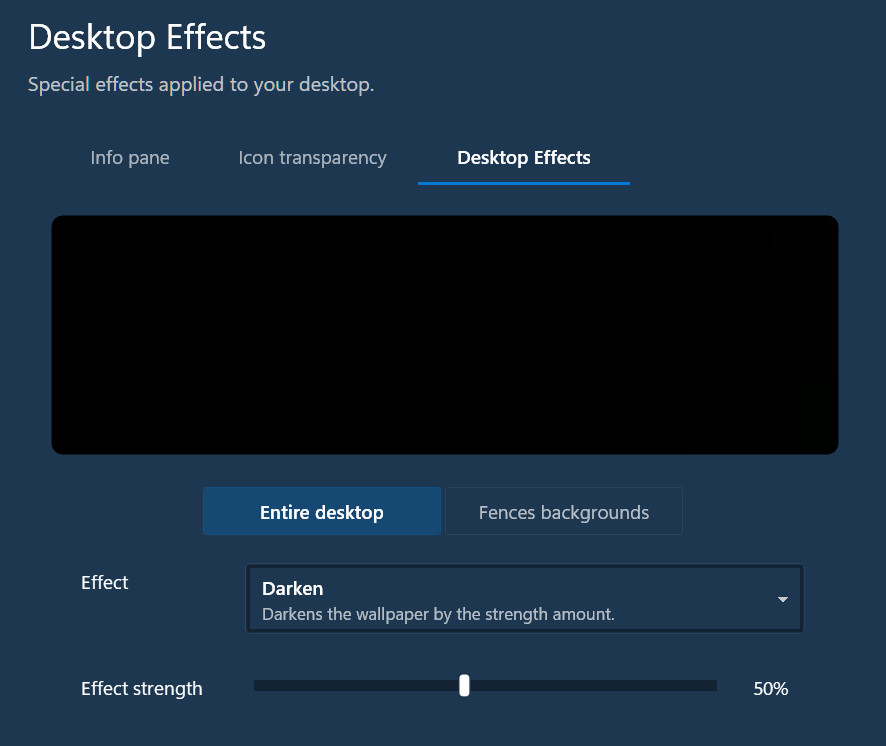
I could have sworn that the first time I used "Desktop Effects," that the current desktop background appeared in the space above the settings. Now it just displays a black rectangle.

Am I mistaken, and this is the expected behavior?

Reply #37 Top
Quoting pelaird, reply 3993495

I could have sworn that the first time I used "Desktop Effects," that the current desktop background appeared in the space above the settings. Now it just displays a black rectangle.


Am I mistaken, and this is the expected behavior?

End of pelaird's quote

If it shows black then your OS wallpaper is black

Reply #38 Top
Quoting Neil, reply 3993500

Quoting pelaird,

reply 3993495

I could have sworn that the first time I used "Desktop Effects," that the current desktop background appeared in the space above the settings. Now it just displays a black rectangle.

Am I mistaken, and this is the expected behavior?

If it shows black then your OS wallpaper is black

End of Neil's quote

I had originally installed 2026 over 11, so I ended up purging and reinstalling. I applied a background in the Windows setting, and then opened DeskScapes and applied a background. Now the Desktop Effects show the current background correctly.

Also, everything else seems to be running smoother.

Thanks

Reply #39 Top

Hi All - There is an updated build of DeskScapes 2026 now available and it can be downloaded here.

  • Includes addition .dll to resolve installation/startup issues.
  • Image improvement generation on 8gb cards 
  • Resolves AI rescaling inconsistencies with older CPUs.


+1 Loading…
Reply #40 Top

Is there a Change Log  somewhere that can be reviewed?

Thanks, Cheers.

Reply #41 Top

For some reason, I intermittently get a totally black background, and DeskScapes won't apply any installed Background. I'm not sure what causes this, but I will try to figure that out. When this happens, usually some interaction with Windows, like a right-click on the desktop to open the context menu, then the background gets applied.

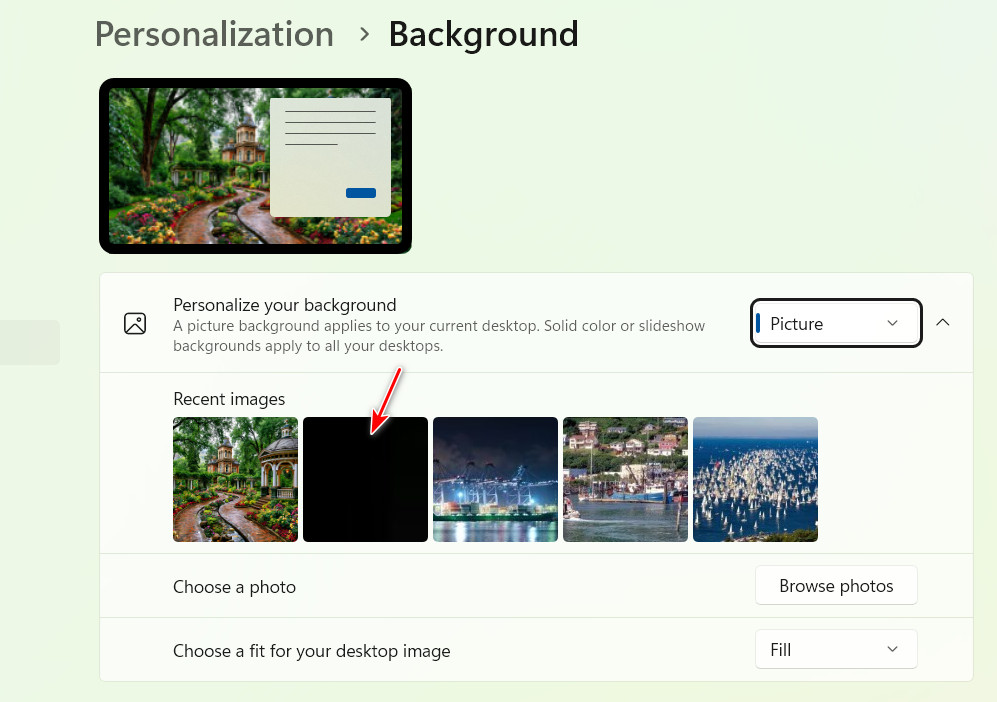
If I open the Windows setting for Personalization >  Background, I see a black background has been added, presumably by some interaction with DeskScapes. When I get a totally black background, and DeskScapes won't apply any installed Background, the black background is the first image in the "Personalize you background" Recent images.

Windows 11 Pro 26200.8457; DeskScapes 26.0.0.1

Reply #42 Top

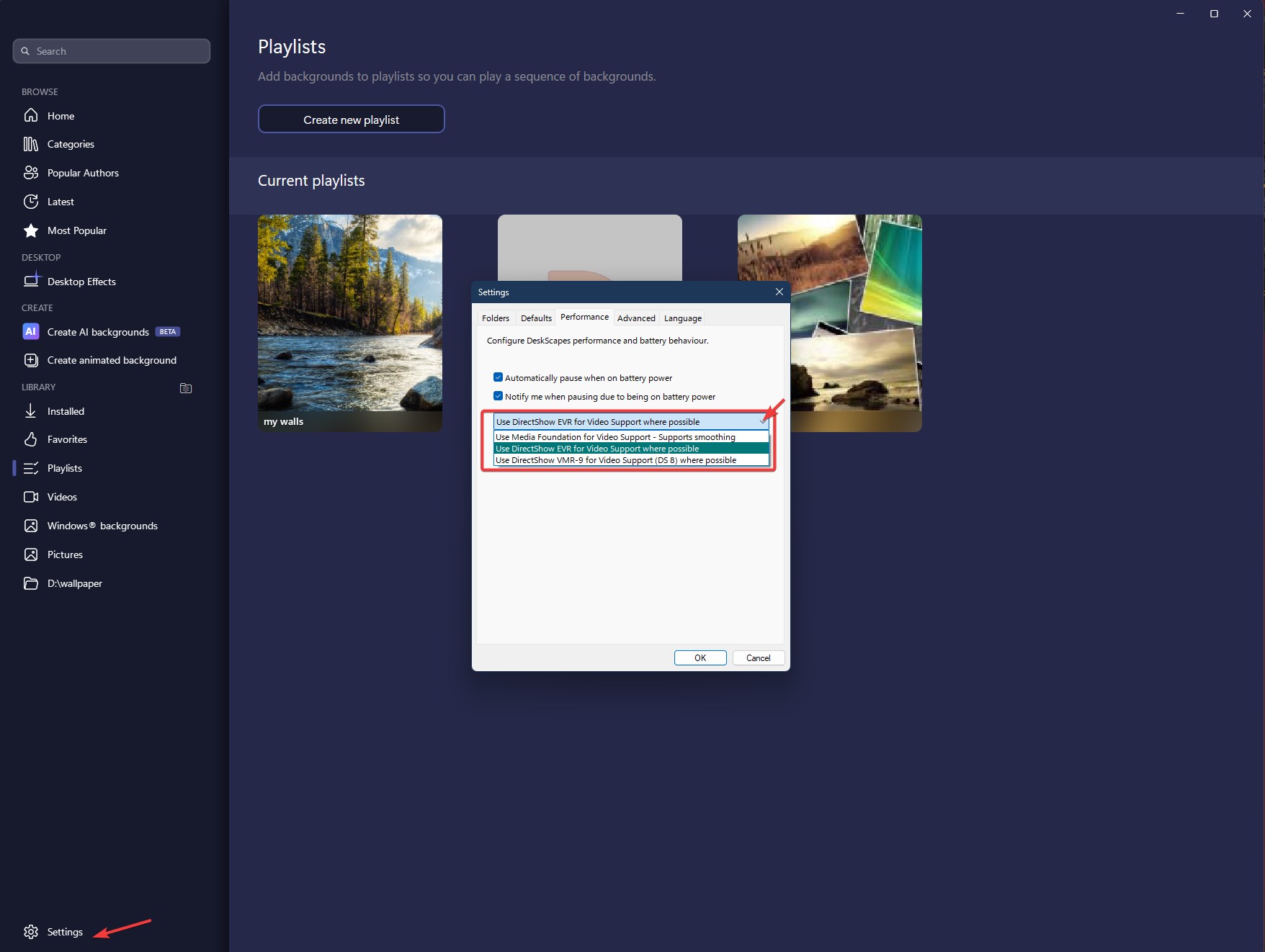
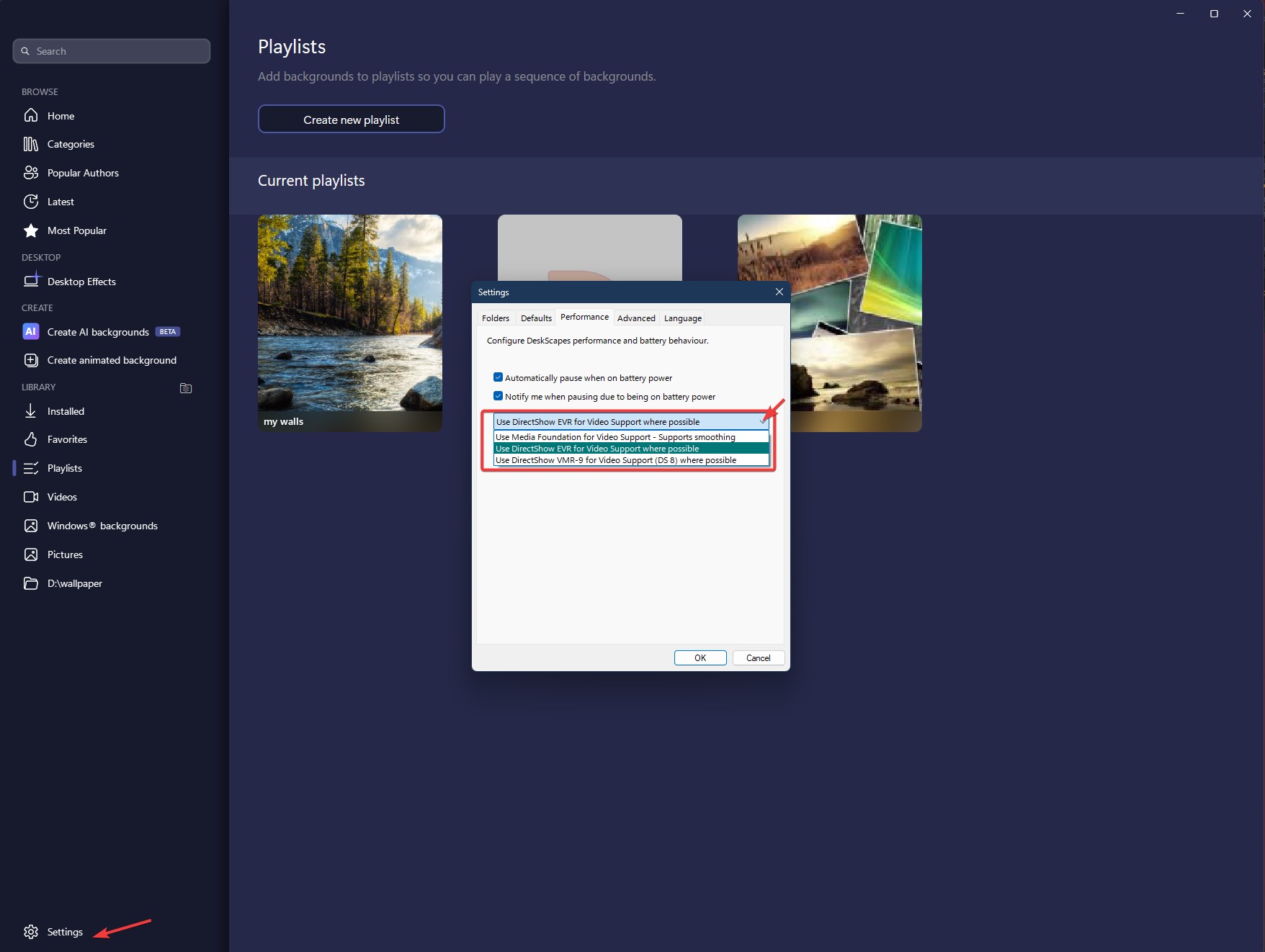
I also get the black background issue. And, from what I found out, I changed my performance setting to "Media Foundation for Video Support" for it to work on my system.

Thank you,

Basj,

Stardock Community  Assistant

Reply #43 Top
Quoting basj, reply 3993532

I also get the black background issue. And, from what I found out, I changed my performance setting to "Media Foundation for Video Support" for it to work on my system.

End of basj's quote

I'm only using Static backgrounds when this happens.

Reply #44 Top
Quoting pelaird, reply 3993533

I'm only using Static backgrounds when this happens

End of pelaird's quote

So am I, so I really not sure why it resolved black wallpaper on my end.

Thank you,

Basj,

Stardock Community  Assistant

Reply #45 Top
Quoting basj, reply 3993534

So am I, so I really not sure why it resolved black wallpaper on my end.

End of basj's quote

I'll give it try.

Thanks

Reply #46 Top
Quoting bdsams, reply 3993503

Hi All - There is an updated build of DeskScapes 2026 now available and it can be downloaded here.

End of bdsams's quote

Should Deskscapes11 be uninstalled or purged prior to Deskscapes2026? Should the new version of Deskscapes2026 simply be installed over the prior one or should the prior one be uninstalled/purged prior to installing the newer one?

Reply #47 Top
Quoting pdenomy, reply 3993505

Is there a Change Log  somewhere that can be reviewed?


Thanks, Cheers.

End of pdenomy's quote

I would suspect this addresses the dxwebsetup.exe libraries issue that was present in the original release.

Reply #48 Top
Quoting dcomo1, reply 3993547

Quoting pdenomy,

reply 3993505

Is there a Change Log  somewhere that can be reviewed?


Thanks, Cheers.

I would suspect this addresses the dxwebsetup.exe libraries issue that was present in the original release.

End of dcomo1's quote

Updated my initial post with a couple of the items that are fixed.

Reply #49 Top

Deskscapes 2026 fails to function at all for me. The animated wallpaper I was using with Deskscapes 11 became a still image with Deskscapes 2026. When I tried multiple times to change to a different wallpaper, I only got a black screen. Rebooting the computer or uninstalling both versions and reinstalling Deskscapes 2026 (with a reboot) didn't change anything. Nor did following advice from a forum member to try the purge and reinstall steps mentioned here: [https://support.stardock.com/space/SHC/1346764874/DeskScapes+purging+and+re-installing].


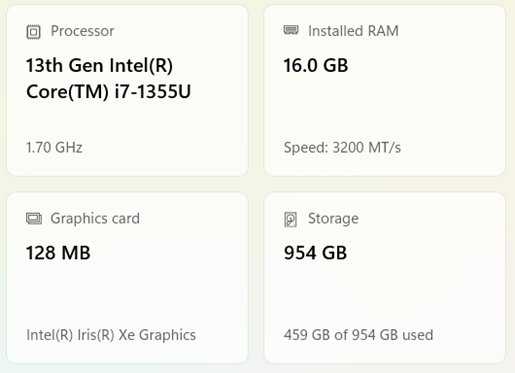
I am using Windows 11 Home, Build: 26200.8457 on a laptop with the following specs:


I would appreciate whatever guidance can help with this issue.

Reply #50 Top
Quoting growe12, reply 3993563

Deskscapes 2026 fails to function at all for me. The animated wallpaper I was using with Deskscapes 11 became a still image with Deskscapes 2026. When I tried multiple times to change to a different wallpaper, I only got a black screen. Rebooting the computer or uninstalling both versions and reinstalling Deskscapes 2026 (with a reboot) didn't change anything. Nor did following advice from a forum member to try the purge and reinstall steps mentioned here: [https://support.stardock.com/space/SHC/1346764874/DeskScapes+purging+and+re-installing].

I am using Windows 11 Home, Build: 26200.8457 on a laptop with the following specs:

I would appreciate whatever guidance can help with this issue.

End of growe12's quote

Hello,

Sorry to hear you are having issues. Please try changing these 3 option and see if any one of those solve your issue. Try it and report back.

Thank you,

Basj,

Stardock Community  Assistant.