Taskbar on multiple monitors, vertical setup - cant click on icons on the bottom of taskbar

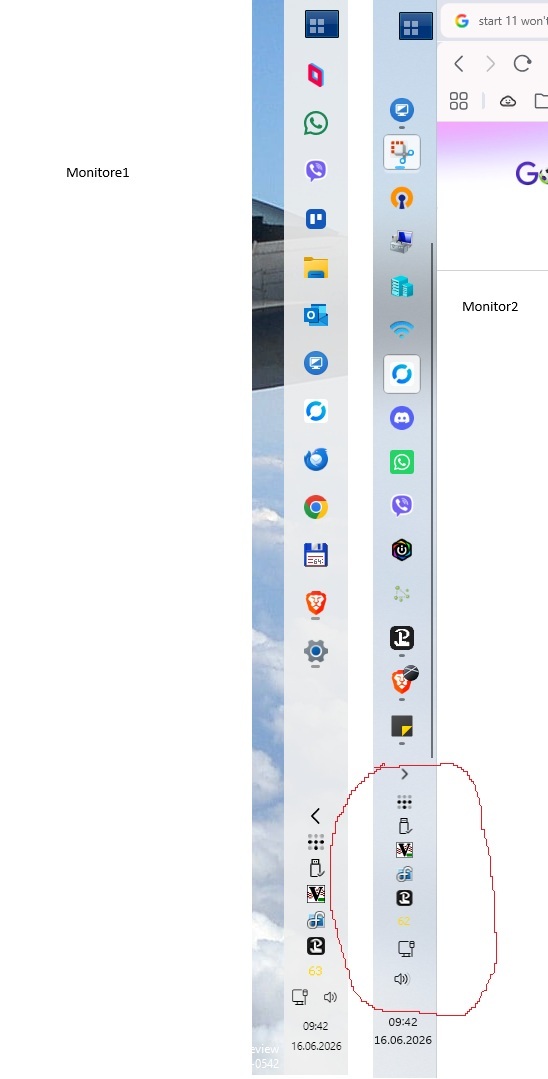
On the picture below, the right one is my main monitor in 2 screen setup, with vertical taskbars enabled. On the right one, i cant click on any buttons in red circle, when i click it doesn't register...If i click on left monitor everything works..
1,407 views 4 replies
Reply #1 Top

Hello,

Sorry to hear you are having issues. Just to be clear, you have both of your taskbar, on primary and secondary monitor, to have taskbar tray area to appear on both at the same time? How do you manage to do that?

Thank you,

Basj,

Stardock Community  Assistant.

Reply #2 Top

I am using also display fusion program and have taskbars enabled across all monitors..If i switch main monitor to bottom positioned taskbar, it works again..

Reply #3 Top

As a test, if you disable DisplayFusion and only have "taskbar tray" on your primary monitor. With vertical taskbar, does the issue disappear?

Thank you,

Basj,

Stardock Community  Assistant

Reply #4 Top

Hello,

We've put together a build you can try, which includes a fix to address this issue.  You can download and update from the link on this thread:

https://forums.stardock.com/541828/start-11-tray-icons-non-responsive#3994836

Please remember to reboot the PC after installing the update.  We encourage you to follow up with feedback on this on the above thread.

Best regards,

Adam McGuinness
Stardock Support Specialist