Pinned taskbar shortcuts control crash

I've activated the Enhanced taskbar and pinned folders and app.

When I go to the "Configure enhanced taskbar/Pinned taskbar shortcuts control", the app window is closing immediately.

Start11 V2.71

Edition    Windows 11 Pro
Version    25H2
OS build    26200.8655
Experience    Windows Feature Experience Pack 1000.26100.315.0

51 views 3 replies
Reply #1 Top

Seems it's linked to the pin folder of my NAS.

I map \\Diskstation as the folder, and I've this strange target :

"C:\Program Files (x86)\Stardock\Start11\PinLaunch.exe" "@FAAfWA0aLPAhvlBDiLBzZ/yW7zy3AAAAsQC7r5M7owAEAAAAAAAtAAAAMVNQU3ND
5Qq+Q61PheRp3IYzmG4RAAAACwAAAAALAAAA//8AAAAAAABFAAAAMVNQUzDxJbfv
RxoQpfECYIye66wpAAAACgAAAAAfAAAADAAAAEQAaQBzAGsAcwB0AGEAdABpAG8A
bgAAAAAAAAAtAAAAMVNQUzqkvd6zN4NDkedEmNoplasRAAAAAwAAAAATAAAAAAAA
AAAAAAAAAAAAAAA="

The folder open well, but I'm unable to change the icon as there's no Properties, and if I force icon change under C:\Users\User\AppData\Roaming\Stardock\Start11_Pins it doesn't change it either.
The menu "Pinned taskbar shortcuts control" doesn't hang if I remove this pin.
Reply #2 Top

Hello,

Sorry to hear you are having issues. I have forwarded your problem/question to Stardock Support Team for their assistance. Please keep an eye on this thread for any updates. We appreciate your feedback and patience. Thank you.

Basj,

Stardock Community  Assistant

+1 Loading…
Reply #3 Top

Thanks !

Been able to change the icon here : 

C:\Users\User\AppData\Roaming\Microsoft\Internet Explorer\Quick Launch\User Pinned\TaskBar

But don't understand why also files (.ink, .ink) here (changing icon here as no effect) :

C:\Users\User\AppData\Roaming\Stardock\Start11_Pins


On Regedit, under : Computer\HKEY_USERS\...\Software\Stardock\Start8\Start8.ini\Start8\TaskbarAppIDCache

I changer the key value from :

"@FAAfWA0aLPAhvlBDiLBzZ/yW7zy3AAAAsQC7r5M7owAEAAAAAAAtAAAAMVNQU3ND
5Qq+Q61PheRp3IYzmG4RAAAACwAAAAALAAAA//8AAAAAAABFAAAAMVNQUzDxJbfv
RxoQpfECYIye66wpAAAACgAAAAAfAAAADAAAAEQAaQBzAGsAcwB0AGEAdABpAG8A
bgAAAAAAAAAtAAAAMVNQUzqkvd6zN4NDkedEmNoplasRAAAAAwAAAAATAAAAAAAA
AAAAAAAAAAAAAAA="

To :  Microsoft.AutoGenerated.{5B4C4CCC-6731-9577-B0AB-C2A4B52FCDD4}

And now the target is fine :
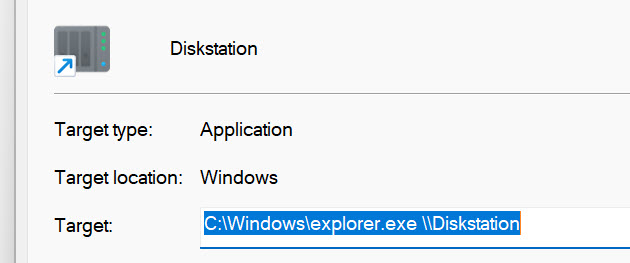
And more important, the "Pinned taskbar shortcuts control" doesn't hang anymore.

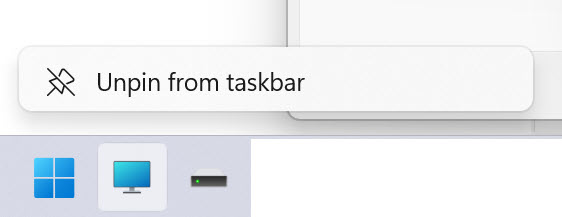
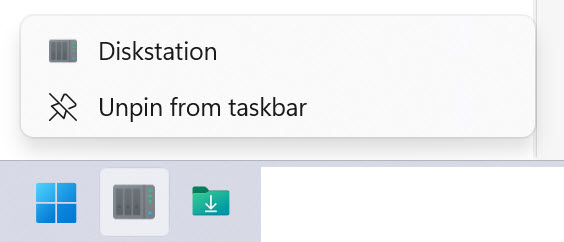
And I also have the possibility to open properties that was missing until now.

Before :
Now :
So something to fix when we link network devices.
