New Group Icon Size

Hello,

I am using Start11 (currently version 2.72) on Windows 11 25H2. The Start menu setting is Windows 10 style.

When I had created and organized groups, but when I try to create a new group, then put a shortcut inside it (new or dragging an existing one), the icon shrinks. No matter what setting I tried, the new group won't display the icons bigger.


Am I missing something? How can I keep the icon sizes in new groups?

71 views 4 replies
Reply #1 Top

Hello,

Sorry to hear you are having issues. Unfortunately, I can't view the video you post. Perhaps upload to some video sharing site such as youtube , make it public,, and post its link here.. Also, need your Windows 11 25H2 OS Build number. Use Winver.exe.

Thank you,

Basj,

Stardock Community  Assistant.

Reply #2 Top

Hello,

The video can be viewed here:


Winver says the build number is Version 25H2 (OS Build 26200.8737).

Although this case never changed for a long time across Windows build numbers and Start 11 versions.

Thanks in advance!


Reply #3 Top

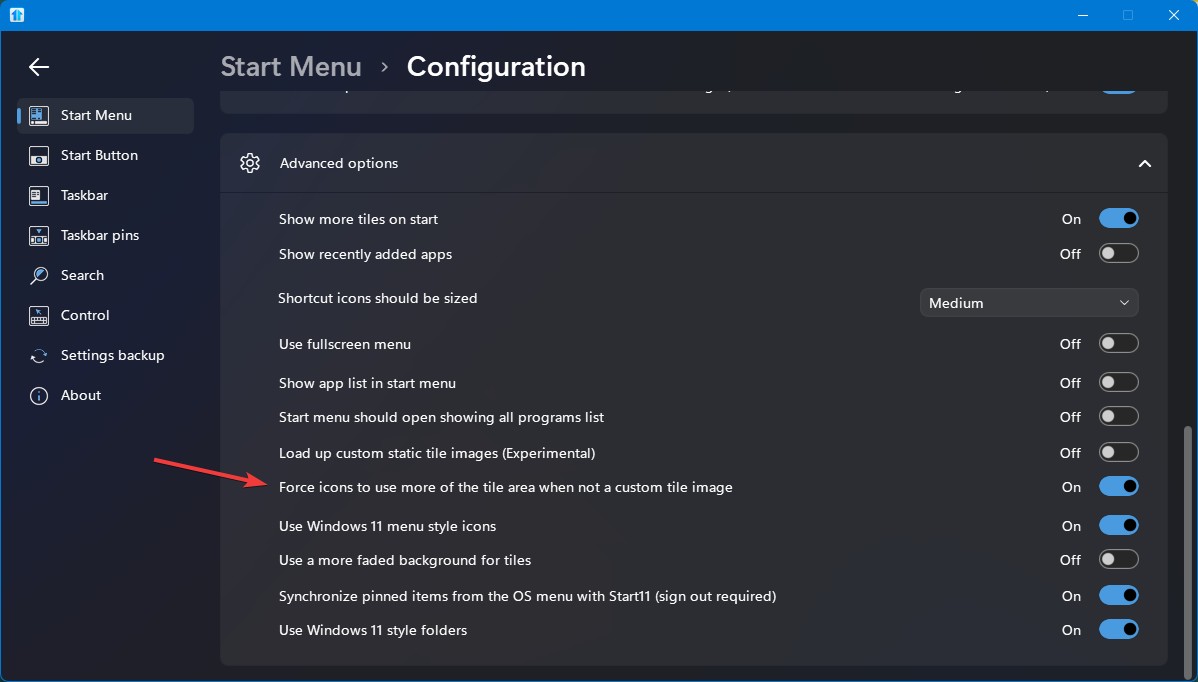
Please check if you have this option turn on.

And once you have, move a tile to a new group. Make sure to restart Explorer.exe after that and the icons in the new group should grow.

Thank you,

Basj,

Stardock Community  Assistant

Reply #4 Top

Thank you for the solution!

That option was already on. An explorer.exe restart is needed to restore the icon size after moving it to a new group, as you said. It works now, but it's a bit confusing for the user if you don't know this :)