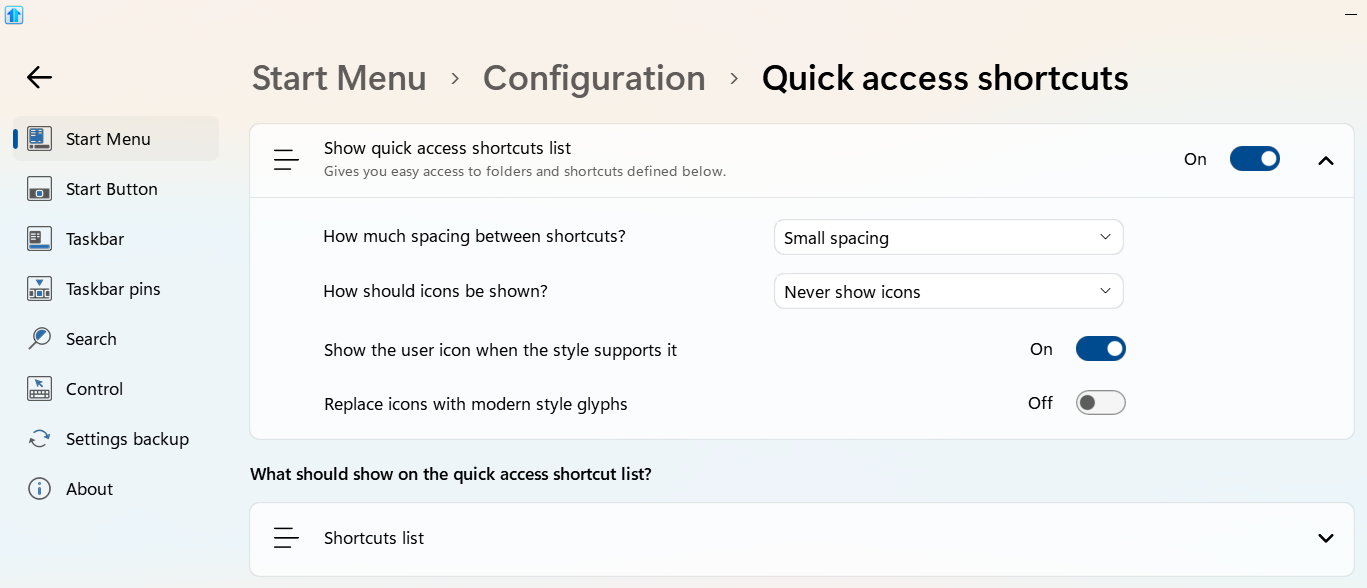
Quick Access Shortcuts > Always Show Icons

What's the Point?

Maybe I'm missing something, but what's the point of having the option of "Always Show Icons" under

Start Menu > Configuration > Quick access side shortcuts

When this is overridden by the dropdown options in "How should icons be shown?" right above it?

  • Never show icons
  • Always show icons
  • Only show icons
  • Align bottom and only show icons


570 views 8 replies
Reply #1 Top

Hello,

Sorry to hear you are having issues. It is best if you mentioned which Start11 Start menu style you're referring to?

Thank you.

Basj,

Stardock Community  Assistant.

Reply #3 Top

This is what I see. I don't see an option "Always show icons" other than the drop down list.

Reply #4 Top

If you are referring to "Show the user icon when the style supports it" vs "How should icons be shown?". "Show the user icon..." is for your "avatar" to show up or not. Its two different things.

Unless, your pointing at totally different area. Post a screenshot with some arrow might help us understand your question better.

Thank you,

Basj,

Stardock Community  Assistant

Reply #5 Top

Wow. I swear that I had a checkbox that said that before. If I see it again, I'll be sure to take a screenshot!

But of interest, my menu style is "Windows 7 with Icons", which always shows the icons for the Quick Access Shortcuts, also rendering the options in that dropdown irrelevant.

Reply #6 Top

Glad you figured that out. We were very confused. 😄

Reply #7 Top

As was I.

But can we agree that the dropdown doesn't make sense for the "Windows 7 with icons" menu style?