


Start 11 Taskbar Pins not appearing on taskbar
from  Stardock Forums
Stardock Forums
The Pin File, Pin Folder & Pin Folder menu do not create a link on the Start 11 2.73 enhanced taskbar. All are selectable, all give a message of 'are you sure you want to pin this" but no file or folder appears. So far I've
- checked 'let Start 11 enhance taskbar' is on
- restarted Explorer
- checked for updates
- rebooted
- changed start menu type (currently is 'modern')
- tried filtered folders (they appear in list on configuration app but not taskbar)
Environment
- Windows 11 25H2
- Start11 v2.73
- Single monitor
Observations
- Pin File and Pin Folder create shortcuts successfully.
-
Shortcuts are created in:
%APPDATA%\Roaming\Stardock\Start11_Pins 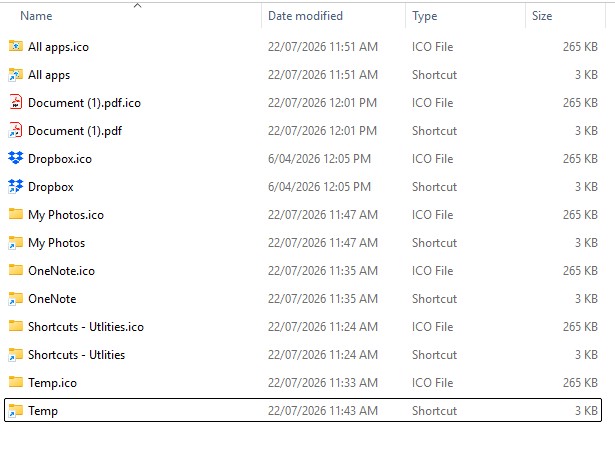
- The shortcuts launch correctly from Explorer.
- Deleting
Start11_Pinscauses Start11 to recreate it automatically. - No errors appear in
SasLog.txt. - The pinned items never appear on the taskbar/Enhanced Toolbar.
