Fall Guys unplayable 6 FPS since last Easy Anti Cheat EAC Update
WindowBlinds 10 Global Hook (wbload2.dll) causes infinite loop with Easy Anti-Cheat (Fall Guys)
 Stardock Forums
BUG / MASSIVE FPS DROP: WindowBlinds 10 Global Hook (wbload2.dll) causes infinite loop with Easy Anti-Cheat (Fall Guys):
Dear Stardock and Easy Anti-Cheat Development Teams,
I am writing to report a severe, reproducible technical conflict between WindowBlinds 10 and the recent Easy Anti-Cheat (EAC) update in Fall Guys. This conflict completely ruins the game's performance and cannot be resolved by standard user workarounds.
System Context:
-
OS: Windows 10
-
CPU / GPU: Intel i7-12700K / NVIDIA RTX 4080 Super
-
Target Performance: 110 FPS (capped via RTSS for OLED 120Hz setup)
The Core Problem: Since the latest EAC update, Fall Guys drops from a stable 110 FPS down to unplayable 6-15 FPS. Using Sysinternals Process Monitor (ProcMon), I traced the issue directly to the injection behavior of wbload.dll and wbload2.dll.
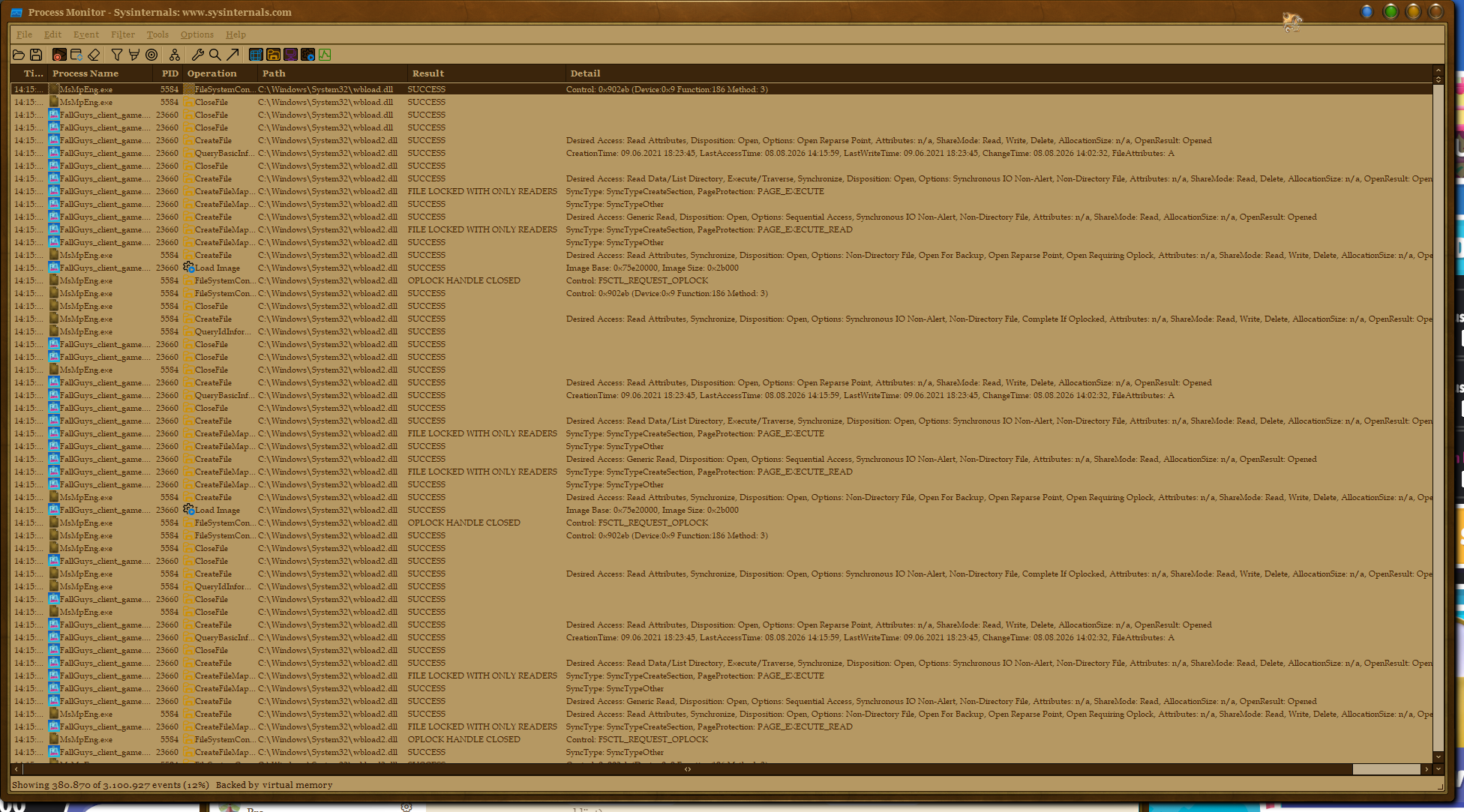
Scenario 1: Default State (Massive Interrupt Loop -> 6-15 FPS) WindowBlinds sets a session-level global hook. When Fall Guys launches, the Windows Loader attempts to inject wbload2.dll into the FallGuys_client_game.exe process. EAC immediately blocks this injection. However, because the hook is mandated by the OS, Windows continuously retries the injection every few milliseconds. This creates an endless, aggressive loop of EAC blocks and Windows Defender (MsMpEng.exe) scans, maxing out CPU interrupts and destroying frametimes.
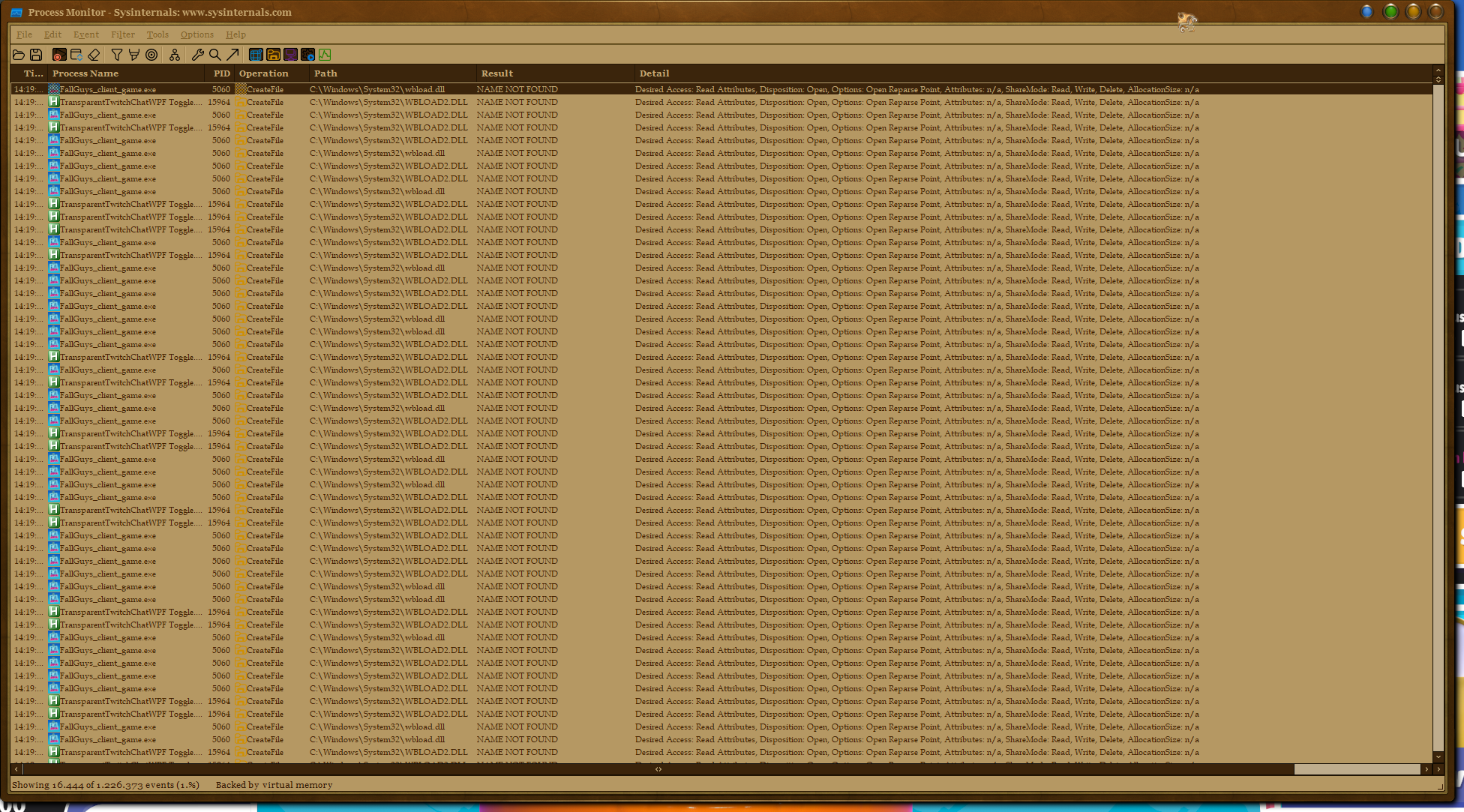
Scenario 2: Renaming the DLL (Overhead Loop -> ~60 FPS max) If I rename the DLLs to prevent the injection conflict entirely, ProcMon logs tens of thousands of NAME NOT FOUND errors generated by FallGuys_client_game.exe (and other WPF apps). The OS still forces every GUI process to look for the DLL because the global hook remains active in the session memory. The background CPU overhead of this constant error loop prevents the game from reaching 110 FPS, artificially capping it at around fluctuating 60 FPS.
Troubleshooting already performed (None of these work):
-
WindowBlinds Exclusion List: Fails. EAC blocks the DLL before the DLL can load far enough to read its own exclusion rules and unload itself.
-
Unloading WindowBlinds (Tray) & Stopping the Service: Fails. The global hook remains orphaned and active in protected system processes (ProcMon shows processes like
winlogon.exestill holding handles). -
Restarting Explorer.exe & DWM.exe: Fails. The hook is tied too deep into the Session 1 level.
-
Registry (AppInit_DLLs): Checked, it is empty.
-
Windows Exploit Protection (Disable extension points): Fails to prevent the OS from passing the session hook to the game executable.
The ONLY workaround right now: Completely logging out of Windows and logging back in with the WindowBlinds service disabled to destroy the session hook entirely. This is highly inconvenient for daily use.
Please forward this messag to the developers. My Request to the Developers:Is there a way to modernize the hook implementation so that selecting "Unload WindowBlinds" actually forces a complete flush of the hook from session memory (including protected processes like winlogon) without requiring a Windows re-login? Alternatively, is there a way to evaluate app exclusions before the OS attempts the injection into the target process? Or could you contact the Easy Anti Cheat developers and ask them if they could give you some sort signature for WindowBlinds that so that EAC would trust it?
Best regards!
🌌🦉