Abisnabidam Abisnabidam

AltTabby 0.70 Beta Release Feedback

AltTabby 0.70 Beta Release Feedback

With the AltTabby 0.70 open Beta release today, we are creating this thread so that users can report any observed issues.

Obtaining the product

Object Desktop members can get the release from within Object Desktop Manager 

Individual purchases (as well as Object Desktop Members) can also be obtained from your account page: https://store.stardock.com/myaccount/products

For guest check-out purchase (no account), from this link: http://www.stardock.com/support/productkeyretrieval

Reporting an issue

Please include the following for anything found:

  • Exact Windows version \ build (winver.exe)

  • Detailed steps to recreate the issue seen

  • Screenshots and videos are very helpful.  Videos can be uploaded to a cloud drive service (GoogleDrive, DropBox, OneDrive, YouTube), with a shared link included in your post.  Images can be copied and pasted directly into a post.

  • If there are specific apps that the app does not work (well) with, please note what apps and their exact versions.  If any app is not common, a link to a trial version would be appreciated.


Thank you for your interest and any time you put into making AltTabby a better product.

1,506 views 42 replies | Pinned
Reply #26 Top
Quoting bkmjhughes, reply 3997080

I have an issue with AltTabby, specifically with respect to grouping of Google Chrome tabs. In the settings I have turned off "group windows of the same app". However AltTabby is grouping some Google Chrome tabs but not other Google Chrome tabs. In the following screenshot, all Google Chrome Tabs are in the same browser window)

Screen shot of issue with AltTabby grouping Google Chrome tabs

 what's most irritating about this is that when I invoke AltTabby, the tabs that are grouped for Google Chrome are in a collapsed state with a triangle beside it, which I have to click to access the grouped tabs, adding friction to the workflow 

 your help would be appreciated.

Thanks

End of bkmjhughes's quote

Have you enabled the option to promote some recent tabs as top level windows?  If so those are promoted to top level so wouldn't be under the main window.  Tabs would be under the main window unless it is told to promote all.

That said if you are using it to switch tabs for a given app (so alt+` etc - or a custom hotkey), we are making a tweak so it doesn't group them at all in that situation.

For adjusting pinning for alt+`, just configure it as a custom hotkey, you can then pick if it is sticky or not.


Reply #27 Top

I think that I found the reason why some Chrome Tabs were promoted to top level windows and not other Chrome tabs. I had the "max recent tabs" set to 20 max. I changed this setting to "all" and now AltTabby is showing all Chrome tabs at the top level as I wanted.

Regarding the use of custom hotkeys, what I am looking for is one specific configuration that will allow me to switch back and forth between the current Chrome tab window and another chrome tab window without AltTabby being sticky. However, I don't know how to configure this. Your help would be appreciated.

Thanks 


Reply #28 Top

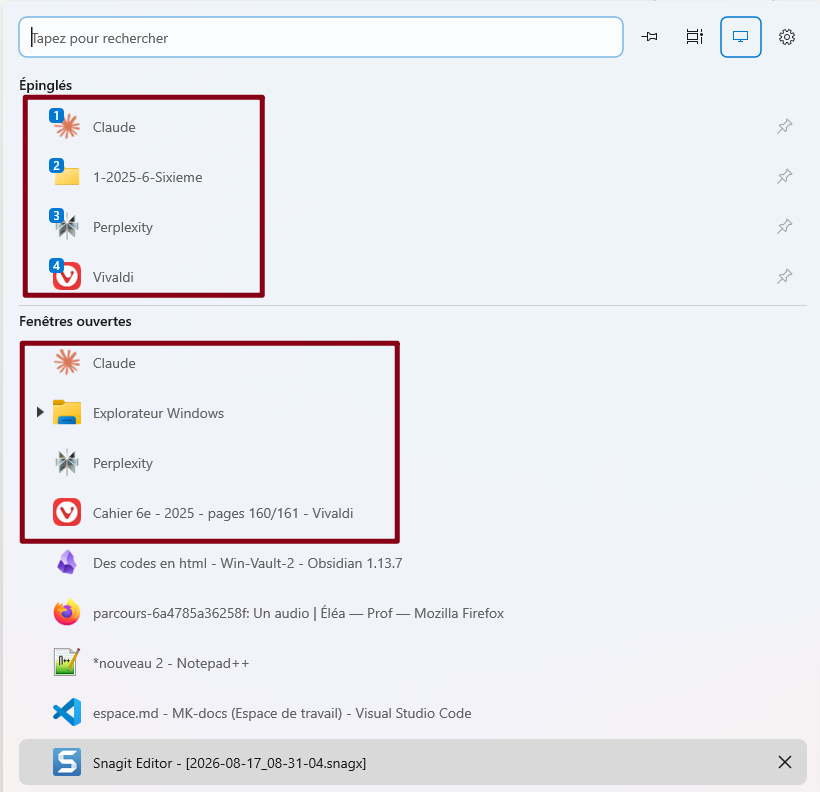
Voilà, en épinglant, les fenêtres apparaissent en double !🙁


Il faut que les fenêtres épinglées n'apparaissent plus du tout dans la catégorie ‘Ouvrir les fenêtres’.
S'il vous plait permettez ce paramétrage !

Reply #29 Top

Regarding the use of custom hotkeys, what I am looking for is one specific configuration that will allow me to switch back and forth between the current Chrome tab window and another chrome tab window without AltTabby being sticky. However, I don't know how to configure this. Your help would be appreciated.


Thanks

Reply #30 Top

I have AltTabby set to the thumbnail view and love almost everything about it.  What I'd really like is a way to configure it so it fills rows first and then columns the same way the native Alt-Tab interface does.

Reply #31 Top

Sometimes I have to quit and relaunch AltTabby a couple of times before it works 

Reply #32 Top
Quoting Neil, reply 3997007
Quoting turtlenut, reply 3996969

This looks amazing, especially the tab support.  I'm wondering if you would be able to support tabs in Brave Browser as you do in Chrome/Edge?

End of turtlenut's quote

It already shows tabs in Brave I think?  It doesn't promote the top X to top level windows though so that can be added.

End of Neil's quote

Not for me.  I see Brave Windows but no tabs.  I do see tabs if I launch Edge (but Brave is the main browser I use and I'd like to keep it that way!)

Reply #33 Top

I have AltTabby set to launch with Windows 11 when I start up my computer, however, AltTabby does not work until I completely quit AltTabby and relaunch it. What happens if I try and use AltTabby before quitting and reopening it using the hotkey command that I have configured (Alt+Tab), the standard Windows app switcher appears.

I would appreciate your response with a solution or a bug fix.

Thanks,

Bob

Reply #34 Top
Quoting bkmjhughes, reply 4145531

I have AltTabby set to launch with Windows 11 when I start up my computer, however, AltTabby does not work until I completely quit AltTabby and relaunch it. What happens if I try and use AltTabby before quitting and reopening it using the hotkey command that I have configured (Alt+Tab), the standard Windows app switcher appears.

I would appreciate your response with a solution or a bug fix.

Thanks,

Bob

End of bkmjhughes's quote

Before you quit the software, can you see if in Taskmanager you see two copies of AltTabby64.exe running under the details view.

Also how are you quitting the software?

Finally if you instead open the config and switch which mode you are using (list vs thumbnail etc) and then back again, does it then work without a restart of the software?

Reply #35 Top

In answer to your questions: 

1) before I quit AltTabby, there are 2 instances of  AltTabby in "Background Processes. "

2) To quit AltTabby, I right-click on the AltTabby icon in the system tray and then click on "Exit AltTabby".

3) If I don't exit AltTabby, but instead open the config and switch which mode I am using (list vs thumbnail etc) and then back again, AltTabby then works without a restart of the software.

Do these answers help you isolate and solve the issue?

Thanks for your ongoing help to get this issue fixed!


Reply #36 Top

Bug: Pinned Brave profiles always switch to the same profile

I tried pinning two different Brave profiles in AltTabby, but both pinned shortcuts always switch to the same Brave profile instead of their respective profiles.

I also disabled Automatic Window Grouping to see if that was causing the issue, but the problem still occurs.

Expected behavior:

Each pinned Brave profile should switch to the window associated with that specific profile.

Actual behavior:

Both pinned profiles switch to the same Brave profile.

Reply #37 Top

Hi,

AltTabby shows all open windows but does not show windows explorer. Can you please fix.

Reply #38 Top
Quoting amd12354, reply 3997139

Voilà, en épinglant, les fenêtres apparaissent en double !🙁


Il faut que les fenêtres épinglées n'apparaissent plus du tout dans la catégorie ‘Ouvrir les fenêtres’.

S'il vous plait permettez ce paramétrage !

End of amd12354's quote

We have added an option under advanced settings to control this in the next update (Behaviour page --> scroll to the bottom and in additional settings there is a button called advanced settings)

This will be in v0.80


Reply #39 Top
Quoting slamani, reply 4145616

Hi,


AltTabby shows all open windows but does not show windows explorer. Can you please fix.

End of slamani's quote

That is very odd.  Have you accidentally told it to ignore explorer windows?

If you click the settings cog on the switcher and pick Manage exclusions and grouping you should be able to see if this has happened.

I am also assuming you mean it does not show open explorer windows, or is this something else (like the desktop?)

Reply #40 Top
Quoting bkmjhughes, reply 4145553

In answer to your questions: 

1) before I quit AltTabby, there are 2 instances of  AltTabby in "Background Processes. "

2) To quit AltTabby, I right-click on the AltTabby icon in the system tray and then click on "Exit AltTabby".

3) If I don't exit AltTabby, but instead open the config and switch which mode I am using (list vs thumbnail etc) and then back again, AltTabby then works without a restart of the software.

Do these answers help you isolate and solve the issue?

Thanks for your ongoing help to get this issue fixed!

End of bkmjhughes's quote

I am hoping that info may have given us the clue as to what is going on there.  The next update (0.8) should have some tweaks in that area.

+1 Loading…
Reply #42 Top
Quoting Neil, reply 4145619
Quoting bkmjhughes, reply 4145553

In answer to your questions: 

1) before I quit AltTabby, there are 2 instances of  AltTabby in "Background Processes. "

2) To quit AltTabby, I right-click on the AltTabby icon in the system tray and then click on "Exit AltTabby".

3) If I don't exit AltTabby, but instead open the config and switch which mode I am using (list vs thumbnail etc) and then back again, AltTabby then works without a restart of the software.

Do these answers help you isolate and solve the issue?

Thanks for your ongoing help to get this issue fixed!

End of bkmjhughes's quote

I am hoping that info may have given us the clue as to what is going on there.  The next update (0.8) should have some tweaks in that area.

End of Neil's quote

Thanks!