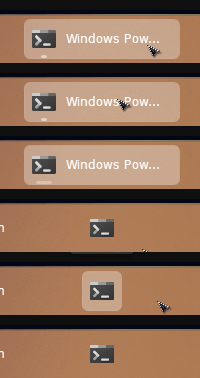
windows terminal pinned icon turns black with enhanced taskbar

start11 v2 enhanced taskbar shows the windows terminal icon correctly while terminal is running, but as soon as terminal is closed and remains pinned, the icon becomes a solid black square.

steps to reproduce:
1. enable the start11 enhanced taskbar
2. pin windows terminal to the taskbar
3. open terminal: the icon displays correctly
4. close terminal: the pinned icon becomes a solid black square

unpinning and re-pinning does not fix the issue.

disabling the start11 enhanced taskbar restores the correct icon with the native windows 11 taskbar.

system details:
start11 version: 2.7.4.0
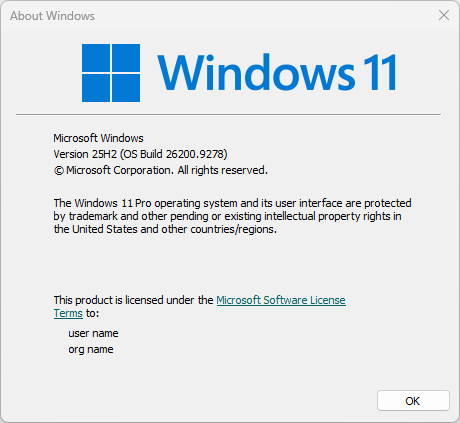
windows: windows 11 pro 25h2
windows build: 26200.9168
windows terminal version: 1.24.11911.0
terminal app id: Microsoft.WindowsTerminal_8wekyb3d8bbwe!App

- the correct terminal icon while terminal is running:


- the black square icon after terminal is closed:

235 views 9 replies
Reply #1 Top

Hello,

Sorry to hear you are having issues. But, I can't reproduce your issue on my system. Refer my short video below.

May I know, how you pinned it to your taskbar? For me I usually do the "Run that app", while it is still running, right click on its taskbar button and select "Pin to taskbar".

Thank you,

Basj,

Stardock Community  Assistant.

Reply #2 Top

yes, i pinned it the same way: i opened windows terminal, right-clicked its taskbar icon while it was running, and selected “pin to taskbar.”

the icon is correct while terminal is running, but turns into a solid black square as soon as terminal is closed.

the same black icon also appears for terminal inside the start11 start menu/search, while the native windows start menu and taskbar show the icon correctly.

i also tested start11 2.80 beta, and the issue is still present.

Reply #3 Top

Perhaps something else is conflicting with Start11, do you have any other application running in the background which also change something in your taskbar, such as DisplayFusion, StartAllback, Windhawk etc?

Would like to suggest 

  1. Testing in Windows Sandbox and see if the issue appear in the Sandbox: https://support.stardock.com/space/SHC/1416855562/Testing+Start+in+Sandbox
  2. Or, Try Clean Boot steps: https://support.stardock.com/space/SHC/1334935592/Start11+Clean+Boot, do note that clean boot need to be done with care.

Try these and report back.

Thank you,

Basj,

Stardock Community  Assistant

Reply #4 Top

Just curious. With the Enhanced taskbar enabled, what happens if you open the Windows Start menu and Search for Terminal and then in the Options select Pin to taskbar? Is the icon initially black since it's not running?

Also, have you tried uninstalling Terminal and then reinstalling from the Windows Store?

Reply #5 Top

i also checked the windows sandbox build.

main system: windows 11 pro 25h2, build 26200.9168
windows sandbox: windows 11 24h2, build 26100.9168

the issue reproduces in both environments.

in the sandbox i installed the official windows terminal package:
Microsoft.WindowsTerminal_1.24.11911.0_8wekyb3d8bbwe.msixbundle

and its required Microsoft.UI.Xaml.2.8 x64 framework, version 2.8.7.

the terminal icon is correct in the native windows start menu/taskbar, but black in the start11 start menu and on the start11 enhanced taskbar when terminal is not running.

could you also let me know the exact windows build you tested on?

Reply #6 Top
Quoting nroj95, reply 4146125

could you also let me know the exact windows build you tested on?

End of nroj95's quote

Hello,

I am on this one.

Thank you,

Basj,

Stardock Community  Assistant

Reply #7 Top

thanks. i updated my main system to the same windows 11 25h2 build you are using, 26200.9278, but the issue is still present.

i also reproduced it in a fresh windows sandbox running windows 11 24h2 build 26100.9278.

in the sandbox i installed the official windows terminal 1.24.11911.0 package, and the issue reproduces there as well.

in both environments, the native windows start menu/taskbar display the terminal icon correctly, while start11 shows it as a black square when terminal is not running.

could you also let me know which windows terminal version and start11 version you tested with?

Reply #8 Top

i found the trigger.

the terminal icon works correctly in start11 only when both the windows app theme and system theme are set to dark.

results:

apps light + system light: black icon
apps light + system dark: black icon
apps dark + system light: black icon
apps dark + system dark: correct icon

i reproduced the same behavior both on my main system and in a clean windows sandbox.

the native windows start menu and taskbar display the terminal icon correctly in all of these theme combinations.

so this appears to be a start11 theme-related icon rendering issue specific to windows terminal.

Reply #9 Top

I am running Windows 11 Pro 26200.9278; and Start11v2 - 2.8.0.2
Windows mode = Dark; and App mode = Light

As a test, I have pinned Terminal to Start11 Enhanced taskbar in the following ways:
1) Pin to taskbar by right-click > More > Pin to taskbar from Start11 menu
2) Pin to taskbar by right-click > More > Pin to taskbar from Start11 All apps menu
3) Pin to taskbar by right-click > Pin to taskbar from Windows Start menu
4) Pin to taskbar by right-click > Pin to taskbar from Windows Start ALL menu
5) Windows Start menu and Search for Terminal and then in the Options select Pin to taskbar

No matter how I pin Windows Terminal to the Start11 Enhanced taskbar, the icon is displayed correctly both when open and when closed.

Terminal has over 190 icon images and perhaps the AppManifest is corrupted.

I would suggest going to Terminal in the Settings > Apps > Installed apps > Terminal; and click the three dots (...) and select Advanced options. Scroll down to Reset and run the Repair and/or Reset options. If neither of these fix the issue, uninstall and re-install from the Microsoft Store.