Keyboard Wake Reliably Crashes Explorer — Mouse Never Does (DeskScapes + Fences)

4/4 reproducible on keyboard-triggered reactivation, 0/4 on mouse — full dump, stack trace, and root-cause analysis inside

Bug Report: Recurring explorer.exe Crash — Fences / DeskScapes

NULL Pointer Read in Shell Icon Work-Area Calculation, Triggered on Keyboard-Initiated Session Reactivation

System: Windows 11, build 10.0.26100.9223 Products involved: Stardock Fences 6 (v6.5.4.1), Stardock DeskScapes (v26.0.1.1, "DeskScapes 2026")


1. Summary

explorer.exe crashes reproducibly following a keyboard-triggered session reactivation from a locked/screen-off state, roughly 13-15 seconds after the keystroke. A controlled trial (4 keyboard reactivations, 4 mouse reactivations, alternating order) found the crash occurs on 4 of 4 keyboard-triggered reactivations and 0 of 4 mouse-triggered reactivations. A full memory dump shows the crash occurring in native Windows shell code, but only after the call chain passes directly through window-procedure hooks belonging to DeskScapes and Fences. Separately, we found two different versions of a core DeskScapes DLL simultaneously loaded in the same explorer.exe process, and that DeskScapes' own uninstaller cannot remove the older of the two.

2. Environment

Item

Value

OS

Windows 11, build 10.0.26100.9223

explorer.exe version

10.0.26100.9223

Fences version

6.5.4.1 (internally consistent)

DeskScapes version (current)

26.0.1.1 ("DeskScapes 2026")

DeskScapes version (legacy, also present and loaded)

11.0.0.0 ("DeskScapes 11")

Monitor 1 (primary)

Dell UltraSharp U2725QE, 3840×2160 native, 200% scaling (Windows-recommended)

Monitor 2

Acer KB272 E, 1920×1080 native, 125% scaling (Windows-recommended)

Automatic sleep/hibernate

Disabled (deliberately, for unrelated reasons); reactivation events described here are display-off/session-lock cycles, not full system suspend/resume

Onset

Began after replacing a prior 1080p-class display with the Dell (above), creating this mixed-DPI monitor pairing for the first time

3. Symptom

  • Both monitor desktops disappear

  • Both taskbars disappear

  • Start menu becomes unavailable

  • Windows itself remains responsive; Task Manager is accessible throughout

  • Manually restarting explorer.exe restores normal operation

4. Reproduction Steps

  1. Lock the session (Win+L) with both DeskScapes and Fences running normally

  2. Allow the display to time out (60 seconds in this environment)

  3. Reactivate using a keyboard keystroke (not mouse movement)

  4. Enter credentials to complete login


Result: explorer.exe crashes approximately 13-15 seconds after the keystroke, consistently, across repeated controlled trials. Mouse-triggered reactivation under otherwise identical conditions does not reproduce the crash.

5. Diagnostic Findings

5.1 — Crash Signature (Event Viewer, Event ID 1000)

Identical across every occurrence:


Faulting application name: explorer.exe, version: 10.0.26100.9223


Faulting module name: comctl32.dll, version: 6.10.26100.9223


Exception code: 0xc0000005


Fault offset: 0x00000000000a2233

5.2 — Memory Dump Analysis

A full user-mode dump, analyzed in WinDbg:


KEY_VALUES_STRING:


    AV.Dereference: NullPtr


    AV.Type: Read


    Failure.Bucket: INVALID_POINTER_READ_c0000005_shell32.dll!CListViewHost::GetWorkAreasWithDPI


    ExceptionAddress: comctl32!CListView::GetWorkAreasWithDpi+0xf3


    Attempt to read from address 0000000000000000


Call stack (most recent call first; third-party frames marked):


comctl32!CListView::GetWorkAreasWithDpi+0xf3


shell32!CListViewHost::GetWorkAreasWithDPI+0x140


shell32!CListViewHost::IterateThroughImageServicesPerWorkArea<lambda>+0xac


shell32!CListViewHost::SetIconsOnlyPerWorkArea+0x36


shell32!CListViewHost::RefreshSettings+0x15c


shell32!CDefView::_ApplySettings+0x158


shell32!CDefView::_ReloadSettings+0x64


shell32!CDefView::_ReloadView+0x41


shell32!CDefView::_Exec+0x4ab / Exec+0x27


shlwapi!IUnknown_Exec+0x80


shell32!CDesktopBrowser::_OnCommand+0xa7


shell32!CDesktopBrowser::_WndProcBS+0xbb9


shell32!CDesktopBrowser::s_DesktopWndProc+0x5c


user32!UserCallWinProcCheckWow+0x356


user32!CallWindowProcW+0x16c


>>> DESKSCAPE!ReloadSettings+0x6201        <-- Stardock DeskScapes


user32!UserCallWinProcCheckWow+0x356


user32!CallWindowProcW+0x16c


>>> DESKTOPDOCK64!Shell_GetUrlPath+0x4d56  <-- Stardock Fences


>>> DESKTOPDOCK64!EnableDrawHooksDotNet+0x25a31


>>> DESKTOPDOCK64!EnableDrawHooksDotNet+0x26466


user32!UserCallWinProcCheckWow+0x356


[... standard message dispatch / thread startup frames omitted ...]


explorer!wWinMain+0xb19


Interpretation: a desktop icon-settings reload is routed through two chained, subclassed window procedures (DeskScapes, then Fences — the CallWindowProcW frames are the standard subclass-chaining mechanism) before reaching native shell32/comctl32 code that dereferences a NULL pointer. Neither third-party module ships public symbols, so the specific function names shown (at large offsets) are unreliable; the module identities and their presence on this stack are not.

5.3 — Two DeskScapes Versions Simultaneously Loaded

ModuleName        FileVersion Company               FileName


----------        ----------- -------               --------


Deskscapes.dll    11.0.0.0    Stardock Corporation  C:\Program Files (x86)\Stardock\DeskScapes\Deskscapes.dll


deskscape.dll     26.0.1.1    Stardock Corporation  C:\Program Files (x86)\Stardock\DeskScapes\deskscape.dll


DesktopDock64.dll 6.5.4.1     Stardock              C:\Program Files (x86)\Stardock\Fences\DesktopDock64.dll


Both DeskScapes files sit in the same install directory and load simultaneously in explorer.exe. The registry shows both "Stardock DeskScapes 11" and "Stardock DeskScapes 2026" entries, sharing the identical uninstaller and the identical uninstall.xml manifest, both with the same install date — indicating a single installer run that failed to remove or supersede the prior version, not a years-old user oversight.

5.4 — Monitor / DPI Configuration

Mixed-DPI, same physical monitor size, different native resolution: Dell (4K, 200% scaling) alongside Acer (1080p, 125% scaling), both Windows-recommended values. The crash site is explicitly DPI-aware work-area calculation code. Crash onset began at or after the monitor swap that created this pairing; confirmed absent before it.

5.5 — DeskScapes Uninstaller Is Non-Functional for the Legacy Registration

Two independent attempts to uninstall "Stardock DeskScapes 11" both hung indefinitely at the "Uninstalling services..." step:


  • Attempt 1: hung with the underlying service in an unclean state

  • Attempt 2 (controlled): service confirmed properly stopped via Service Control Manager beforehand; hung identically regardless


Both attempts were verified to make zero progress (registry entries and files fully unchanged) after forcibly ending the uninstaller and rebooting. This rules out service state as the cause and points to a defect in the uninstaller itself.

5.6 — Controlled Trial: Device Type Determines Reproducibility

To eliminate reliance on ambiguous system logs, reactivation trials were performed and recorded directly by the operator, alternating trigger type each trial to control for time/state drift:


Trigger

Trials

Crashes

Mouse

4

0

Keyboard

4

4


This split is statistically unlikely to occur by chance (Fisher's exact p ≈ 0.014). Service state and loaded-module state were confirmed unchanged throughout via direct verification, ruling out environmental drift. No mechanism is currently known for why input device type would affect this crash — this is the most specific and actionable open question in this report.

5.7 — External Corroboration

Stardock's own community forums document closely related issues:


  • A January 2026 thread reports DeskScapes 11 crashing explorer.exe specifically on multi-monitor systems

  • A May 2026 thread describes a user resolving a DeskScapes 2026 issue by manually removing leftover files and registry entries after an uninstall attempt, then reinstalling — directly analogous to Sections 5.3 and 5.5 above

6. What This Report Does and Does Not Establish

Established with high confidence:


  • The crash is real, reproducible on demand via keyboard-triggered reactivation, and identical every time

  • DeskScapes' and Fences' own code executes directly on the crashing call stack — not merely loaded in the process

  • DeskScapes has an independent, confirmed defect (dual-version loading) and a non-functional uninstaller for the affected version

  • The crash correlates with a mixed-DPI monitor configuration and did not occur before it


Not yet established:


  • We have not been able to remove DeskScapes/Fences and confirm the crash stops — every uninstall attempt failed before this test could be completed. The evidence connecting these products to the crash is strong and converging, but circumstantial rather than a direct removal-based confirmation.

  • No mechanism is known for why keyboard-triggered reactivation reproduces the crash while mouse-triggered reactivation does not.

7. Questions / Requested Action for Stardock

  1. Can Fences and/or DeskScapes reproduce a NULL-pointer condition in desktop icon-reload/work-area handling under a mixed-DPI multi-monitor configuration, specifically following keyboard-triggered session reactivation?

  2. Is there a known difference in how your hook code handles a keyboard-initiated versus mouse-initiated reactivation sequence?

  3. Is it expected for DeskScapes 11 and DeskScapes 2026 files to coexist and both load after an upgrade? If not, this is an installer/uninstaller defect independent of the crash.

  4. Is a full memory dump (1.55 GB) useful for your engineers? Available on request via file transfer.

  5. Is there a supported clean-removal procedure for machines where the standard uninstaller hangs indefinitely at "Uninstalling services..."?

Appendix — Related but Distinct Finding (Start11)

A separate crash pattern was also found in ShellExperienceHost.exe, directly faulting in Start11's own module (Start10_64.dll, v2.8.0.2). This module is confirmed loaded in the current explorer.exe process but does not appear on the crash stack described above. Included for completeness given the same vendor and a related symptom category; not connected by evidence to the crash described in this report.


Moved to Deskscapes area
 

902 views 7 replies
Reply #1 Top

Hello,

Sorry to hear you are having issues. I have forwarded your problem/question to Stardock Support Team for their assistance. Please keep an eye on this thread for any updates. We appreciate your feedback and patience. 

While waiting, I would suggest to do purge and reinstall steps on both Deskscapes and Fences just to be sure everything get install properly. Please do it one at a time. Refer here for Fences and Deskscapes Purge and reinstall steps:

  1. https://support.stardock.com/space/SHC/1346764874/DeskScapes+purging+and+re-installing
  2. https://support.stardock.com/space/SHC/1332477959/Fences+purging+and+re-installing

Try those and report back.

Thank you.

Basj,

Stardock Community  Assistant

Reply #2 Top

Hi Basj,

Thank you for the guidance and for escalating this to the support team.

Update: I've completed a full uninstall, purge, and clean reinstall of DeskScapes 2026 — it's activated and running normally now.

I'll run through the reactivation sequence that was reliably triggering the explorer.exe crash later today. I need to step away for a bit first, but I'll report back with results once that's done.

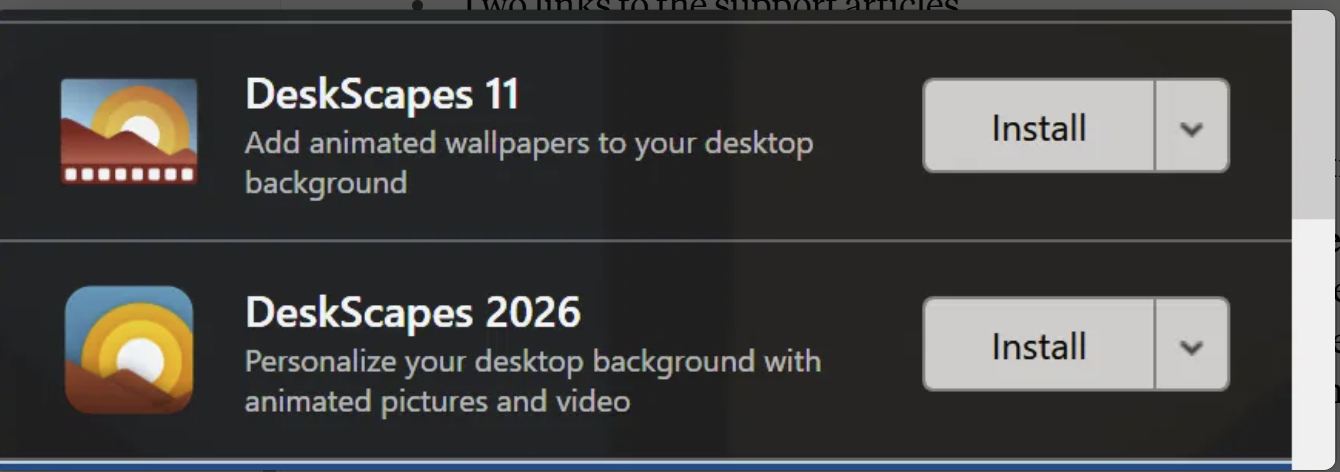
One more thing worth flagging while it's fresh: I believe I've identified how the dual-version install (DeskScapes 11 and DeskScapes 2026 both present) came about in the first place. In Object Desktop's product list, both versions are shown as separate line items, each with its own independent "Install" button — nothing distinguishes one as superseding the other. I suspect I installed both at some point, not realizing they'd coexist rather than one replacing the other. That overlap then sat dormant, apparently unnoticed, until I swapped in a new monitor, which is what actually surfaced the crash. This looks like a genuine human-factors trap in how Object Desktop presents those two entries — might be worth a look on your end, separate from whatever else is going on with the crash itself.

Two DeskScapes


Also — apologies for posting the same content across two threads earlier. Fair point, and understood. I'll keep any further updates on this to my own thread from here on.

Thanks again for your help.

Reply #3 Top

As a heads up the two different versions on the files (v11 and v26) is normal.  One file is the same between the same versions so it wasn't reversioned.

If you look closely you will see the filenames are different, one is the loader for the other.

Reply #4 Top

Hi Neil,

Thanks for the correction — you're right, I described this loosely earlier. Looking back at my own file listing, deskscape.dll (v26.0.1.1) and Deskscapes.dll (v11.0.0.0) are in fact different filenames, not the same file re-versioned. Appreciate you catching that.

One piece I'm still trying to reconcile with "this is normal," though: Windows' own Programs and Features showed two entirely separate entries — "Stardock DeskScapes 11" and "Stardock DeskScapes 2026" — each with its own version number and its own independent uninstaller, and Object Desktop's manager showed two separate "Install" buttons for them (screenshot posted above). If Deskscapes.dll is an intentional shared/loader component, would that normally come bundled invisibly with the current version, rather than showing up as its own standalone, separately-installable product with its own uninstall entry? That's the part that looked like the actual trap to me — not the coexistence of the two files themselves, but two "Install" buttons that look like independent choices when one may not be.

Genuinely asking — if that dual-listing is also expected/normal, I'd like to understand why, since it's what led me to (probably) install both in the first place.

Chip


Reply #5 Top

Update for both of you, since this bears directly on the question I just asked Neil:

I reinstalled DeskScapes 2026 from Object Desktop, clicking Install on the 2026 tile only — not the DeskScapes 11 tile. After the install completed, checking the running system directly:

- Deskscapes.dll (v11.0.0.0) and deskscape.dll (v26.0.1.1) are both loaded in explorer.exe

- The DeskScapes11 service is present and actively running

So this isn't a case of me clicking both Install buttons this time — a single, deliberate install of 2026 alone produced the v11 component running regardless. That's a cleaner data point than my earlier guess about how the overlap happened, and it lines up with what Neil described: this pairing may simply be how a 2026 install normally behaves, not leftover debris from a mistake on my end.

One odd wrinkle I can't explain yet: the DeskScapes 11 tile/icon was visible in Object Desktop right after the install completed, but after a reboot it's no longer showing there — even though the underlying service and files are still present and running. Not sure if that's just a stale UI refresh or something else. Mentioning it in case it's meaningful on your end.

On the crash itself: no crashes since the reinstall so far, but I want to be upfront that this isn't a real test yet — my normal use has mostly involved mouse-triggered reactivation, which never reproduced the crash even before the reinstall (0/4 in controlled trials, vs. 4/4 for keyboard-triggered reactivation). I'm running a proper controlled retest — alternating mouse and keyboard reactivation trials — shortly, and will report actual results once that's done rather than relying on incidental observation.

Chip


Reply #6 Top

Hello, 

To help narrow down the cause, please try running Deskscapes with Fences turned off, and then do the opposite—run Fences with Deskscapes turned off. This way we can confirm which program is triggering the issue. Once we know the culprit, we’ll be able to focus on the right fix.

Thank you, Basj, Stardock Community Assistant

Reply #7 Top

Hi Basj and Neil,

Update following formal verification testing. Short version: the crash has not reoccurred, and I'm leaning toward the DeskScapes purge/reinstall as the corrective action — based specifically on the observations from testing the evening before the reinstall, which is what led us to conclude it was appropriate to proceed with formal Post Maintenance Testing (PMT) in the first place. Two other things also changed in the same window, so I want to lay out the full picture rather than overstate certainty.

**Summary**

Following the DeskScapes purge and reinstall, I ran a formal test procedure (health sweep + three rounds of controlled reactivation trials) rather than relying on casual observation. Result: 30 trials today (plus 8 the prior evening), 0 crashes, each round independently confirmed via explorer.exe process persistence, Application log queries, and Kernel-Power log cross-referencing.

**Basis for leaning toward the DeskScapes fix**

The evening before the purge/reinstall, controlled testing (interleaved mouse/keyboard reactivation trials) and a full memory dump had already pointed specifically at DeskScapes and Fences — the dump showed the crash occurring only after the call chain passed directly through both products' own hook code, and we'd separately confirmed two different versions of a core DeskScapes DLL loaded simultaneously in explorer.exe. Those observations were the basis for treating the purge/reinstall as an appropriate corrective action and moving into formal PMT to confirm it.

**For full transparency, two other things changed in the same window that I can't fully rule out:**

1. **A Windows Insider Program build installed overnight** (KB5124061, build 26220.9343) that replaced the exact explorer.exe and comctl32.dll files named in every crash dump. No public release notes confirming a relevant fix in that file, so this remains a real but unexplained variable.

2. **Wallpaper configuration** — initial retest rounds had no DeskScapes wallpaper active. I've since restored the original static/animated wallpaper pair on both monitors and reran a full 10-trial round — still 0 crashes.

**A new, separate finding:** while attempting to isolate Fences for a controlled test (per your suggestion to test each product independently), Fences' desktop shell hook (DesktopDock64.dll) resisted every standard method of disabling it — closing the application, unregistering the DLL directly (confirmed via the regsvr32 success dialog), and unchecking "Enable Fences" in its own Settings. All three left the DLL loading into a freshly-restarted explorer.exe regardless. This mirrors the DeskScapes uninstaller issue already reported.

**My ask:** if you'd like to independently verify DeskScapes as the root cause, could you advise the supported method for fully disabling Fences' and DeskScapes shell integration? My own attempts didn't succeed, and a clean isolation test would settle this more definitively.

Happy to provide the full PMT documentation if useful for your records.

Thanks again for the guidance so far.

Chip