Need Help on a Windows 10 Issue

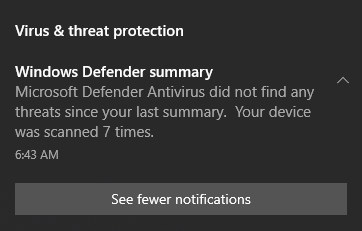
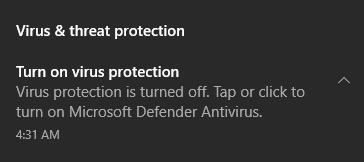
Does anyone know why over the last 4 days I keep getting this Notification a few minutes after boot on Windows 10? All updates are done too.
92 views 7 replies
Reply #1 Top

I did get an MS Update for Win10 a few days ago, believe it or not, so if you got that update it may have been wrapped up in that.  I don't happen to use Defender though so I really can't tell.  Looking at the update history I don't see anything referring to Windows Defender specifically though.  You might look at your update history and see if it anything there gives you any idea.  Generally speaking, it looks like a "nuisance update" without much meat to it. 

Oh, I'm not on their extended service plan, don't know if you are or not.

Reply #2 Top

Here is the AI Overview from Google for that notification.

AI Overview
The image shows a standard notification from Microsoft Defender Antivirus confirming that your device was scanned 7 times and no threats were found.
What This Notification Means
Safe Status: Your PC is secure and clean of detected malware.
Routine Scans: Microsoft Defender regularly checks files in the background to ensure ongoing safety.
Frequent Alerts: These summary notifications can sometimes appear repeatedly after system updates or routine background maintenance.
    How to Manage or Hide It
    Click See fewer notifications directly on the prompt to reduce how often these summary updates pop up.
    You can also adjust notification preferences inside your main Windows Security settings.

      Reply #3 Top

      Oops, sorry for posting that image in the original post, it should have been this one: 

      I get it a few minutes after every boot, and when I have over the system tray icon it's saying "No action needed".  I cannot figure out why this is happening.

      Reply #5 Top
      Quoting pelaird, reply 4146758

      That is a known issue with Windows 11. 

      Here is a link to an article on the false notification for Windows Defender.


      https://www.windowslatest.com/2026/08/30/windows-11-is-warning-virus-protection-is-off-but-microsoft-confirms-its-false/

      End of pelaird's quote

      But I am on Windows 10 pelaird. I said that in the original post. I see though in the link you added that Microsoft is working on the issue, and that it was due to an update. It effects Windows 10 and 11.

      Reply #6 Top
      Quoting LightStar, reply 4146760

      But I am on Windows 10 pelaird.

      End of LightStar's quote

      I knew that. Sorry. I copied this from an email I had sent to my brother who was having the same issue.

      Reply #7 Top
      Quoting pelaird, reply 4146763
      Quoting LightStar, reply 4146760

      But I am on Windows 10 pelaird.

      End of LightStar's quote

      I knew that. Sorry. I copied this from an email I had sent to my brother who was having the same issue.

      End of pelaird's quote

      No problem, thanks for your help! :)