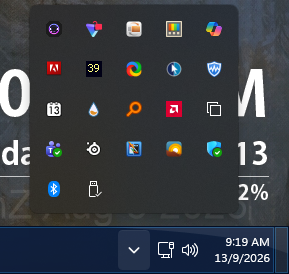
No System Tray Icon

No "unload" function available

Windows Version Number: Windows 11 Core 25H2 (26100.ge_release.240331-1435)
App Version: WindowBlinds 11.07 (024 x64 - Windows 11 Edition

Windows 11 Core 25H2 (26100.ge_release.240331-1435)
WindowBlinds 11.07 (024 x64 - Windows 11 Edition) - 64 bit OS

a) there is NO "hidden system tray" icon shown even though the setting was repeatedly ON / OFF several times with no change

b) since NO sys tray icon, NO way to UNLOAD windowblinds (that I can find).

WindowBlinds is "up to date".

Thank you.


212 views 8 replies
Reply #1 Top

Hello,
Sorry to hear you are having issues. This is what I get when I applied Acrylic 7 WB skin, Perhaps I am not looking at the same thing. Please post screenshot, with Acrylic 7 applied so we understand the issue better.

Thank you,
Basj,
Stardock Community Assistant.

Reply #2 Top

I'm not doing that. It took over a half-hour to undo the mess WB created. Any real ideas or settings to check then LMK.  I am willing to help but not waste my time on meaningless exercises. Thanks anyway.


Anybody else have a solution that doesn't require hoop-jumping?


(I just loaded WB to day even though I bought it months ago.)

Reply #3 Top

It "doesn't work" the same way regardless of the skin; I tried a few including "default". Still no sys tray icon and no way to unload it. had to reboot and use "ctrl" to kill it from loading; now, I need to stop it from loading at boot but can not do that w/o that icon to "unload WB". 

And it should not have anything to do w/ the skin being used. It's a WB program problem, not a skin one.


Reply #4 Top
Quoting stdock2026d, reply 4146809

Anybody else have a solution that doesn't require hoop-jumping?

End of stdock2026d's quote

Great, lets wait for someone to help out. Appreciate your patience.

Thank you,

Basj,
Stardock Community Assistant

Reply #5 Top
Quoting stdock2026d, reply 4146812

I tried a few including "default"

End of stdock2026d's quote

Loading the "Default theme by Microsoft", the first skin in the skins list, should unload WindowBlinds.  WindowBlinds should then not start up at login/reboot after that, until you've loaded another WindowBlinds theme, at which point WindowBlinds will continue to load at startup again.  When you switch to the default theme you may want to logout and back in once to help clear everything out.

I'm afraid I don't know what to tell you regarding the system tray icon.

Reply #6 Top

Thanks for the suggestion.

And after I load the "default", I have to spend a half-hour or more reconfiguring the default BACK to my desired look. That's a good effort at helping, but not a solution. (I tried it if you were to read my  earlier posting.)

Having only ONE way to unload this is not the best design practice. I should have know better than to mess w/ WB. If I complain or say the sw is not up to snuff, I'll be blocked just like every  other time when SD doesn't like the truth about the products. 

SD :   I expect this to WORK. I paid lots of $ for it. I do not appreciate SD abdicating their responsibility and forccing me into this time-wasting forum.

Help fix this problem now. This is not acceptable behavior.


Reply #8 Top

Sorry to hear that, wish I can help, but since you don't like to waste your time a little to see what is the actual problem.

Thank you,

Basj,
Stardock Community Assistant