Island Dog Island Dog

Rainmeter Gallery Accepting Submissions

Rainmeter Gallery Accepting Submissions

The new Rainmeter gallery on WinCustomize is open but in private mode right now.  We are accepting Rainmeter skin submissions via normal upload, but they will remain in moderation until we get enough to launch.

More information about Rainmeter here - http://rainmeter.net/RainCMS/

If you have some Rainmeter skins, please head over and get them in our galleries!

68,901 views 108 replies
Reply #26 Top

...and I must say I am pretty inpressed.
End of quote

I totally agree -- as soon as I'm finished with my next Windowblind, I'm going to see if I can skin this to match, but for now, for my personal use, I've made a few accompanying accessories to match the Rainmeter default skin.

Reply #27 Top

I can't get any themes to load. I shut down the default skin and tried to run several others to no avail. Now I have a blank desktop.

Reply #28 Top

"I can't get any themes to load. I shut down the default skin and tried to run several others to no avail. Now I have a blank desktop."


How are you installing the skins RND? If you have not download a skin in the .rmskin format then you need to put the extraxted files into the rainmeter skins folder that was created in your documents at the time of installation. Then you just right click and choose config if your using the 1.3 version but if your using the 1.4 beta version then you right click+rainmeter menu then config. When you click on the skin you want there is usually a side menu or box that will open. Make sure to click on the last thing that opens.


Here is a shot I just done using the same rainmeter skin in the other shots. I made mods to mine by adding quad core to the system skin and changing some other things like disk and feed info.

Reply #29 Top

I got to try this.

Reply #30 Top

How are you installing the skins RND? If you have not download a skin in the .rmskin format then you need to put the extraxted files into the rainmeter skins folder that was created in your documents at the time of installation. Then you just right click and choose config if your using the 1.3 version but if your using the 1.4 beta version then you right click+rainmeter menu then config. When you click on the skin you want there is usually a side menu or box that will open. Make sure to click on the last thing that opens.
End of quote


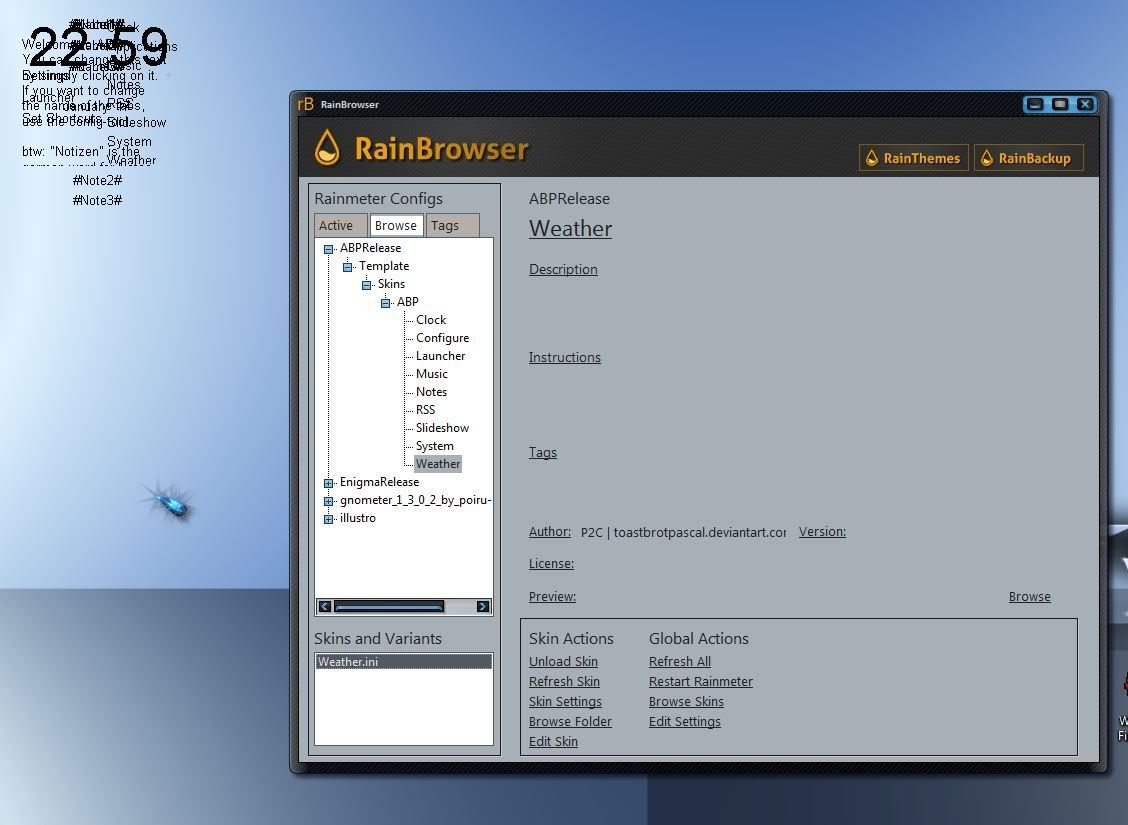
Did all that. Beta. Everything for ABP opens in the top left corner with no background, all jumbled together.

The other two I downloaded, the recommended skins, don't load at all. Maybe I should get the non beta version.

Reply #31 Top

Looks great, AvMan, nice to see someone trying it out!
End of quote

Thanks karmat !!!! :)

Reply #32 Top

Beta.
End of quote

Your answer might lie there, Jim. Maybe the 1.3 stable edition might be a better place to start?

Reply #33 Top

What if you just wanted just 1 item to be visable like the clock or weather is that possible?

Reply #34 Top

Beta. Your answer might lie there, Jim. Maybe the 1.3 stable edition might be a better place to start?
End of quote

The latest beta works perfectly, I'm on W7/64, it's totally stable. It's been awhile since I downloaded ABP, but it's a top suite, not sure why it's not working for you. All new apps will appear in the top left corner, you need to move them to where you want them.

Right click on the Rainmeter icon in your system tray, hover over Themes and choose Manage Themes. The 'RainThemes' utilitity will open and you'll see what skins/themes you have installed, just load the one you want.

You can also right click the icon, hover over Configs, scroll down and click on Manage Skins and the 'RainBrowser' utility will open where you can manage and edit your skins. When it first comes up, it willl show in the far left 'Active' column the skins that are open on your desktop, to see all the skins that you have, click on the 'Browse' tab.

Most Important Tip...

- when you download a new skin, remember to REFRESH ALL (or it won't show up)

- when you make changes to a skin, remember to REFRESH SKIN (two different commands)

Here are some excellent easy instructions:

Rainmeter 101 http://rainmeter.net/RainCMS/?q=Rainmeter101

Getting Started http://rainmeter.net/RainCMS/?q=Rainmeter101_GettingStarted

Using Rainmeter http://rainmeter.net/RainCMS/?q=Rainmeter101_Interacting

Adding Skins http://rainmeter.net/RainCMS/?q=Rainmeter101_AddingSkins

Anatomy of a Skin http://rainmeter.net/RainCMS/?q=Rainmeter101_AnatomyOfASkin

Skin Tutorials http://rainmeter.net/RainCMS/?q=SkinTutorials

Reply #35 Top

Thanks karmat. I'm playing with it too. Takes some getting used to, but is functional!

Reply #36 Top

I went ahead and made the skins that had been moderated public. One of the Journeyman skinners had submitted and because they don't go thru moderation it ended up available. So I released the others.

Vark would be a good one to try RND. It's set up for beginners to easily get what they need out of it.

Reply #37 Top

Thanks karmat. I'm playing with it too. Takes some getting used to, but is functional!
End of quote

There is a bit of a learning curve to it, but it's worth it! People just need to do abit of reading and tinkering to get the feel of it. But with all the changes to Rainmeter this year, users can now just download a skin without doing much modifying, but where's the fun in that!

Reply #38 Top

Do you folks think that skinning Rainmeter will be the same as Rainlander and Winstep, meaning will skinners make themed skins for it to go with WindowBlind Themes?  :-"

Reply #39 Top

This is all good stuff, hoping to see a lot of skins from some of you clever skinners. though i seem to have already D/L a lot of rainmeter skins O:)

Reply #40 Top


I went ahead and made the skins that had been moderated public. One of the Journeyman skinners had submitted and because they don't go thru moderation it ended up available. So I released the others. Vark would be a good one to try RND. It's set up for beginners to easily get what they need out of it.


Vark is great because it's so versatile. My last three screenshots in my gallery have it https://www.wincustomize.com/users/2687090/karmat.

Reply #41 Top

Quoting DaveBax, reply 33
What if you just wanted just 1 item to be visable like the clock or weather is that possible?
End of DaveBax's quote


Yes, it is, Dave.  You right click anywhere on the skin, which brings up a menu of all the bits in the skin.  Click on the ones that you don't want to uncheck their .ini, and POOF, they're gone.  Click in the same way to turn "on" the .ini file, and they appear!

Reply #42 Top

Quoting Philly0381, reply 38
Do you folks think that skinning Rainmeter will be the same as Rainlander and Winstep, meaning will skinners make themed skins for it to go with WindowBlind Themes? 
End of Philly0381's quote


Philly, I plan on trying my hand at Rainmeter to match my new Curse of the Full Moon Windowblind that I'm working on.

Reply #43 Top

Quoting k10w3, reply 43


Quoting Philly0381,
reply 38
Do you folks think that skinning Rainmeter will be the same as Rainlander and Winstep, meaning will skinners make themed skins for it to go with WindowBlind Themes? 

Philly, I plan on trying my hand at Rainmeter to match my new Curse of the Full Moon Windowblind that I'm working on.

End of k10w3's quote

I will keep a lookout for it.  :sun:

Reply #44 Top

You can also right click the icon, hover over Configs, scroll down and click on Manage Skins and the 'RainBrowser' utility will open where you can manage and edit your skins. When it first comes up, it willl show in the far left 'Active' column the skins that are open on your desktop, to see all the skins that you have, click on the 'Browse' tab.
End of quote

This is where I found the "skins" and chose one and clicke load skin. As I said, the skins load in the top left corner, without any background, all on top of each other, a jumbled mess. ( see screeny)

Right click on the Rainmeter icon in your system tray, hover over Themes and choose Manage Themes. The 'RainThemes' utilitity will open and you'll see what skins/themes you have installed, just load the one you want.
End of quote


The only "theme" I see is the default one. I see all my "skins", but only the default "theme".  I see all the configs.


Reply #45 Top

Click in the same way to turn "on" the .ini file, and they appear!
End of quote

This doesn't work for me, I think I have a bad install.


Quoting Lantec, reply 36
I went ahead and made the skins that had been moderated public. One of the Journeyman skinners had submitted and because they don't go thru moderation it ended up available. So I released the others.

Vark would be a good one to try RND. It's set up for beginners to easily get what they need out of it.
End of Lantec's quote

I'll try that Mike, thanks!

Reply #46 Top

The quotes are borked...lol.

Reply #47 Top

Quoting RedneckDude, reply 47
The quotes are borked...lol.
End of RedneckDude's quote


I think the gods of DX that claim your computer as their realm are making the fact that they are jealous gods known to you.  Ya got a cyber turf war goin' on there, Jim!

Reply #48 Top

I reinstalled with the non beta....same thing...aaaarrrgggghhhhh.

Reply #49 Top


Quoting RedneckDude, reply 48
I reinstalled with the non beta....same thing...aaaarrrgggghhhhh.
End of RedneckDude's quote

RND - I asked the author of ABP what might be the cause of your problem. After lookng at the screenshot you provided, he told me...

He has RainBrowser opened in which I can clearly see that he hasn't stored ABP in Skins/ABP but in Skins/ABPRelease/Template/Skins/ABP. So simply putting ABP in the right folder should solve his problem.

Here is a screenshot showing my RainBrowser with ABP, and you can see how it differs from yours...


+1 Loading…
Reply #50 Top

Quoting karmat, reply 49


Quoting RedneckDude,
reply 48
I reinstalled with the non beta....same thing...aaaarrrgggghhhhh.


RND - I asked the author of ABP what might be the cause of your problem. After lookng at the screenshot you provided, he told me...

He has RainBrowser opened in which I can clearly see that he hasn't stored ABP in Skins/ABP but in Skins/ABPRelease/Template/Skins/ABP. So simply putting ABP in the right folder should solve his problem.

Here is a screenshot showing my RainBrowser with ABP, and you can see how it differs from yours...


Reduced 65%

Original 561 x 673

End of karmat's quote


That is so cool of you to find out for me. I don't understand why they don't package these things so that they go to the right places, or at least provide clear instructions on how to do it.

The instructions I got say to extract the zip to the rainmeter folder in my documents if it isn't a rlskin format. It don't say anything about sorting the files inside the zip.