[Resolved] "Show search the internet button" doesn't work
from  Stardock Forums
Stardock Forums
The classic search icon cannot be disabled.



 Stardock Forums
The classic search icon cannot be disabled.
Stardock Forums
Top
Hello,
Sorry to hear you are having issues. Need more information.
Thank you,
Basj,
Stardock Community Assistant.
Stardock Forums
Top
My system:
Windows 11 Professional 25H2 Build 26200.7171
Start 11 v2 2.56
"Everything" is deactivated.
 Stardock Forums
Top
Stardock Forums
Top
Hello,
I believe that option is for user to force use Bing or Google in internet Search, when disable, it suppose to use what ever Search engine you set on your browsers. But, I tested, it look like it always default to Bing. To be sure, I have forwarded your problem/question to Stardock Support Team for their assistance. Please keep an eye on this thread for any updates. We appreciate your feedback and patience. Thank you.
Basj,
Stardock Community Assistant
Stardock Forums
Top
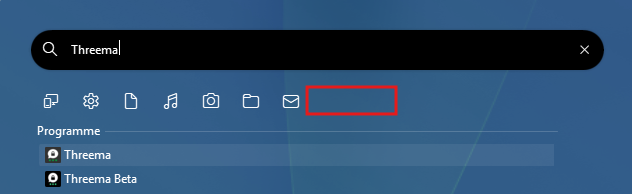
If it is not the button marked above, I would like to know which button is meant here: “Show 'search the internet' button.”
The button in the taskbar? This will not be displayed even if the search field has been removed in the Windows settings.
Shouldn't the sentences actually read:
“Search the web”
“Show search the web button”
Stardock Forums
Top
Hi thomas-k,
Thanks for posting. We now have this logged for review.
Internal Ref: ODNT-11789
Best regards,
Adam McGuinness
Stardock Support Specialist
Stardock Forums
Top
Confirmed. The problem has been fixed.
My system:
Windows 11 Professional 25H2 Build 26200.7171
Start 11 v2 2.60 Beta
Welcome Guest! Please take the time to register with us.