DeskScapes 2026 doesn't Survive Explorer Restart

DS 2026 not starting following an Explorer Restart

I am starting a separate thread for this topic because the quotes were getting ridiculously long in the "DeskScapes 2026 Release Feedback Thread." Here we won't need to use quotes.

When I restart explorer.exe, DeskScapes 2026 doesn't restart for some reason.

Following the explorer.exe restart, if I right-click the desktop and select "Show more options," then DeskScapes starts.

I had thought it was just the Info Pane, but I did a test by creating a Playlist of three static walls set to change every 30 seconds so I could tell if it was actually DeskScapes not starting. Sure enough, DeskScapes was not restarting.

I have no idea what's causing this to happen.

With DeskScapes running, if I restart the computer, DeskScapes loads normaly as expected.

Following an explorer.exe restart, if I use the Task Manager to stop the DeskScapes64.exe service (even though it says it's running), and then go to "C:\Program Files (x86)\Stardock\DeskScapes\" and double-click Deskscapes64.exe, then DeskScapes starts.

After this process, DeskScapes restarts properly after an explorer.exe restart. First the screen goes black and the desktop appears, and then it goes black again and DeskScapes starts. However, after a computer restart, the issue is present again.

pelaird

Windows 11 Pro 25H2 - 26200.8457;  DeskScapes 2026 - 26.0.0.1

864 views 9 replies
Reply #1 Top

Hello,

Sorry to hear you’re running into issues. Just a thought, have you tried doing a purge and reinstall to see if that helps? Otherwise, it may be best to wait for the Support or Dev team to step in with more detailed guidance.

Thank you,

Basj,

Stardock Community  Assistant.

Reply #2 Top

Tried doing the purge and reinstall as you suggested. Same issue is still present.

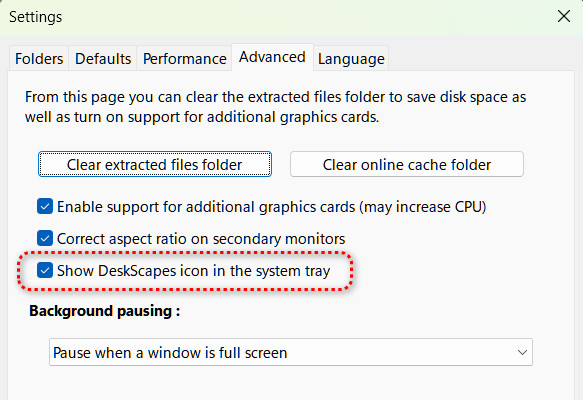
It is interesting though. After restarting explorer.exe and then right-clicking the desktop and selecting "Show more options," DeskScapes starts and the DeskScapes icon appears in the System tray. After restarting the computer, DeskScapes starts and the DeskScapes icon does not appear in the System tray even though " Show DeskScapes icon in the system tray" is checked.


Reply #3 Top

Hello,

I have forwarded your problem/question to Stardock Support Team for their assistance. Please keep an eye on this thread for any updates. We appreciate your feedback and patience. Thank you.


Basj,

Stardock Community  Assistant

+1 Loading…
Reply #4 Top

Hello and thanks for posting.

We've had the system tray icon issue logged and that is expected to be resolved with a future update.  

  • Internal Reference: ODNT-12317

While I haven't been able to reproduce the other issue from restarting Windows Explorer here on my setup (current release build of DS2026, dual monitors, Win 11 25H2 26200.8390) at this time, I will have this thread noted.  It seems relevant to add there are things related to restarting Explorer also being actively addressed.  

I would certainly like to know if we're able to isolate specific conditions to re-produce the issue, and if they persist through a future update.

Best regards,

Adam McGuinness
Stardock Support Specialist

+1 Loading…
Reply #5 Top

Will do. 

It's really not a big deal as it is easy to get DeskScapes to load using the right-click method. I will spend some time investigating further, and let you know if I have any new info.

Thanks,

pelaird

Reply #6 Top

I updated to DeskScapes2026_26.0.1.0-j54-Setup yesterday and am still experiencing the explorer restart issue not starting DeskScapes.

I have been searching the internet and my system for clues, but have not found any solution.

If I understood what happens when Shift + Right-click on the desktop is executed, maybe I could narrow down where the issue originates. I will add that my setup has not changed from DeskScapes 11.0.2.0, and this did not happen then. Something has changed in the way DeskScapes is loaded after background processes are restarted.

Any help in where to look?

Philip

Reply #7 Top
Quoting pelaird, reply 3993894

I updated to DeskScapes2026_26.0.1.0-j54-Setup yesterday and am still experiencing the explorer restart issue not starting DeskScapes.

I have been searching the internet and my system for clues, but have not found any solution.

If I understood what happens when Shift + Right-click on the desktop is executed, maybe I could narrow down where the issue originates. I will add that my setup has not changed from DeskScapes 11.0.2.0, and this did not happen then. Something has changed in the way DeskScapes is loaded after background processes are restarted.

Any help in where to look?

Philip

End of pelaird's quote

Shift + right click just makes explorer load up a dll which pulls in deskscapes.  This is a fallback and not the usual way to load.  Deskscapes64.exe is the usual loader piece

Reply #8 Top

Neil,

For some reason Deskscapes64.exe isn't running properly after a restart of explorer.exe. Something must be blocking it.

If I go to the Task Manager > Details, it says it's running, but if I "End Task" there, and then go to "C:\Program Files (x86)\Stardock\DeskScapes\Deskscapes64.exe" and launch it, the desktop goes black and DeskScapes then loads. Or, if I Shift + Right-click on the desktop, the desktop goes black and DeskScapes then loads.

It's not a big deal for me, It's just my nature to want to find out what's going on.

Philip

Reply #9 Top

We will take a look at the code to look for possible failure cases.

+1 Loading…