Bug Report / Feature Request: Broken scrolling step on vertical taskbar (Start11 v2)

Bug Report / Feature Request: Broken scrolling step on vertical taskbar (Start11 v2)

https://www.stardock.com/products/start11/

1. Overview

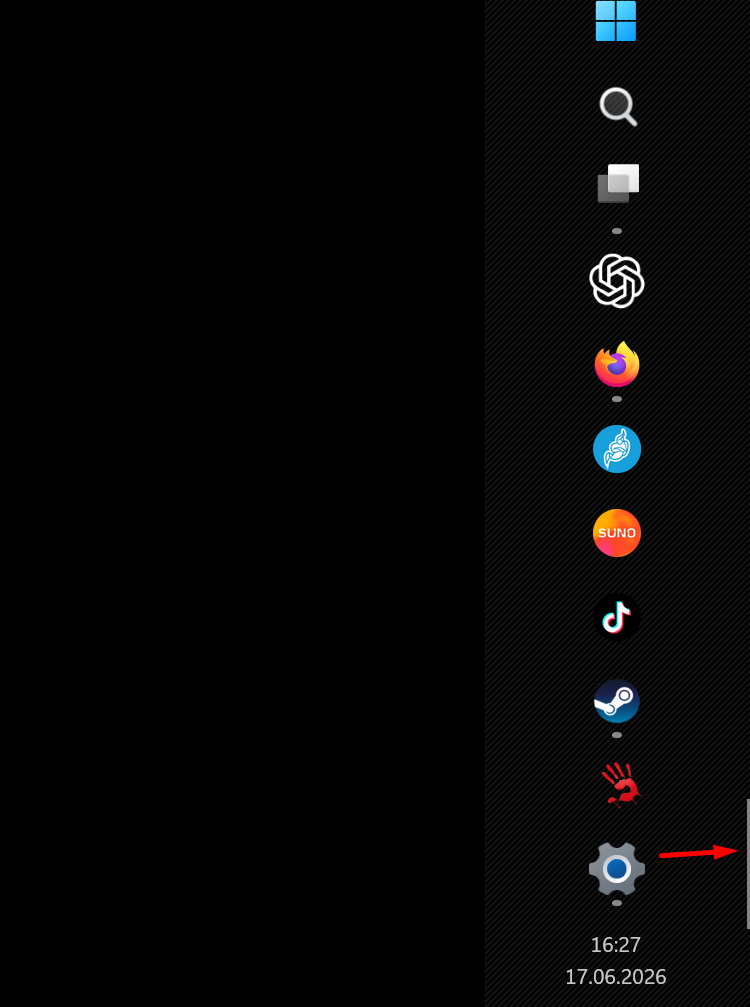
When the taskbar is configured to be positioned vertically (on the right side of the screen) and contains a large number of pinned/active application icons, the scrolling behavior inside the taskbar area is broken. The scrolling physics skips the middle section entirely.

2. Environment

  • OS: Windows 11

  • Software: Start11 (Stardock)

  • Taskbar Position: Vertical (Right)

3. Problem Description

As shown in image, when the number of running and pinned applications exceeds the vertical screen height, a scrollbar appears on the taskbar. However, using the mouse wheel or clicking the scroll controls does not result in smooth or incremental scrolling. Instead:

  • Scrolling down jumps directly to the absolute bottom of the icon list.

  • Scrolling up jumps directly to the absolute top of the icon list.

  • All icons located in the middle/center area of the taskbar become completely inaccessible because the scrolling animation skips past them entirely.

4. Expected Behavior

  • Mouse wheel scrolling on a vertical taskbar should move the icon list incrementally (e.g., icon-by-icon or by a fixed pixel step).

  • Users must be able to smoothly scroll and stop at any intermediate position to access centered icons.

  • The scrollbar thumb behavior should accurately reflect the visible position of the icons.

670 views 3 replies
Reply #1 Top

Subject: Feature Request: Multi-row icon layout support for vertical taskbar mode

1. Rationale / Use Case

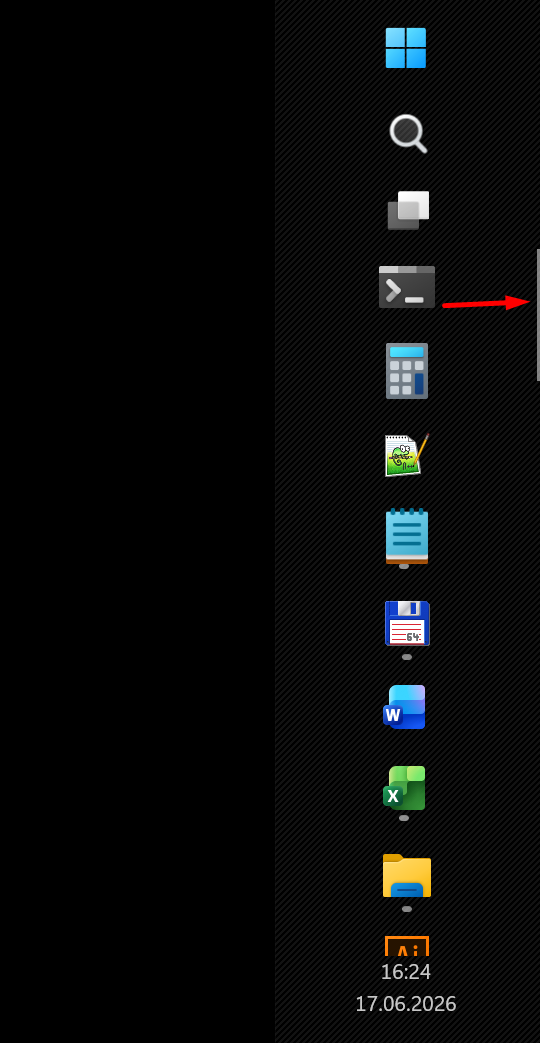
In addition to fixing the scrolling issue, it would be extremely beneficial to add an option for multi-row icon placement when the taskbar is positioned vertically. As seen in image, the icons are currently restricted to a single vertical column. When a user has a large number of pinned and running applications, a single column forces heavy reliance on scrolling, which slows down workflow.

2. Proposed Feature

  • Add an option in Start11 settings to allow the taskbar icons to wrap into two or more parallel vertical rows when the taskbar width is expanded.

  • Instead of forcing a single-column list that overflows into a scrollbar, the system should allow a grid-like layout (e.g., 2, 3, or more rows of icons side-by-side).

3. Benefits

  • Faster Navigation: Users can view significantly more application icons simultaneously without needing to scroll up and down.

  • Better Screen Real Estate Utilization: For users with wide or ultra-wide monitors, widening the vertical taskbar to accommodate 2–3 rows of icons is a much more efficient use of space than an endless single column.

Reply #2 Top

Hello,

Sorry to hear you are having issues. I  believe I can reproduce your issue on my system. Refer to my short video below. I have forwarded your problem/question to Stardock Support Team for their assistance. Please keep an eye on this thread for any updates.

Quoting davidshevchenko, reply 3994546

Subject: Feature Request: Multi-row icon layout support for vertical taskbar mode

1. Rationale / Use Case

In addition to fixing the scrolling issue, it would be extremely beneficial to add an option for multi-row icon placement when the taskbar is positioned vertically. As seen in image, the icons are currently restricted to a single vertical column. When a user has a large number of pinned and running applications, a single column forces heavy reliance on scrolling, which slows down workflow.

2. Proposed Feature

Add an option in Start11 settings to allow the taskbar icons to wrap into two or more parallel vertical rows when the taskbar width is expanded.

Instead of forcing a single-column list that overflows into a scrollbar, the system should allow a grid-like layout (e.g., 2, 3, or more rows of icons side-by-side).

3. Benefits

Faster Navigation: Users can view significantly more application icons simultaneously without needing to scroll up and down.

Better Screen Real Estate Utilization: For users with wide or ultra-wide monitors, widening the vertical taskbar to accommodate 2–3 rows of icons is a much more efficient use of space than an endless single column.

End of davidshevchenko's quote

I have forwarded your request to the Stardock Support Team for their review and recommendations. We really do appreciate your feedback, 

Thanks

Basj,

Stardock Community  Assistant.

Reply #3 Top

Hello and thanks for posting.

I can see how the vertical taskbar scrollbar jumping like that can be somewhat jarring, especially with many open apps.

Quoting davidshevchenko, reply 3994546

Subject: Feature Request: Multi-row icon layout support for vertical taskbar mode

1. Rationale / Use Case

In addition to fixing the scrolling issue, it would be extremely beneficial to add an option for multi-row icon placement when the taskbar is positioned vertically. As seen in image, the icons are currently restricted to a single vertical column. When a user has a large number of pinned and running applications, a single column forces heavy reliance on scrolling, which slows down workflow.

2. Proposed Feature

Add an option in Start11 settings to allow the taskbar icons to wrap into two or more parallel vertical rows when the taskbar width is expanded.

Instead of forcing a single-column list that overflows into a scrollbar, the system should allow a grid-like layout (e.g., 2, 3, or more rows of icons side-by-side).

3. Benefits

Faster Navigation: Users can view significantly more application icons simultaneously without needing to scroll up and down.

Better Screen Real Estate Utilization: For users with wide or ultra-wide monitors, widening the vertical taskbar to accommodate 2–3 rows of icons is a much more efficient use of space than an endless single column.

End of davidshevchenko's quote

I'll have this all logged for review.  Internal reference: ODNT-12465

Best regards,

Adam McGuinness
Stardock Support Specialist