V6.5.4 Don't know where to start to Troubleshoot this bug. Icons Squashed when using Virtual Monitor

Appollo-Moonlight / Virtual 4k Monitor / Regedit Tweaked / Windows 11

I need help, I'm 'thinking' it's Fences as this only happened when I updated to V6 and then sub-updates.

I have 4 monitors, and I use fences to keep my icons hidden and in place and it does a backup and allows me to restore. Seemed to work fine with that.

I use Apollo and Moonlight, so I can play my games in 4k on my Laptop streaming it from the Desktop, I'd connect and usually the icons would stay in their place when it switches off the 4 real monitors and leave me with a 4k virtual monitor.

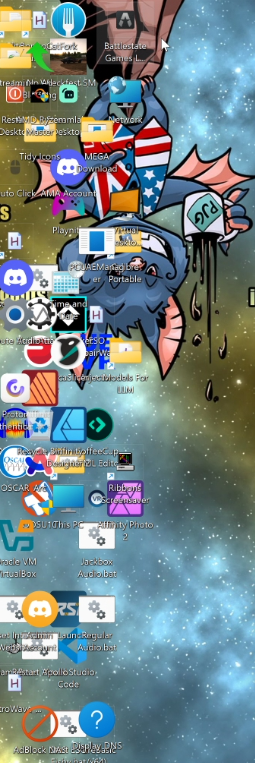
Recently, all the icons have clumped into the side or corner, and when I go into the settings of Fences, tweaking some of the settings like 'Enable Snapping' in the Layout section, just messing with those makes the icons stay in the same place, but re-arrange themselves.

My problem, I have 4 things that are being involved (Fences, Registry switching from -1125 to -910 bringing them closer, Apollo/Moonlight and Windows 11) and I don't know what to troubleshoot, I could be troubleshooting something and it's a simple fix in one of them, so I don't know where to start.

Where do I start, is there anything in Fences I'm overlooking, is there any logs or information I can provide to you to help me get to the bottom of this if it's fences related?

Thanks and Regards

Paul.
2,193 views 16 replies
Reply #1 Top

Hello,

Sorry to hear you are having issues. I believe this best answer by Support, hence, I have forwarded your problem/question to Stardock Support Team for their assistance. Please keep an eye on this thread for any updates. We appreciate your feedback and patience. 

Meanwhile, please do these steps.

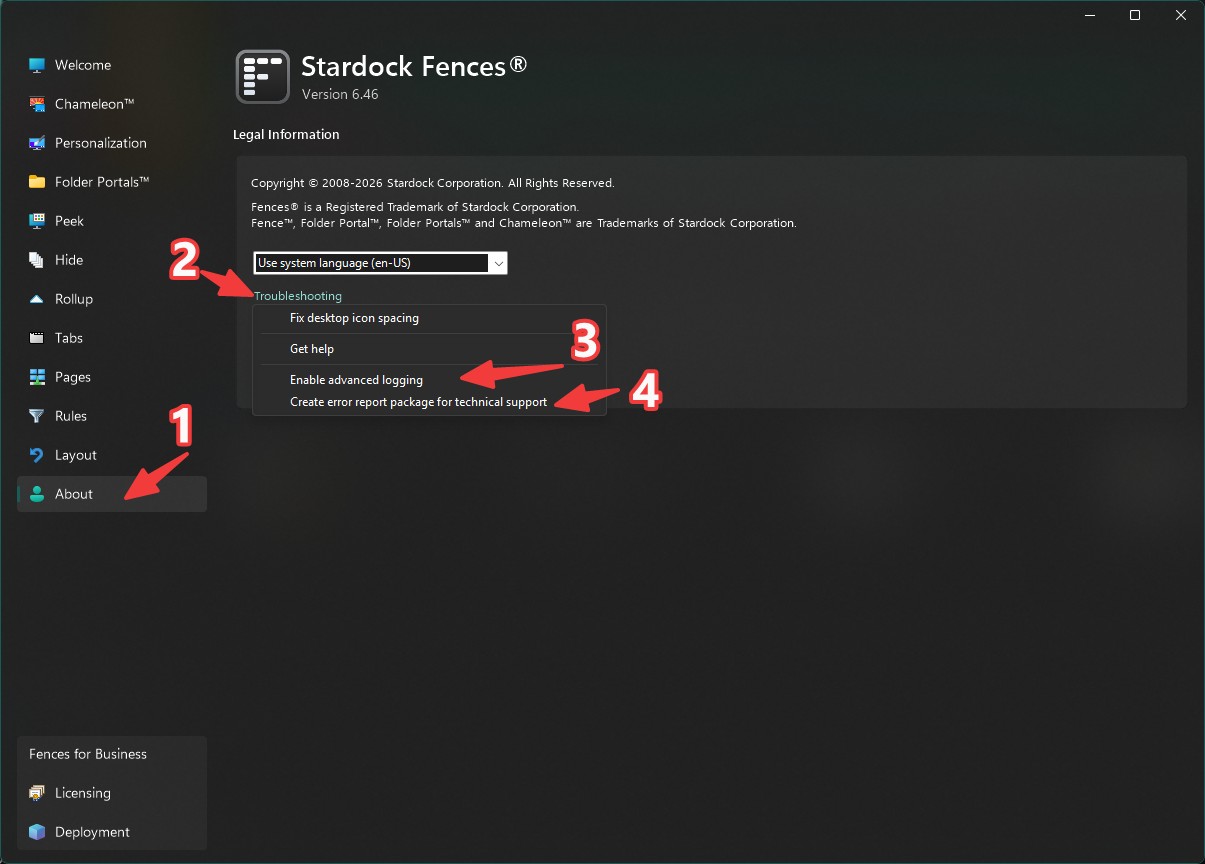
While your Fences and all the icons in correct position, Turn on Advance logging, once that done, reboot the system. After reboot is done, try to reproduce your issue. After the issue appear. Create error report package and send in for review. Do mention this thread in your report. So they can fall back to this thread.

Thank you.

Basj,

Stardock Community  Assistant

Reply #2 Top

+1, the advanced log would help to dig in! Enable, reboot, repro, then create report from the same menu.

Perhaps do so before trying out the "Fix Deskop Icon Spacing" in the troubleshooting menu, which will essentially reset the spacing to default. But at any rate, assuming you'd like to keep the compressed spacing but not have them be bunched up.

Does this happen on all monitors? Triggered when you switch from the 4 to the virtual and back again etc?

Apollo/Moonlight is an oddball, but it should just be yet-another-monitor, so we'll see if something stands out.

Reply #3 Top

I've activated the troubleshooting mode.

My icons were in the location I want when I had my normal 4 monitors on, I checked the registry and it was set at -1215, and I restarted the system, I turned on Apollo/Moonlight and the icons all shifted to the left of the virtual monitor and crammed together down the side. I tried the 'Fix Desktop Icon Spacing' in the troubleshooting menu and after log off and back in during Apollo/Moonlight the icons were all squashed into the top left quadrant/corner of my virtual screen. 

I've uploaded to the Dropbox redirect and got "We’ll let Jeff Bargmann know you uploaded files."

I also have to ask, what happened to the first post that was here, it just went? the user icon was a blue icon, I read it, but then I was coming back to follow the steps a little later and the post had gone, and now I see 'edited' at the top if the new first post?

Thanks
Paul.

Reply #4 Top
Quoting PJGHangouts, reply 4145981

I also have to ask, what happened to the first post that was here, it just went? the user icon was a blue icon, I read it, but then I was coming back to follow the steps a little later and the post had gone, and now I see 'edited' at the top if the new first post?

End of PJGHangouts's quote

The first reply was from Haalee, but now it is gone. Not sure by who. When I posted my reply it was as reply#2. I did edited my reply, so perhaps that is why there is an "edited" tag there. But I did not touch Reply#1 in any way. Hope that answer your question.

Thank you,

Basj,

Stardock Community  Assistant

Reply #5 Top

Hi PJG, thanks for sending that report. I notice a couple things:

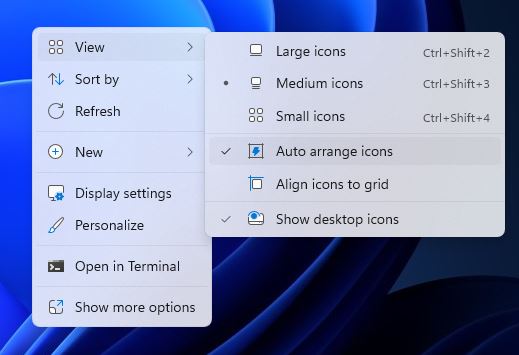
- It seems like both "Grid" and "Auto Arrange" are turned off. Could you try enabling one or both and seeing if it helps the issue?

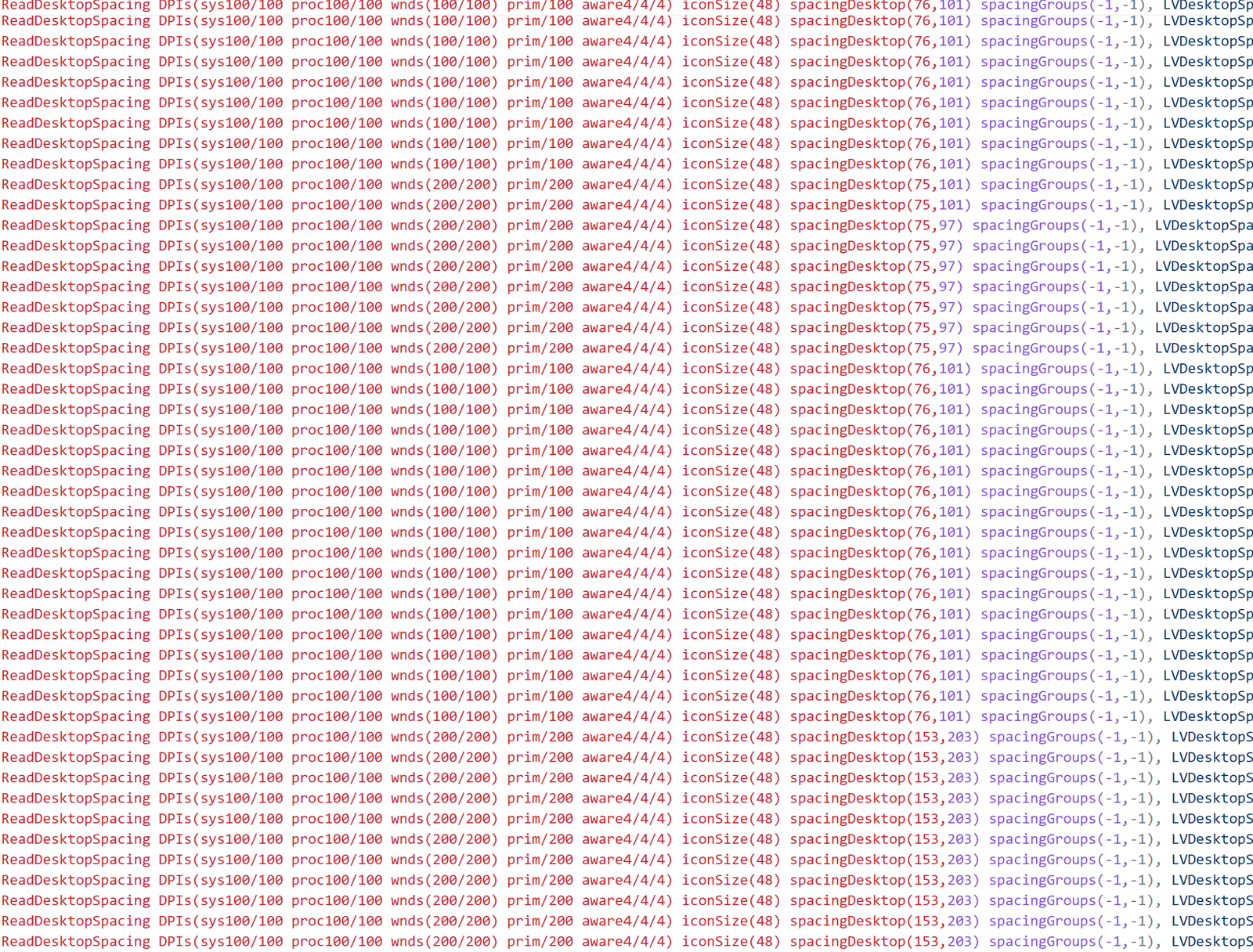
- Looking through the logs, I do see it going from 4 monitors @ 100% DPI and then going to the one monitor at @ 200%, and all the numbers actually look very good, but just it can't use the spacing becaue icon positions are set to manual! (So hopefully "arrange to grid" or auto arrange helps.)

If you don't want it on always, you can probably get away with toggling it on and off again, just, any new icons will get funky positions when switching between the 100% and 200% DPIs, because there's inadequate data to ensure they're obeying the rules during such a transformation without either grid or auto arrange.


2026-09-02 03:09:03,301 - WM_SETTINGCHANGE Monitor State [4|-3000,0|6840x1920|100]

2026-09-02 03:15:11,713 - IconSpacing Changed 76x101

2026-09-02 03:15:12,170 - ReadDesktopSpacing DPIs(sys100/100 proc100/100 wnds(100/100) prim/100 aware4/4/4) iconSize(48) spacingDesktop(76,101) spacingGroups(-1,-1), LVDesktopSpacingRaw(76,101) desktopSpacingCalc(76,101) desktopSpacingCalcOldVsNew(75,76) MetricsSpacingRaw(75,75) MetricsSpacingAdj(76,101) lvHwndSpacingRaw(91,91) lvHwndSpacingAdj(91,91) groupsMatchDesktop(0) shim(2)

2026-09-02 03:16:04,992 - WM_SETTINGCHANGE Monitor State [1|0,0|3840x2160|200]

2026-09-02 03:16:00,869 - ReadDesktopSpacing DPIs(sys100/100 proc100/100 wnds(200/200) prim/200 aware4/4/4) iconSize(48) spacingDesktop(153,203) spacingGroups(-1,-1), LVDesktopSpacingRaw(152,196) desktopSpacingCalc(152,196) desktopSpacingCalcOldVsNew(75,152) MetricsSpacingRaw(75,75) MetricsSpacingAdj(152,196) lvHwndSpacingRaw(182,182) lvHwndSpacingAdj(182,182) groupsMatchDesktop(0) shim(2)

2026-09-02 03:16:05,222 - ReadDesktopSpacing DPIs(sys100/100 proc100/100 wnds(200/200) prim/200 aware4/4/4) iconSize(48) spacingDesktop(153,203) spacingGroups(-1,-1), LVDesktopSpacingRaw(152,198) desktopSpacingCalc(152,198) desktopSpacingCalcOldVsNew(75,152) MetricsSpacingRaw(75,75) MetricsSpacingAdj(152,198) lvHwndSpacingRaw(182,182) lvHwndSpacingAdj(182,182) groupsMatchDesktop(0) shim(2)

2026-09-02 03:16:05,222 - IconSpacingSize Changed 182x182 / 182x182

2026-09-02 03:16:05,222 - IconSpacing Changed 152x198

2026-09-02 03:17:56,342 - ReadDesktopSpacing DPIs(sys100/100 proc100/100 wnds(200/200) prim/200 aware4/4/4) iconSize(48) spacingDesktop(153,203) spacingGroups(-1,-1), LVDesktopSpacingRaw(152,198) desktopSpacingCalc(152,198) desktopSpacingCalcOldVsNew(75,152) MetricsSpacingRaw(75,75) MetricsSpacingAdj(152,198) lvHwndSpacingRaw(182,182) lvHwndSpacingAdj(182,182) groupsMatchDesktop(0) shim(2)


Haalee is a support assistance bot which IT has been testing, who has, surprise surprise, been providing inaccurate information, so I deleted it when I saw it. Thanks for your patience.

Reply #6 Top
'- Looking through the logs, I do see it going from 4 monitors @ 100% DPI and then going to the one monitor at @ 200%, and all the numbers actually look very good, but just it can't use the spacing becaue icon positions are set to manual! (So hopefully "arrange to grid" or auto arrange helps.)'
Unfortunately that didn't help, I guessed those 'menu' choices were actually windows, not linked to your app, but now I have troubleshooting turned on, I see other menu choices, about triggering a crash, etc.
Unless you are telling me there are settings in the app itself, to toggle arrange to grid and auto arrange?
if there isn't, from the right click and toggle on or off didn't make any change apart from appearing to rotate the icons, like random re-position and then back to where they were, in the wrong place.
Oh, and I get the IT/AI etc, I use it on the daily, it's not as good as all the people making the big money are making us believe it is.
Any more thoughts on my problem I'm facing? Attached is what I see right now [if it goes through]
Reply #7 Top

Just to confirm this screenshot is with "Auto arrange icons" and "Align icons to grid" turn on? If so, that is strange, 

Thank you,

Basj,

Stardock Community  Assistant

Reply #8 Top

Yes it's activated. I think it's something to do with the 'medium' choices.

See the attached video for what happens to my icons doing some simple attempted changes. (Via Dropbox)

If I put it small, it appears to work, I just can't see it, large with respect, I don't want all my icons visible on the internet (so I'm not doing a screenshot) but large works also but too big to use.

I used the 'create report' again, to allow me to upload the latest report, nothing will have changed, but it allows to trigger the dropbox, and I also uploaded a recording of my desktop icons changing while I'm 'tweaking'

Hope this helps to get to the bottom of it, it's not annoying, but more of an inconvenience at the moment.

Thanks.

Reply #9 Top

Oh wow, @Paul that is quite the video. Painful to watch. Ok noted. We will dive into the 2nd report! Confirmed that AA/Grid are indeed turned on in that latest snapshot.

More soon. Will be staring at screens like this & adding additional output until something makes sense.

Reply #10 Top

No problem keep me posted, I can only but say, make sure you are looking away on a regular basis or you eyes will look like this after a few minutes.


Googly Eyes Gif

Reply #11 Top

Ok! I can reproduce! And, I think the solution is already in your hands. Simply do the "Fix desktop icon spacing" from Troubleshooting menu again and log off and on. New build [will post link tmw] resolves this without the need for "fix icon spacing" usage. The issue I think is a Fences setting, not related to the system setting. You should be fine to put the system setting back to -910 after. In my testing this was fine.

Here's the pattern.

"UseRealtimeIconSpacing"=dword:ffffffff

Tech details in case interested: basically I see this setting turning on and then turning off! It goes from fffffffe in a previous report to ffffffff in the 9/3 report, which are two different defaults based on new vs upgrade installs. This is likely the result of loading from backup layouts after attempts to "fix desktop icon spacing", which applies this new value. Just for context, determining actual spacing is tricker than it seems, and we quote unquote ""improved"" this in V6 for a variety of types of mid-flight resolution/DPI changes, but it weakened in in other ways. To carefully roll out an improvement that addresses all scenarios, we rolled out different defaults for upgrading vs new installs, which for upgrades applied the change only to "Large" icons which were a known troublemaker and can be treated differently at DPIs > 100%. Looks like this hits at medium @ 200% too. We've been feeling confident in the algo as a whole, able to reproduce, and it's been seeming time to roll this algo out wide. For reference, Windows handles DPI changes differently depending on whether or not resolution changes alongside DPI, which is why just the problem persists if you change DPI back to 100% without changing resolution. (Windows internals are complex!)

If this doesn't fix, there's even more detail now in the new build log - so, the process if this doesn't help would be: install the upcoming new build, reboot and see what it reads out.

I feel silly suggesting this as it seems like "I've tried that, but still I went and loaded an old layout", implying it didn't fix it or something, but that's the read!

Reply #12 Top
So, this is what I did.
I did as you said, I used the troubleshoot menu, but, when it comes to 'log off and log on again' the moment I do that from the Apollo/Moonlight combo, it ends the virtual connection and drops me back to the 4 monitor setup.
So, I did that, restarted, so I was back at 4, reset through the troubleshoot menu, put my registry back to my usual values, logged off and back on, putting my icons to the size I want, then rearranged as I always have My Computer, My Network and Recycle Bin top left, then took a snapshot of that.
Then went back into Apollo/Moonlight and did the same, I now have both snapshots for each mode, just in case, and if I re-arrange icons or remove, unhide, etc, I'll just update.
I'll await the next update to be pushed, hope my bug helped you find a problem you didn't know was there. 
Thanks again for your support.


Reply #13 Top

Hi Paul,

Please check your private messages if you haven't, you should find a thank-you message from me for your extra effort here :)

And to follow up, we now have a test build for you to try.  Please remember to reboot the PC after download/installing:

https://stardock.cachefly.net/software/Fences/Fences6/Fences6_6.5.6.2-j140-Setup.exe

Please let us know if this helps!

Best regards,

Adam McGuinness
Stardock Support Specialist

Reply #14 Top

Adam, 

Thank you for that, it's appreciated. I know what it's like on the other side of the fence when people say "Errrr, it's broke, fix it" I'd rather someone provide me with details/screenshots for the stuff I do (all personal hobbies) so I know where to start, so I like to offer that help out myself if it, well, errr, helps.

I'll install and test it later today and if I have any issues I'll create a new forums post. (again, something that bugs me when you see someone jump onto someone else's post instead of creating a separate thread lol)

Regards

Paul.

+1 Loading…
Reply #15 Top

@Paul, we appreciate! Yes this definitely makes a difference so thank you for your patience.

Yes this build (v6.56/6.5.6.2) has the "improved spacing detection at all icon sizes" on by default for all installs, so give it a shot. We'll see if applying it in this way gets it done, or if issue remains and so more heavy-thinking to do.

If for some reason it's still a no-go, there's even more fine-grained debug output related to all this, so, a new debug report upload would be the next step, and we'd get to walk through again with the enhanced spacing detail.

No need to start a new thread if it's the same issue! Fingers crossed

+1 Loading…
Reply #16 Top

Well, so far it looks 'normal' I changed my regedit back, and I don't have any visible issues now, it give me a kick in the rear delete to actually delete some of the icons that were 'hidden' like the games from steam I install.

If you want me to upload a 'report' so you can compare the previous broken setup with the current, I can, you just need to ask.

I'll get back to you otherwise in this thread, if I need too.

Regards

Paul.