Start11 v2 Beta (2.81) Feedback Thread

With the Start11 v2 Beta (2.81) release today, we are creating this thread so that users can report any observed issues.  

Obtaining Object Desktop Insider Builds

Object Desktop Manager

Object Desktop members can get beta and Insider builds from within Object Desktop Manager with 'Enable Object Desktop Insider builds' enabled:

image-20240219-210025.png

Stardock Download Page

Or via their download page in the ‘Object Desktop Insider’ section

image-20240219-213743.png

Obtaining Beta Releases

Stardock.com

If a beta was released, Object Desktop Members would see it in the ‘Object Desktop’ section.

Individual purchases would see it on their registration of the product under their download page.

image-20240219-214050.png

Steam

  • Right-click the Product in Steam

  • Properties

  • Betas

  • Select the beta branch at the top right (there is no password)

Example

https://cdn.stardock.us/support/uploads/steamwebhelper_2024-02-19_17-44-35.png

Reporting an issue

Please include the following for anything found:

  • Exact Windows version \ build (winver.exe)

  • Detailed steps to recreate the issue seen

  • Screenshots and videos are very helpful.  Videos can be uploaded to a cloud drive service (GoogleDrive, DropBox, OneDrive, YouTube), with a shared link included in your post.  Images can be copied and pasted directly into a post.

  • If there are specific apps that the app does not work (well) with, please note what apps and their exact versions.  If any app is not common, a link to a trial version would be appreciated.

Thank you for your interest and any time you put into making Start11 v2 a better product.

541 views 14 replies | Pinned
Reply #1 Top

Start11 v2.81 Changelog (Beta)

Date

9/09/2026

Version

  • UI: 2.81

  • File version: 2.8.1.0

Changes

  • Fixes taskbar alignment problem with centered taskbar icons on secondary displays when the taskbar is at the bottom.

Reply #2 Top

Known issues

While we appreciate all feedback, please remember that we offer no official support for beta \ preview \ developer channel versions of Windows. If you report issues while in any of those early release channels, you should not expect them to be addressed unless it still exists in a retail version of Windows.

Reply #3 Top

***Reserved***

Reply #4 Top

So I installed this beta because I also had the issue with a multimonitor setup. Now I am traveling, and I cannot verify it, but I am still very upset with the Internal reference: ODNT-12512 that still is not fixed. As I explained, you cannot click on the battery and power settings after right clicking on the battery icon, and this situation has degraded since 2.74 where the problem only appeared when I increased the size of the taskbar more than 3-4 lines. I change the power profile pretty often and this is very irritating, especially since my post seems to fall on deaf ears and there is even degradation of the performance.

EDIT: Before issuing this beta update, you could have at least bring back the previous functionnality which was degraded with v2.8

Reply #5 Top

Hi Nikosyan,

Quoting Nikosyan, reply 4146617

So I installed this beta because I also had the issue with a multimonitor setup. Now I am traveling, and I cannot verify it, but I am still very upset with the Internal reference: ODNT-12512 that still is not fixed. As I explained, you cannot click on the battery and power settings after right clicking on the battery icon, and this situation has degraded since 2.74 where the problem only appeared when I increased the size of the taskbar more than 3-4 lines. I change the power profile pretty often and this is very irritating, especially since my post seems to fall on deaf ears and there is even degradation of the performance.

EDIT: Before issuing this beta update, you could have at least bring back the previous functionnality which was degraded with v2.8

End of Nikosyan's quote

We appreciate that you checked the behavior again in 2.8, and as I said on that thread, I have updated our log for the developer to include that information.  

Indeed, on some PCs, the mouse selection area for that context menu on the taskbar is off, making it difficult to click.  Just to clarify your message here, are you saying this is still happening for you in 2.81, also?  If so, I will make sure this is noted in our log on the issue.  

In the meantime, as this gets looked at, please also know you can access your power & battery settings by typing "Battery settings" and selecting it from your Start menu.

Best regards,

Adam McGuinness
Stardock Support Specialist

Reply #6 Top

Hola,

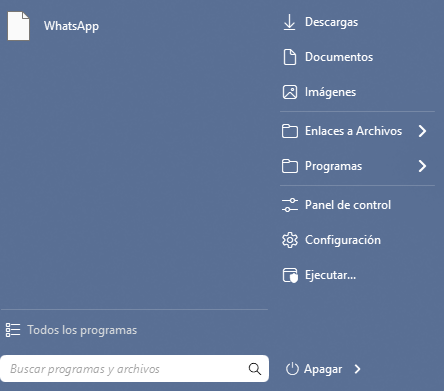
Desde las primeras versiones de Start11 v2, he experimentado un problema persistente con algunos iconos de aplicaciones que aparecen como iconos blancos en blanco.

El problema se presenta en dos lugares:

  • En la barra de tareas Start11, cuando la aplicación afectada está abierta.

  • En el menú Inicio de Start11, en la sección de programas usados ​​recientemente.

Esto no afecta a todas las aplicaciones, pero sí a algunas de ellas de forma constante. Los iconos se muestran correctamente en otras partes de Windows, incluida la barra de tareas nativa. Por lo tanto, el problema parece estar relacionado con la forma en que Start11 recupera, almacena en caché o muestra ciertos iconos de las aplicaciones.

Mi versión actual de Windows es Windows 11 25H2, compilación 26200.9445.

Llevo mucho tiempo intentando solucionar este problema sin éxito. He probado los pasos habituales para resolverlo, pero el problema persiste. Dado que los mismos programas muestran sus iconos correctamente en la barra de tareas estándar de Windows, sospecho que podría tratarse de un problema de compatibilidad con Start11 v2, de la caché de iconos o de la representación gráfica.

¿Podría indicarme si se trata de un problema conocido y si existe alguna solución recomendada, procedimiento de diagnóstico o archivo de registro que pueda proporcionar?

Gracias.


Barra de tareas de Windows


Reply #7 Top
Quoting fjmatad, reply 4146627

Hola,

Desde las primeras versiones de Start11 v2, he experimentado un problema persistente con algunos iconos de aplicaciones que aparecen como iconos blancos en blanco.

El problema se presenta en dos lugares:

En la barra de tareas Start11, cuando la aplicación afectada está abierta.

En el menú Inicio de Start11, en la sección de programas usados ​​recientemente.

Esto no afecta a todas las aplicaciones, pero sí a algunas de ellas de forma constante. Los iconos se muestran correctamente en otras partes de Windows, incluida la barra de tareas nativa. Por lo tanto, el problema parece estar relacionado con la forma en que Start11 recupera, almacena en caché o muestra ciertos iconos de las aplicaciones.

Mi versión actual de Windows es Windows 11 25H2, compilación 26200.9445.

Llevo mucho tiempo intentando solucionar este problema sin éxito. He probado los pasos habituales para resolverlo, pero el problema persiste. Dado que los mismos programas muestran sus iconos correctamente en la barra de tareas estándar de Windows, sospecho que podría tratarse de un problema de compatibilidad con Start11 v2, de la caché de iconos o de la representación gráfica.

¿Podría indicarme si se trata de un problema conocido y si existe alguna solución recomendada, procedimiento de diagnóstico o archivo de registro que pueda proporcionar?

Gracias.

End of fjmatad's quote

Hello,
Sorry to hear you are having issues. Need to know which steps did already done, so we know not to suggest it again. Also, need to know:

  1. How did you pinned that specific application to your Start menu? 
  2. if you try different start menu style, does the issue still appear?
  3. The issue Only appear on Start menu, not on the taskbar?

    Thank you,
    Basj,
    Stardock Community Assistant.


Reply #8 Top

The issue persists even after a clean installation of Windows and after uninstalling and reinstalling Start11.

In this specific case, the application affected is WhatsApp. Its icon appears as a blank white icon both in the Start11 Start menu and in the Start11 taskbar. The application is not pinned: in the taskbar, the blank icon appears only while WhatsApp is running, and in the Start menu it appears under the recently used applications section.

I have always used the Modern style in Start11, but the problem remains even after switching to other Start menu styles.

The WhatsApp icon displays correctly in the native Windows taskbar, which further suggests that the problem may be related to Start11’s handling of application icons, running applications, or recently used items.

Best regards
Francisco J. Matas


Reply #9 Top
Quoting fjmatad, reply 4146641

The issue persists even after a clean installation of Windows and after uninstalling and reinstalling Start11.

In this specific case, the application affected is WhatsApp. Its icon appears as a blank white icon both in the Start11 Start menu and in the Start11 taskbar. The application is not pinned: in the taskbar, the blank icon appears only while WhatsApp is running, and in the Start menu it appears under the recently used applications section.

I have always used the Modern style in Start11, but the problem remains even after switching to other Start menu styles.

The WhatsApp icon displays correctly in the native Windows taskbar, which further suggests that the problem may be related to Start11’s handling of application icons, running applications, or recently used items.

Best regards

Francisco J. Matas

End of fjmatad's quote

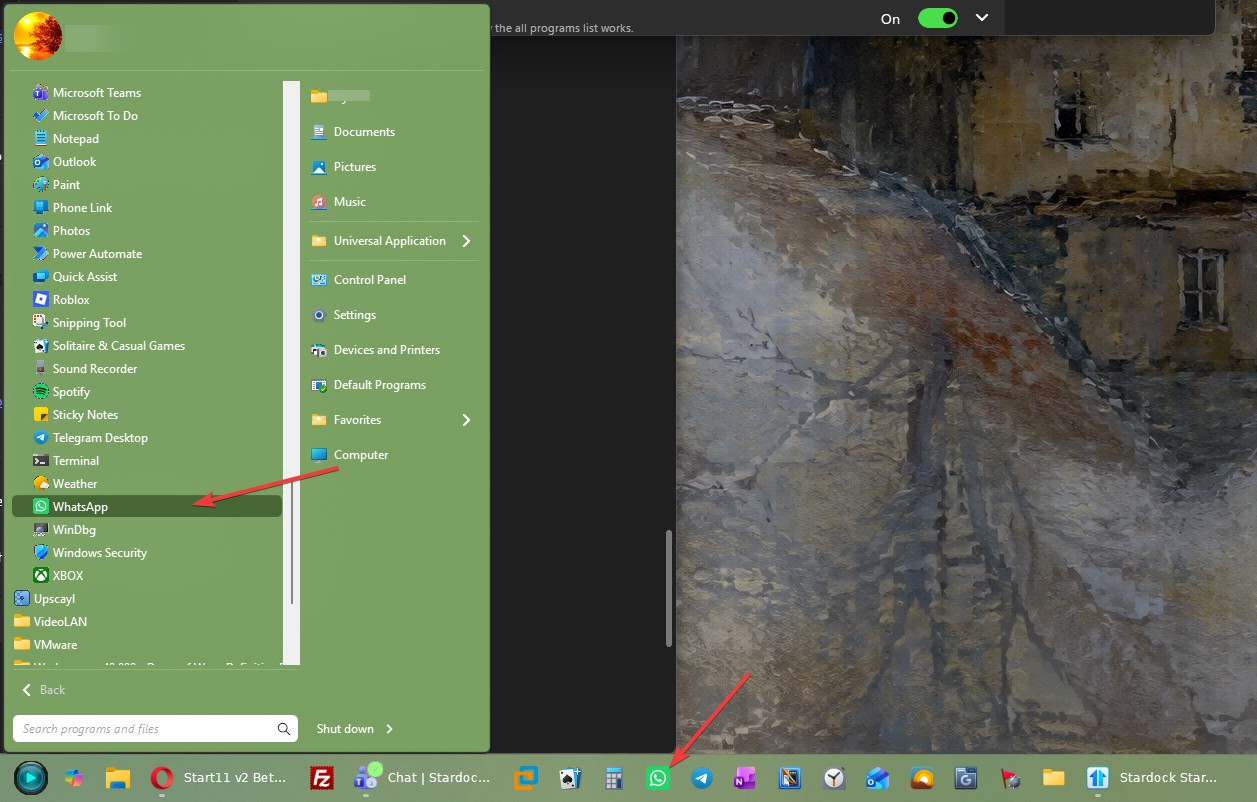
This is what I get on my Modern Start menu and taskbar. The Whatapp icon showup ok for me.

Need to check, your Whatsapp from MS Store or direct download Whatsapp Webpage?

Thank you,

Basj,
Stardock Community Assistant


Reply #10 Top
Quoting Abisnabidam, reply 4146626

Hi Nikosyan,


Quoting Nikosyan, reply 4146617

So I installed this beta because I also had the issue with a multimonitor setup. Now I am traveling, and I cannot verify it, but I am still very upset with the Internal reference: ODNT-12512 that still is not fixed. As I explained, you cannot click on the battery and power settings after right clicking on the battery icon, and this situation has degraded since 2.74 where the problem only appeared when I increased the size of the taskbar more than 3-4 lines. I change the power profile pretty often and this is very irritating, especially since my post seems to fall on deaf ears and there is even degradation of the performance.

EDIT: Before issuing this beta update, you could have at least bring back the previous functionnality which was degraded with v2.8

End of Nikosyan's quote

We appreciate that you checked the behavior again in 2.8, and as I said on that thread, I have updated our log for the developer to include that information.  

Indeed, on some PCs, the mouse selection area for that context menu on the taskbar is off, making it difficult to click.  Just to clarify your message here, are you saying this is still happening for you in 2.81, also?  If so, I will make sure this is noted in our log on the issue.  

In the meantime, as this gets looked at, please also know you can access your power & battery settings by typing "Battery settings" and selecting it from your Start menu.

Best regards,

Adam McGuinness

Stardock Support Specialist

End of Abisnabidam's quote

Yes this behavior is exactly the same, you cannot click at all on it, a situation that has degraded with v2.8 if Йam not mistaken. Before you could click if the taskbar was one-two lines thick. Thank you for the suggestion, of course I know that there other ways to access the settings, but already Microsoft has degraded the access from Windows 10 (direct dragging on the battery for power settings), everytime you add one more click is an annoyance and disruption of workflows (i.e. unplugging the laptop to change place while on full performance and needing to change the setting also on while battery, back and forth)

Reply #11 Top
Quoting Nikosyan, reply 4146679

Yes this behavior is exactly the same, you cannot click at all on it, a situation that has degraded with v2.8 if Йam not mistaken. Before you could click if the taskbar was one-two lines thick. Thank you for the suggestion, of course I know that there other ways to access the settings, but already Microsoft has degraded the access from Windows 10 (direct dragging on the battery for power settings), everytime you add one more click is an annoyance and disruption of workflows (i.e. unplugging the laptop to change place while on full performance and needing to change the setting also on while battery, back and forth)

End of Nikosyan's quote

Thank you for clarifying; I do understand the annoyance and disruption.  And yes, I have reproduced this on a PC in version 2.81 (when Enhanced Taskbar is on) also.  

While investigating further, I've also noted that some PCs tested do not have the same issue.  This is interesting, and my best guess is currently the results are specific to certain displays.  

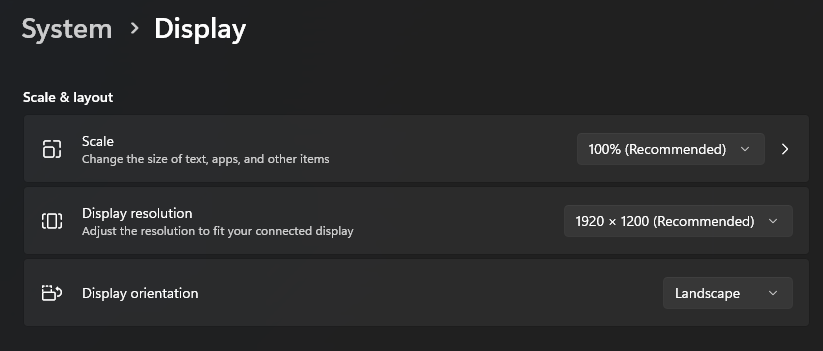
To add to our log, could you also check your System -> Display settings?  I think it would be helpful to know what it says under the "Scale & layout" heading there (Scale, display resolution, display orientation).  

Just as an example, the issue did not reproduce on a PC test with these specifications:

Thank you again for your help identifying and investigating the issue.  We do appreciate it.

Best regards,

Adam McGuinness
Stardock Support Specialist

Reply #12 Top
Quoting Abisnabidam, reply 4146699
Quoting Nikosyan, reply 4146679

Yes this behavior is exactly the same, you cannot click at all on it, a situation that has degraded with v2.8 if Йam not mistaken. Before you could click if the taskbar was one-two lines thick. Thank you for the suggestion, of course I know that there other ways to access the settings, but already Microsoft has degraded the access from Windows 10 (direct dragging on the battery for power settings), everytime you add one more click is an annoyance and disruption of workflows (i.e. unplugging the laptop to change place while on full performance and needing to change the setting also on while battery, back and forth)

End of Nikosyan's quote

Thank you for clarifying; I do understand the annoyance and disruption.  And yes, I have reproduced this on a PC in version 2.81 also.  

While investigating further, I've also noted that some PCs tested do not have the same issue.  This is interesting, and my best guess is currently the results are specific to certain displays.  

To add to our log, could you also check your System -> Display settings?  I think it would be helpful to know what it says under the "Scale & layout" heading there (Scale, display resolution, display orientation).  

Just as an example, the issue did not reproduce on a PC test with these specifications:

Thank you again for your help identifying and investigating the issue.  We do appreciate it.

Best regards,

Adam McGuinness

Stardock Support Specialist

End of Abisnabidam's quote

I have the same behavior on the laptop display (1600p-125% scaling ) and the main desktop display (1200p - 100% scaling)

EDIT: Maybe is a 16:10 vs 16:9 issue?

EDIT2: I will try again when I get back at my desk also with my 4k monitor and both orientations. 

Reply #13 Top
Quoting basj, reply 4146666
Quoting fjmatad, reply 4146641

The issue persists even after a clean installation of Windows and after uninstalling and reinstalling Start11.

In this specific case, the application affected is WhatsApp. Its icon appears as a blank white icon both in the Start11 Start menu and in the Start11 taskbar. The application is not pinned: in the taskbar, the blank icon appears only while WhatsApp is running, and in the Start menu it appears under the recently used applications section.

I have always used the Modern style in Start11, but the problem remains even after switching to other Start menu styles.

The WhatsApp icon displays correctly in the native Windows taskbar, which further suggests that the problem may be related to Start11’s handling of application icons, running applications, or recently used items.

Best regards

Francisco J. Matas

End of fjmatad's quote

This is what I get on my Modern Start menu and taskbar. The Whatapp icon showup ok for me.

Need to check, your Whatsapp from MS Store or direct download Whatsapp Webpage?

Thank you,

Basj,

Stardock Community Assistant

End of basj's quote

Hello,

WhatsApp was installed using the installer downloaded directly from the official WhatsApp website, not through the Microsoft Store.

I should also mention that I have a traditional way of organizing application shortcuts on my system. When an application creates a shortcut in the standard Windows Start menu, I move that shortcut to a custom and organized folder structure within my user’s Start menu.

I do not keep application shortcuts in their default installation directories or in the standard Start menu folders. Instead, I organize them manually in my own custom Start menu folders.

Could this custom shortcut arrangement be related to the blank WhatsApp icon displayed by Start11? The icon appears correctly in the standard Windows taskbar, but it appears blank in the Start11 taskbar when WhatsApp is running and in the recently used programs section of the Start11 menu.

Best regards,
Francis

Reply #14 Top
Quoting fjmatad, reply 4146718

Hello,

WhatsApp was installed using the installer downloaded directly from the official WhatsApp website, not through the Microsoft Store.

I should also mention that I have a traditional way of organizing application shortcuts on my system. When an application creates a shortcut in the standard Windows Start menu, I move that shortcut to a custom and organized folder structure within my user’s Start menu.

I do not keep application shortcuts in their default installation directories or in the standard Start menu folders. Instead, I organize them manually in my own custom Start menu folders.

Could this custom shortcut arrangement be related to the blank WhatsApp icon displayed by Start11? The icon appears correctly in the standard Windows taskbar, but it appears blank in the Start11 taskbar when WhatsApp is running and in the recently used programs section of the Start11 menu.

Best regards,

Francis

End of fjmatad's quote

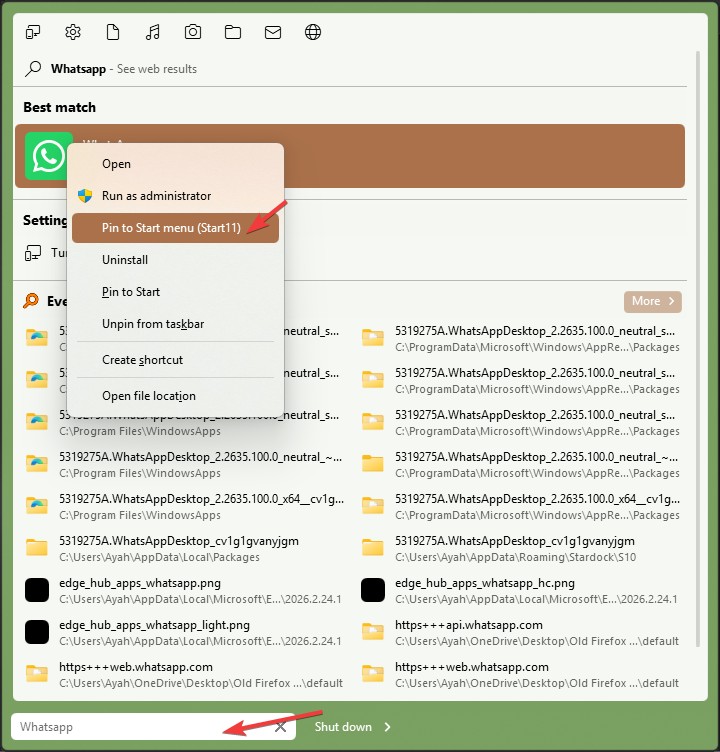
Not really sure how Start11 done it, but have you tried pinned the apps directly within Start11 Start menu?


Basj,
Stardock Community Assistant