You can add another mesh (hardpoint) without re-modeling. Open the starbases mesh file and copy 1 of the points. then re-name it. If you want it to be located in the center then copy the 1 named "Center". Paste it in with all the other points, re-name it to "Ability-2" . Add the name of your new Ion ability in the " " alongside Ability:2 in the starbase's entity file. Oh! and don't forget to add to the point count in the mesh file once you have added the extra point. Then do a
SZ0
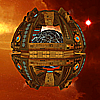
Here's three ships I have created for a mod that should hopfully be completed within the next month. I am currently re-texturing, so they the last 1 will look a bit better (hopefully), when it is completed. The mod will be for Doplomacy and will add a new capital ship with a couple of new abilities to each race, accessable through diplomatic research. <img style="border: 1px solid black; margin: 1px;" src="http://i986.photobucket.com/albums/ae350/splits_2010/Scr
Ok!, no worries. Thanks for the info, I should be able to work it out. This is good, I was thinking about adding another research to the chain, so that will all be possible now. Thanks again for your help. [e digicons]:beer:[/e] [e digicons]:grin:[/e]
The button with 2 heads looking at each other is the 1 I have put in, 2nd row down, 3rd column in. I don't see any way around it unless I can increase the size of the block to fit another row. Is that possible? Or could I put in another block and have the research chain go down
Thanks for the info. Regretfully that won't be possible, without changing the tiers that the game uses. I don't want to change anything, tier wise, with original Dip. Just add to it. Oh well, no arrows it is.
Another thing to check out is the "AbilityDeployCombatTurret" & "AbilityDeploySiegeTurret" abiliity files. They are essentially what creates a frigate by capitalships. Also there associated files "FrigateCombatTurret" & "FrigateSiegeTurret" which are essentially frigates with a limit on thier life span.
It sounds like your mesh has no textures attached to it. Open the mesh file, in the second set of lines there should be; DiffuseTextureFileName "whateverthethingis-cl.dds" SelfIlluminationTextureFileName "whateverthethingis-da.dds" NormalTextureFileName "whateverthethingis-nm.dds" Go to the texture folder of the Entrenchment folder you copied your mesh from and copy the 3 whateverthethingis t
I want to have a reseaech prerequisite another but I don't want/can't have the arrow. Basicly I want the research to be above the one that pre-requisites it, in the same tier but up a row. I know the arrow is only able to go to the next tier or down a row, but is the arrow really that important. Do'se it have to be there. If so can the arrow's be altered so they go up. Or also can you have it so a pre-requisited research is on the other side of another unrelated research button, or in a
Hmm, when you added the phase missile data to the other 2 weapons did you copy and paste the info from the original. I'm just wondering because I have had problem somewhat like this before from doing this. What I had forgot to do was change the DamagePerBank:FRONT 168.000000 on weapon2 to DamagePerBank: LEFT & RIGHT. Since Weapon2 only has hardpoints that face left & right. Weapon0 only has points that face forward.
I'm not sure exactly what you mean, but if you mean how do you run the Dev.exe, just locate and double click on the application file in the SoaSE install directory. Should be C;/ > program files > Stardock Games > Sins of a Solar Empire. it should be in with all the others for original, Entrenchment & diplomacy, and there should be a Dev app. for each.
I don't know what your problem is with scenario template and starbases and envoys, I don't use them, but I would say that the reason your broad cast structure isn't working is because dead asteriods are not colinizable. You are only supposed to be able to build planet modules in GW's you can colonise. Edit; sorry Ryat is Correct, you can colonize them but they do need to be colonised. Also the appropriate planetry upgrades may be needed.
[quote]one ship shooting 6 missiles at a time at one target shouldnt be causing that much of a problem, especially not when those are the only ships that are visible at the time...[/quote] Yeah you wouldn't think so. I have had a ship shotting 12 phase missles, from only 1 weapon type set mind you, and I don't experience any problems. I'm really at a loss as to what your problem may be. Maybee there is something wrong with the MissileTravelEffect data within the weapon, but you would
Since the Dev.exe is not picking anything up, indicates, to me anyhow, that it is the graphic's setting. Just as a couple of things to try to perhaps help narrow it down; If you arn't running on lowest graphic settings, try lowering them and see if that fix's it. If you still have the problem it may be that phase missiles are quite demanding on memory and having all those extra phase missles is causing it. Another thing to take note of may be that the missle's target is
Oh! I did not realize this. I thought SoftImage was the only 1. Are there any other programs that can export .xsi
Do these missile's that stop disappear, or are they still there, just stopped? If they disappear it may be because the missle has entered phase space, which they are supposed to do then re-appear inside the shields of the target vessel. If on the other hand they just stop and stay put in the 1 position for some time, it may indicate that there is some lag in the program process's and a graphic's performance setting may need to be reduced. Other indicators that this is happening may be a stutt
You can use either to make the models. You must however use Softimage or SoftImage Mod Tool(free version) to export to .xsi format for the ConvertData.xsi to convert your model into .mesh which SoaSE uses. So if you create a model with Blender you will need to export it into a format that SoftImage can import, Import it into Softimage and then export it as .xsi following the instructions in the documentation folder of Forge tools. Here is a list of supported file formats for SoftImage
I have just completed a model that I just could'nt get the tangent colors to match. No matter which way you orientate them some of the polygons don't have the the colors in them that others do, unless I made them all black. Which after many hours of almost completely fruitless research, I'm pretty sure your not supposed to do. They should be either green, blue or red. Now after hours and hours of trying to get my model all 1 color or close to it with gradual shifts in color, a flow on, so to
I have had this problem before also, although I don't have Max. The textures bridged across a few areas where the model was symetrised, and where the culprit polygons where at 90 degrees to the projection (edge on). I don't think there is any choice but to re-UV the at fault polygons with their projections re-aligned correctly. If there arn't so many for you to rectify and you have the space you may be able to relocate the polygons with their new projections and then just add new textures for
Not all abilities have only 1 point. MissleBarrage, PhaseMissileSwarm are examples of this. I have moded the gauss blast ability, which normally only fires from 1 point, and made it so it fires from 4. Check out this post as to how it was done. https://forums.sinsofasolarempire.com/373975
Yes you can heal any shared edges together after the they have been subprojected seperatly or torn apart. If the rings are to have the same texture you can overlay 1 rings mesh's over the other's mesh and they will have the same texture you put on them.
You can overlap polygons that are the same. For example if you have a number weapons that are all the same you can subproject them 1 on top of another before scaling, rotating and transforming them all together. For ones that are orientated differently you can either rotate them to a similar orientation then snap the individual points over the the ones that correspond, or you can select the actual projection and rotate that until the mesh is orintated correctly and then snap your points to co
I don't really have that much expirience with 3D cad, but I'll try and help you out. I don't know how you are getting your model from IGES to xsi., but the the fact that IGES deals with solid type models may be the problem. I think you need them as a mesh type. One thing you could try if you haven't already is "3D Object converter"
You may have done this but just in case you haven't. Have you writen in the "creationSourceAbility" line of the star base's entity file the name of the ability you are creating?
Have you updated the latest versions? If so the ConvertData for 1.19,1.05 and Dip 1.01 are not included in the converter. You can copy the ConvertData's for the install folder in Program Files > StardockGames > SoaSE and paste them into the folder where all the convertdata's are that came with harpo's converter. You may need to re-name them. Check out the post for the utility for further info. <a id="ctl00__Content__RepeaterPosts_ctl32__PostTitle" t
You can make the utility compatable on your own reletively easily. Just copy the convertdata from your install folder and paste it with all the others that are in your Sins Ref. folder. Copy also, the diplomacy folder from the install diplomacy folder to your sins ref. folder. Make sure you have the name of the covertdata as ConvertData_Diplomacy1.01 and your Diplomacy folder named Diplomacy 1.01. Once you have it set up like this it should convert the new Diplomacy 1.01 folder.